Sand and Bone

Books
|
Show History | ||||
| Book | Kind | Edition | Last update | |
 Rules Updates Rules Updates | ||||
| Rules Updates | Rulebook | 4 | September 2026 | |
| Spearhead: Sand and Bone | ||||
| Spearhead: Sand and Bone | Expansion | 4 | May 2025 | |
Path to Glory Battlepack
SPEARHEAD
The Age of Sigmar grows fraught. On horizons yonder, the forces of Chaos loom, threatening to engulf the Mortal Realms in mayhem and violence once more. In the wake of these troubling times, Spearhead forces are dispatched across the realms to seek out ancient sites of power that still reside deep within the uncharted hinterlands. Will you take up the call to battle and lead a Spearhead force to victory?Welcome to the world of Spearhead. In this game mode, players engage in small-scale battles that are fast and tactical, suitable for newcomers and veterans alike. In Spearhead, each army is available as a self-contained boxset, allowing players to quickly muster a force. In addition, Spearhead battles are fought upon a compact battleeld, meaning you can set up a game even with limited space. Spearhead uses specially tailored rules to ensure that every battle is a tense and exciting aair that comes right down to the final moments.
SPEARHEAD BOX SETSFighting a Spearhead battle could not be easier. Each player picks their army by choosing one of the many Spearhead box sets available. Each of these is a complete army, including all the miniatures a player will need to do battle. The rules for Spearhead box sets are available in faction pages. | ||
Path to Glory Battlepack
Getting Started
Below is a handy step-by-step guide to help you prepare for your rst few Spearhead battles. Following these steps will help you get up and running with Spearhead in no time!2. CHOOSE A REALM BATTLEFIELDSpearhead battles are fought on realm battlefields. Each side of a realm battlefield is themed around one of the eight Mortal Realms. | ||
3. PICK YOUR REGIMENT ABILITY AND ENHANCEMENTEach Spearhead army has a choice of 2 different regiment abilities and 4 different enhancements for your general. At the start of the battle, you must pick 1 of each for your army (see Spearhead Armies). | ||
- Every Spearhead army has a set of battle traits, regiment abilities and enhancements.
- The battle traits are rules and abilities for your army that you will use in every battle.
- The regiment abilities and enhancements are picked at the start of every battle. You can experiment with different combinations to see what works best for you. Some regiment abilities and enhancements are better against certain foes, so it pays to study the strengths and weaknesses of the enemy before making your choice!
- Every unit in a Spearhead army has its own warscroll, where you can see its characteristics and weapons.
- Any unique abilities the unit can use will also be found on its warscroll.
- At the bottom of every warscroll you can find its keywords, such as HERO, WIZARD, MONSTER or INFANTRY.
- Some warscrolls have a number in a red circle above the Save characteristic. This is the unit’s ward save, which is also shown on its keywords line.
Spearhead Battlepack
Sand and Bone
1.0 Spearhead Armies
Each player in a Spearhead battle is the commander of a Spearhead army. A Spearhead army is a set of units that comes with its own rules and warscrolls. You can find the rules for Spearhead armies on your faction page.
THE CORE RULESTo play a game using this battlepack, you’ll need the Core Rules. The Core Rules explain the basics of Warhammer Age of Sigmar, such as how to move your models and how to use abilities.You don’t need the Advanced Rules to use this battlepack. | ||
1.1 Army Composition
On the first page of every Spearhead army’s rules, you will find the army composition. This lists which units are included in the Spearhead army and who the general is. Unlike other Warhammer Age of Sigmar armies, the composition of a Spearhead army is fixed and cannot be changed.1.2 Battle Traits
Every Spearhead army has one or more battle traits. These are powerful and thematic abilities that apply to some or all of the units in the army. For example, the ‘Castelite Formation’ battle trait enables the Cities of Sigmar to stand firm against the horrors of the Mortal Realms, while the ‘Relentless Discipline’ battle trait grants Ossiarch Bonereaper constructs peerless battlefield precision even in the most extreme conditions.1.3 Regiment Abilities
Every Spearhead army has a choice of 2 regiment abilities, each of which provides the army with a different strength in battle.1.4 Enhancements
Every Spearhead army has a set of 4 enhancements to pick from. These are upgrades for the army’s general that make them more powerful in a variety of ways.1.5 Spearhead Warscrolls
The warscrolls for the units in each Spearhead army are included with the other rules for the army. Although Spearhead warscrolls are similar to the warscrolls found in battletomes, they have been tailored to work specifically with Spearhead and cannot be used with other battlepacks.WIZARDS AND PRIESTS IN SPEARHEADSome units in Spearhead have the WIZARD or PRIEST keyword. If you are familiar with other battlepacks, it is important to note the Magic module in the Advanced Rules is not used in Spearhead. As a result, there are no unbinding rolls and no chance of miscasts (among other things). Spells and prayers are resolved like any other ability. | ||
2.0 Realm Battlefields
Spearhead battles are fought on realm battlefields. Once the players have picked their Spearhead armies, they must agree on a realm battlefield to use. Each realm battlefield comes with a matching Spearhead deck, along with a battleplan that explains how to fight a battle on that realm battlefield.A realm battlefield is 30" x 22" and double-sided, with each side corresponding to a different location in the Mortal Realms. The realm battlefield in this battlepack is set in Shyish. One of its sides represents Dolorum, the domain of Olynder, the Mortarch of Grief; the other other side represents Ossia, part of the empire ruled by Katakros, Mortarch of the Necropolis.
Spearhead decks are sets of cards that are used in Spearhead battles. Each realm battlefield has its own Spearhead deck. Each Spearhead deck consists of 2 twist decks (one for each side of the realm battlefield) and 2 battle tactic decks (one for each player).
2.1 Twist Cards
Each twist deck is made up of twist cards. A twist is a special rule that applies to the battle round being played. Each deck of twist cards corresponds to a specific side of the realm battlefield.Errata
Show
Twist Cards
In the Dolorum twist ‘Survivor’s Grief’, replace:
‘Each player scores 1 victory point at the end of their turn for each friendly unit that is destroyed or that is a replacement unit.’
With:
‘Each player scores 1 victory point at the end of their turn for each friendly unit from their Spearhead that has either been destroyed or replaced this battle, not including replacement units.’
‘Each player scores 1 victory point at the end of their turn for each friendly unit that is destroyed or that is a replacement unit.’
With:
‘Each player scores 1 victory point at the end of their turn for each friendly unit from their Spearhead that has either been destroyed or replaced this battle, not including replacement units.’
2.2 Battle Tactic Cards
Each battle tactic deck is made up of battle tactic cards. The rules on each are split into 2 parts: a battle tactic and a command. You can either score the battle tactic at the end of your turn if you meet its conditions (to gain victory points) or you can use the command on the card for a more immediate benefit. You cannot do both, so choose wisely!Each command will say when it can be used and what effect it has. After the effect has been resolved, the card is discarded. You can issue multiple commands to the same unit in the same phase.
Errata
Show
Battle Tactics Cards
In ‘Monument of Living Bone’, change the effect to: ‘The target is also treated as an objective for the rest of the turn.’
3.0 Spearhead Battleplans
Each realm battlefield has a corresponding battleplan. The battleplan is a set of instructions on how to fight the battle and how to determine the winner.You can find the battleplan for the Sand and Bone realm battlefield here.
4.0 Terrain
In every Sand and Bone Spearhead battle, the armies fight around 2 large terrain features and 2 small terrain features. A mystical terrain feature may also be present.
Before the armies are deployed, each player will set up 1 large terrain feature and 1 small terrain feature wholly within their territory and 1 mystical terrain feature may also be set up.
When a unit is targeted by an attack, if it is impossible to draw a straight line from the closest point on the attacking model’s base to the closest point on a model in the target unit’s base without that line passing over a terrain feature, the target unit is considered to be behind a terrain feature for that attack
Each terrain feature has certain passive abilities depending on its type:
Large Terrain Feature: (Large Fence\Wall) Cover, Obscuring, Unstable
Small Terrain Feature: (Small Fence\Wall) Cover, Unstable
Large Mystical Terrain: (Crypt of Blood) Unholy, Unstable, Cover
Small Mystical Terrain: (Icon of Nulahmia) Inspiring, Unstable, Cover
Before the armies are deployed, each player will set up 1 large terrain feature and 1 small terrain feature wholly within their territory and 1 mystical terrain feature may also be set up.
When a unit is targeted by an attack, if it is impossible to draw a straight line from the closest point on the attacking model’s base to the closest point on a model in the target unit’s base without that line passing over a terrain feature, the target unit is considered to be behind a terrain feature for that attack
Each terrain feature has certain passive abilities depending on its type:
Large Terrain Feature: (Large Fence\Wall) Cover, Obscuring, Unstable
Small Terrain Feature: (Small Fence\Wall) Cover, Unstable
Large Mystical Terrain: (Crypt of Blood) Unholy, Unstable, Cover
Small Mystical Terrain: (Icon of Nulahmia) Inspiring, Unstable, Cover
|
 Once Per Turn (Army), Any Combat Phase Once Per Turn (Army), Any Combat Phase |
UNHOLY DRAUGHT: Drinking deep provides incredible power, but at what cost?
Declare: Pick a friendly unit within 6" of a Crypt of Blood terrain feature to be the target.
Effect: Roll a dice. Add 1 to the roll if you are the underdog. On a 4+, add 1 to hit rolls for the target’s combat attacks for the rest of the turn. Otherwise, inflict D3 mortal damage on the target.
Effect: Roll a dice. Add 1 to the roll if you are the underdog. On a 4+, add 1 to hit rolls for the target’s combat attacks for the rest of the turn. Otherwise, inflict D3 mortal damage on the target.
 Once Per Turn (Army), End of Any Turn Once Per Turn (Army), End of Any Turn |
VEILED PROMISES: The Agents of Neferata are everywhere, manipulating enemies far and wide for mysterious purposes.
Declare: Pick a friendly unit within 6" of an Icon of Nulahmia terrain feature to be the target.
Effect: Roll a dice. Add 1 to the roll if you are the underdog. On a 4+, add 3 to the target’s control score for the rest of the turn. Otherwise, subtract 3 from the target’s control score for the rest of the turn.
Effect: Roll a dice. Add 1 to the roll if you are the underdog. On a 4+, add 3 to the target’s control score for the rest of the turn. Otherwise, subtract 3 from the target’s control score for the rest of the turn.
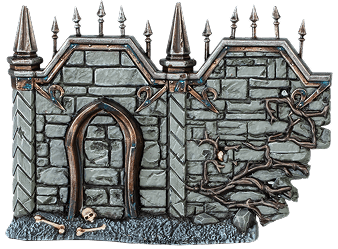
Small Wall
(Small Terrain Feature)
(Small Terrain Feature)
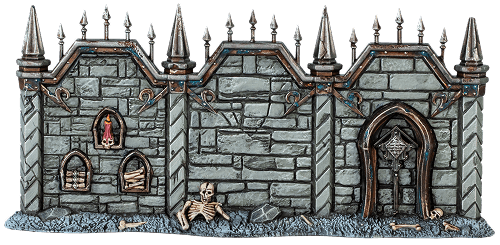
Large Wall
(Large Terrain Feature)
(Large Terrain Feature)
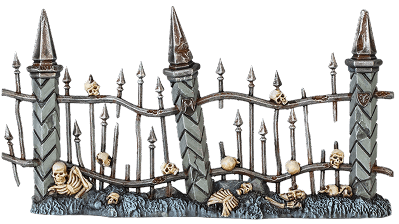
Small Fence
(Small Terrain Feature)
(Small Terrain Feature)
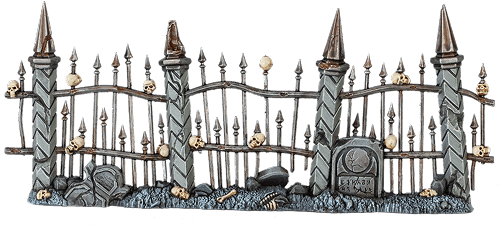
Large Fence
(Large Terrain Feature)
(Large Terrain Feature)
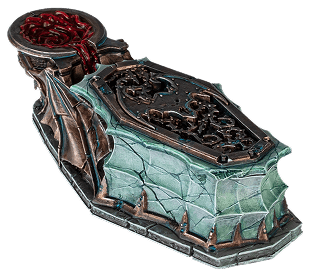
Crypt of Blood
(Large Mystical Terrain Feature)
(Large Mystical Terrain Feature)
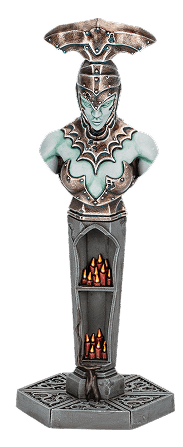
Icon of Nulahmia
(Small Mystical Terrain Feature)
(Small Mystical Terrain Feature)
Errata
Show
Terrain
Add the following:
‘When a unit is targeted by an attack, if it is impossible to draw a straight line from the closest point on the attacking model’s base to the closest point on a model in the target unit’s base without that line passing over a terrain feature, the target unit is considered to be behind a terrain feature for that attack.’
‘When a unit is targeted by an attack, if it is impossible to draw a straight line from the closest point on the attacking model’s base to the closest point on a model in the target unit’s base without that line passing over a terrain feature, the target unit is considered to be behind a terrain feature for that attack.’
5.0 Objectives
In Spearhead battles, objectives are printed on the surface of each realm battlefield (the objective is the whole circle, not just the symbol in the centre). Some objectives are different sizes to others.5.1 Contesting Objectives
In Spearhead battles, while a model is on an objective (wholly or partially), it is contesting it.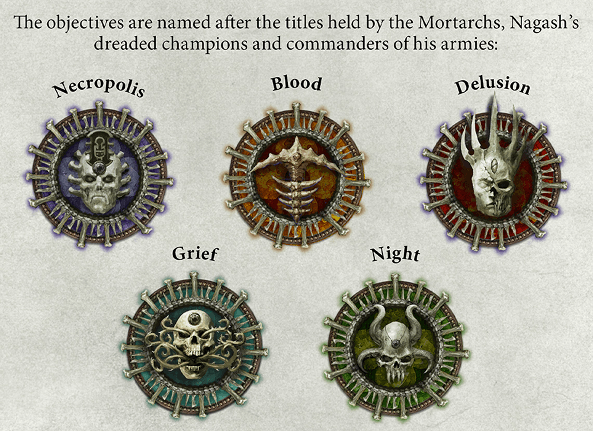
6.0 Reinforcements
Some units have the REINFORCEMENTS keyword. These units can be brought back to the battlefield after being destroyed as replacement units (Core Rules, 24.2).If any of your units have the REINFORCEMENTS keyword, you can use the following ability:
 Once Per Turn, Your Movement Phase Once Per Turn, Your Movement Phase |
CALL FOR REINFORCEMENTS: A second wave of troops enters the fray, replacing those lost to the rigours of battle.
Declare: Pick a friendly REINFORCEMENTS unit that has been destroyed.
Effect: Set up an identical replacement unit on the battlefield, wholly within friendly territory, wholly within 6" of the battlefield edge and not in combat.
Each REINFORCEMENTS unit can only be replaced once. Replacement units cannot themselves be replaced.
Effect: Set up an identical replacement unit on the battlefield, wholly within friendly territory, wholly within 6" of the battlefield edge and not in combat.
Each REINFORCEMENTS unit can only be replaced once. Replacement units cannot themselves be replaced.
| KEYWORDS | CORE |
| Units with the REINFORCEMENTS keyword have this icon bellow of their warscroll stats for ease of use. | ||
Battleplan
Battleplan Sand and BoneDarkness falls over Shyish, but there is power and influence for the taking in these benighted lands for those with the courage to seek it. Within spectral hollows and the haunted ruins of dead cities, there are ancient sites of power, dread temples dedicated to the Mortarchs of Nagash. As every faction sends forth desperate bands of warriors to secure these unholy sites, explorers should tread warily. The whispers from the mausoleum and the gravesite may yield great reward for the bold but also tremendous danger... PRE BATTLE SEQUENCE 1. Roll off. The winner chooses who is the attacker and who is the defender.2. The attacker picks their regiment ability and their enhancement. Then the defender does the same. 3. The defender chooses which side of the realm battlefield the players will fight on: Dolorum (the green side) or Ossia (the purple side). 4. The defender picks 1 of the deployment maps on the right and chooses which territory belongs to which player. Then, if you are fighting on the Ossia realm battlefield, set up a Crypt of Blood terrain feature in the middle of the battlefield. 5. The defender picks Terrain Group A or B (see below), then sets it up. Then, the attacker takes the other Terrain Group and sets that up. Each terrain feature must be set up wholly within friendly territory, more than 6" from all other terrain features and more than 3" from both long battlefield edges and enemy territory. Terrain features cannot be set up on top of the objectives (either wholly or partially). TERRAIN GROUP A: Large Wall, Small Fence TERRAIN GROUP B: Small Wall, Large Fence 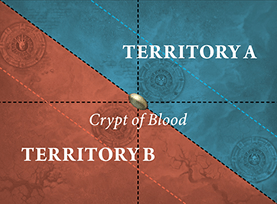 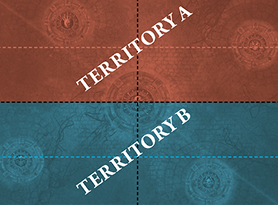 DEPLOYMENT Do not deploy armies as described in the Core Rules. Instead, the attacker sets up all the units in their army first, followed by the defender. Each unit must be set up wholly within friendly territory and more than 6" from enemy territory.BATTLE LENGTH The battle lasts for 4 battle rounds.SPECIAL RULES PREPARING THE SPEARHEAD DECK This battle uses the Sand and Bone Spearhead deck. One player takes the twist deck that corresponds to the side of the battlefield the players are fighting on, shuffles it and places it face down next to the battlefield (the other twist deck is not used). Then, each player takes 1 battle tactic deck, shuffles it and places it face down where they can reach it during the battle. START OF THE BATTLE ROUND SEQUENCE The following sequence is resolved at the start of each battle round:1. If it is the first battle round, the attacker chooses who will take the first turn. In any other battle round, the players make a priority roll (Core Rules, 12.0). 2. Determine the underdog (Core Rules, 12.0). 3. The twist card is drawn (see below). 4. The players draw battle tactic cards (see below). 5. Any abilities with the Start of Battle Round timing are used.TWIST CARDS One twist card is drawn at the start of each battle round. Follow the rules on it as soon as it is drawn.BATTLE TACTIC CARDS At the start of the first battle round, each player draws a hand of 3 battle tactic cards.At the start of each subsequent battle round, each player draws battle tactic cards until they once more have a hand of 3 battle tactic cards. Before they do so, they can discard any number of battle tactic cards in their hand. Cards are discarded face-up.
VICTORY POINTS Each player scores victory points at the end of each of their turns as follows:
GLORIOUS VICTORY The player with the most victory points at the end of the battle is the winner. If the players are tied on victory points, the battle is a draw.ErrataShow Battleplan: Sand and Bone In step 4 of the Pre-battle Sequence, replace: ‘Then they set up the mystical terrain for that realm battlefield as shown on the deployment maps, if any.’ With: ‘Then, if you are fighting on the Ossia realm battlefield, set up a Crypt of Blood terrain feature in the middle of the battlefield.’ | |||||||||||
Cards
Dolorum Twist
• DOLORUM TWIST •
SAVAGE MOURNING Grief turns into a ferocious desire for retribution, where only bloodshed can salve a warrior's sorrow.
Each player scores 1 victory point at the end of their turn for each friendly unit that is in combat with any enemy units.
If there is an underdog, at the end of their turn, if there are more destroyed friendly units than destroyed enemy units, they score 1 additional victory point.
If there is an underdog, at the end of their turn, if there are more destroyed friendly units than destroyed enemy units, they score 1 additional victory point.
• DOLORUM TWIST •
SURVIVOR’S GRIEF The cries of the recently dead spur their fellows to fight on despite the odds.
Each player scores 1 victory point at the end of their turn for each friendly unit from their Spearhead that has either been destroyed or replaced this battle, not including replacement units.
If there is an underdog, then they can pick 1 friendly unit. If there is no underdog, then the players roll off and the winner can pick a friendly unit. That unit can use CHARGE abilities even if they used a RETREAT or RUN ability in the same turn.
If there is an underdog, then they can pick 1 friendly unit. If there is no underdog, then the players roll off and the winner can pick a friendly unit. That unit can use CHARGE abilities even if they used a RETREAT or RUN ability in the same turn.
• DOLORUM TWIST •
BANISH YOUR FEARS Overcoming the rasping promises of the damned, these warriors find the courage to forge into the shadows.
Each player scores 1 extra victory point at the end of their turn for each objective they control that was controlled by their opponent at the start of their turn.
In addition, if there is an underdog, they can pick 1 friendly unit. That unit’s melee weapons have Anti-charge (+1 Rend) for the rest of the battle round.
In addition, if there is an underdog, they can pick 1 friendly unit. That unit’s melee weapons have Anti-charge (+1 Rend) for the rest of the battle round.
• DOLORUM TWIST •
OVERPOWERING GRIEF A pall of sorrow wells up on the battlefield, spreading bleakness and despair.
The underdog picks an objective. If there is no underdog, the players roll off and the winner picks an objective. That objective is no longer controlled by either player and cannot be controlled this battle round.
• DOLORUM TWIST •
HAUNTED LOCUS A baleful shrine materialises out of the darkness, the air around it thick with a whispering curse.
The underdog reveals the Icon of Nulahmia. If there is no underdog, the players roll off and the winner reveals the Icon of Nulahmia. The player that reveals the Icon of Nulahmia places the Icon of Nulahmia terrain feature anywhere on the battlefield, more than 3" from each other terrain feature, more than 3" from all units (friendly and enemy) and not touching an objective.
• DOLORUM TWIST •
DARKENED SKIES Unnatural night falls and spirits coalesce around the places of death.
If there is no underdog, the players roll off and the winner picks an objective.
For the rest of the battle round, that objective is treated as being contested by a friendly unit of the player that picked it. That unit has a control score of 1 that cannot be modified.
Designer’s Note: If there are any enemy units contesting that objective, you’ll need to have a higher control score if you want to keep control of it at the end of the turn.
For the rest of the battle round, that objective is treated as being contested by a friendly unit of the player that picked it. That unit has a control score of 1 that cannot be modified.
Designer’s Note: If there are any enemy units contesting that objective, you’ll need to have a higher control score if you want to keep control of it at the end of the turn.
Ossia Twist
• OSSIA TWIST •
DISCIPLINED CONQUEST Nothing can distract these warriors from taking and holding this crucial ground.
The underdog picks 2 objectives.
If there is no underdog, each player picks 1 objective, starting with the active player.
Each player scores 2 extra victory points at the end of their turn if they control both objectives.
If there is no underdog, each player picks 1 objective, starting with the active player.
Each player scores 2 extra victory points at the end of their turn if they control both objectives.
• OSSIA TWIST •
INVINCIBLE REDOUBTS Imbued with Ossian precision, these warriors prepare to meet the enemy with flawless resistance.
The underdog can pick 1 of the effects below. If there is no underdog, the players roll off and the winner can pick the effect.
Precision Strike: Pick a friendly unit. For the rest of the battle round, while that unit is wholly within friendly territory, it has STRIKE-FIRST.
Dissent in the Ranks: Pick an enemy unit. For the rest of the battle round, while that unit is wholly within friendly territory, it has STRIKE-LAST.
Precision Strike: Pick a friendly unit. For the rest of the battle round, while that unit is wholly within friendly territory, it has STRIKE-FIRST.
Dissent in the Ranks: Pick an enemy unit. For the rest of the battle round, while that unit is wholly within friendly territory, it has STRIKE-LAST.
• OSSIA TWIST •
CO-ORDINATED BOMBARDMENT A relentless and macabre had of skulls forces warriors' heads down and wears at their resolve
The underdog can pick an objective. If there is no underdog, the players roll off and the winner can pick an objective.
Subtract 1 from hit rolls for enemy units while they are contesting that objective for the rest of the battle round.
Subtract 1 from hit rolls for enemy units while they are contesting that objective for the rest of the battle round.
• OSSIA TWIST •
SECURED SUPPLY LINES A reliable chain of resupply provides a tangible advantage in the battle to come.
The underdog picks 2 terrain features. If there is no underdog, each player picks a different terrain feature. Each player scores 1 extra victory point at the end of their turn if they control both terrain features.
In addition, the underdog can pick 1 friendly unit. For the rest of the battle round, while that unit contests either of the terrain features that were picked, it has WARD (5+).
In addition, the underdog can pick 1 friendly unit. For the rest of the battle round, while that unit contests either of the terrain features that were picked, it has WARD (5+).
• OSSIA TWIST •
WILL OF THE NECROPOLIS The cold shadow of a deathless empire falls upon the battlefield, steeling some but debilitating others.
The underdog can pick 1 of the effects below. If there is no underdog, the players roll off and the winner can pick the effect.
Adaptable Defence: Pick a friendly unit on the battlefield to be the target. Ignore all modifiers to save rolls for the target (positive and negative) for the rest of the battle round.
Broken Will: Pick an enemy unit on the battlefield to be the target. The target has a maximum control score of 1 for the rest of the battle round.
Adaptable Defence: Pick a friendly unit on the battlefield to be the target. Ignore all modifiers to save rolls for the target (positive and negative) for the rest of the battle round.
Broken Will: Pick an enemy unit on the battlefield to be the target. The target has a maximum control score of 1 for the rest of the battle round.
• OSSIA TWIST •
UNCOMPROMISING INVASION The advance into enemy territory is inexorable as both sides attempt to seize the advantage.
Each player scores 1 extra victory point at the end of their turn for each objective not wholly within their territory that they control which is not contested by any enemy units.
In addition, if one of the players is the underdog, they can pick a friendly unit and then roll a D6. Add the result to that unit’s control score for the rest of the battle round.
In addition, if one of the players is the underdog, they can pick a friendly unit and then roll a D6. Add the result to that unit’s control score for the rest of the battle round.
Battle Tactic
• BATTLE TACTIC •
DIG TWO GRAVES Seek out death in every quarter of the battlefield - yours or the enemy's.
You complete this battle tactic at the end of your turn if any models were slain within friendly territory and any models were slain within enemy territory.
• COMMAND •
 Enemy Charge Phase Enemy Charge Phase |
COUNTER-CHARGE: Seeing the need for decisive action, the warriors charge forth to stall the enemy’s advance or enact a bold interception.
Declare: Pick a friendly unit that is not in combat to use this ability.
Effect: That unit can use a CHARGE ability as if it were your charge phase.
Effect: That unit can use a CHARGE ability as if it were your charge phase.
• BATTLE TACTIC •
WAR OF ATTRITION Grind down the enemy to shatter their resolve.
You complete this battle tactic at the end of your turn if any enemy units were destroyed this turn
AND
more enemy units than friendly units were destroyed this turn.• COMMAND •
| End of Any Turn |
SPEED OF DEATH: Death comes on swift wings; one need only allow themselves to be carried.
Declare: Pick a friendly unit in combat.
Effect: Remove that unit from the battlefield, then set it up again on the battlefield more than 6" from all enemy units.
Effect: Remove that unit from the battlefield, then set it up again on the battlefield more than 6" from all enemy units.
• BATTLE TACTIC •
HOLD GROUND This land is yours, let no foe take it from you.
You complete this battle tactic at the end of your turn if you control the large terrain feature within friendly territory.
• COMMAND •
| Any Combat Phase |
FRANTIC SCRAMBLE: Use the carnage of the churning melee to press your attack.
Declare: Pick a friendly unit that is in combat to be the target.
Effect: The target can move 3". It can move into combat.
Effect: The target can move 3". It can move into combat.
• BATTLE TACTIC •
RAZE Break through enemy lines and lay waste to the lands beyond.
You complete this battle tactic at the end of your turn if there are any friendly units within 3" of the long battlefield edge in enemy territory.
• COMMAND •
| Any Charge Phase |
DETERMINED EFFORT: With grit and zeal, these warriors seek to bring the fight to their enemies.
Declare: Pick a friendly unit that is not in combat to use this ability.
Effect: Add D3 to charge rolls for that unit for the rest of the turn.
Effect: Add D3 to charge rolls for that unit for the rest of the turn.
• BATTLE TACTIC •
MORBID CONSECRATION Sanctify this ground with an offering of death.
You complete this battle tactic at the end of your turn if you control an objective not wholly within friendly territory. It cannot be the Dais of Blood or the Dais of the Necropolis.
• COMMAND •
| Your Hero Phase |
FINAL BREATH: Death is not the end here..
Declare: Pick a friendly unit that has been destroyed and has not already been replaced.
Effect: Set up either a replacement unit with a combined Health characteristic of up to 4 or a single-model replacement unit with X damage points already allocated to it, where X is its Health characteristic minus 4. The unit must be set up more than 6" from all enemy units.
Effect: Set up either a replacement unit with a combined Health characteristic of up to 4 or a single-model replacement unit with X damage points already allocated to it, where X is its Health characteristic minus 4. The unit must be set up more than 6" from all enemy units.
• BATTLE TACTIC •
ATTACK ON TWO FRONTS Divide and conquer by approaching the foe from two directions.
You complete this battle tactic at the end of your turn if you control 2 objectives that were controlled by your opponent at the start of the turn.
• COMMAND •
 Reaction: Opponent declared an ATTACK ability Reaction: Opponent declared an ATTACK ability |
TRANSLUCENT FLESH: The touch of Shyish briefly turns these warriors to phantoms.
Used By: A unit targeted by that ATTACK ability.
Effect: For the rest of the phase, if the unmodified hit roll or wound roll for an attack that targets this unit is 1-3, the attack fails and the attack sequence ends.
Effect: For the rest of the phase, if the unmodified hit roll or wound roll for an attack that targets this unit is 1-3, the attack fails and the attack sequence ends.
• BATTLE TACTIC •
DESOLATE LANDSCAPES Roam these benighted domains and engage any foe you see.
You complete this battle tactic at the end of your turn if a friendly unit used a FIGHT ability this turn
AND
that unit is not contesting an objective and is on the battlefield.• COMMAND •
| Your Hero Phase |
AURA OF ENDING: A life-draining corona of amethyst magic surrounds your champion.
Declare: Pick a friendly HERO contesting an objective to use this ability, then pick each enemy unit contesting that objective.
Effect: Roll a dice for each of those enemy units. On a 4+, inflict 2 mortal damage on that enemy unit.
Effect: Roll a dice for each of those enemy units. On a 4+, inflict 2 mortal damage on that enemy unit.
• BATTLE TACTIC •
TAKE WITHOUT WARNING The enemy leaves a critical position unguarded. Claim it!
You complete this battle tactic at the end of your turn if you gain control of an objective that was controlled by your opponent at the start of the turn
AND
none of the units contesting that objective used a FIGHT ability this turn.• COMMAND •
| Any Hero Phase |
MONUMENT OF LIVING BONE: This alabaster edifice is redolent with power.
Declare: Pick a terrain feature within friendly territory to be the target.
Effect: The target is also treated as an objective for the rest of the turn.
Effect: The target is also treated as an objective for the rest of the turn.
• BATTLE TACTIC •
THE DAIS OF THE NECROPOLIS The forbidding icon of Katakros marks this land.
You complete this battle tactic if you control the Dais of the Necropolis at the end of your turn.
• COMMAND •
| Any Combat Phase |
GRIND THEM TO DUST: Fight with reckless abandon to annihilate the enemy.
Declare: Pick a friendly unit to use this ability.
Effect: That unit can use 2 FIGHT abilities this phase. After the first is used, however, inflict D3 mortal damage on that unit and it has STRIKE-LAST for the rest of the turn.
Effect: That unit can use 2 FIGHT abilities this phase. After the first is used, however, inflict D3 mortal damage on that unit and it has STRIKE-LAST for the rest of the turn.
• BATTLE TACTIC •
THE GRIP OF DEATH Surround the enemy before you close in for the kill.
You complete this battle tactic at the end of your turn if you control 2 objectives not wholly within friendly territory.
• COMMAND •
| Enemy Movement Phase |
RE-FORM THE LINE!: These warriors hastily reposition or reform their ranks.
Declare: Pick a friendly unit to use this ability.
Effect: If that unit is in combat, it can use a RETREAT ability as if it were your movement phase. If that unit is not in combat:
Effect: If that unit is in combat, it can use a RETREAT ability as if it were your movement phase. If that unit is not in combat:
- If it is not damaged, roll a dice for each slain model from that unit. For each 5+, you can return 1 slain model to that unit.
- If it is damaged, roll a dice for each damage point it has. For each 5+. Heal (1) that unit.
• BATTLE TACTIC •
RAID Drive deep into enemy territory and wreak havoc!
You complete this battle tactic at the end of your turn if any friendly units are wholly within enemy territory and not in combat
• COMMAND •
| Any Charge Phase |
TERRIFYING ASSAULT: This sudden onslaught disrupts the cohesion of the foe with its sheer ferocity.
Declare: Pick a friendly unit that is in combat to use this ability, then pick an enemy unit in combat with it to be the target.
Effect: Roll a dice. Subtract the roll from the target’s control score for the rest of the turn.
Effect: Roll a dice. Subtract the roll from the target’s control score for the rest of the turn.
• BATTLE TACTIC •
THE DAIS OF BLOOD Hold Neferata's sigil to be granted her dark favour.
You complete this battle tactic if you control the Dais of Blood at the end of your turn.
• COMMAND •
| Enemy Combat Phase |
UNLEASH BLOODLUST: These warriors hurl themselves into the fray as if possessed by a red hunger.
Declare: Pick a friendly unit to use this ability.
Effect: Add 1 to Attacks characteristics of that unit’s melee weapons for the rest of the turn. However, that unit has a maximum control score of 1 for the rest of the battle round.
Effect: Add 1 to Attacks characteristics of that unit’s melee weapons for the rest of the turn. However, that unit has a maximum control score of 1 for the rest of the battle round.
Hit Roll
Roll a dice. If the roll equals or exceeds the attacking weapon’s Hit characteristic, the attack scores a successful hit: move on to the next step. If not, the attack fails and the attack sequence ends. Unmodified hit rolls of 1 always fail. If an unmodified hit roll for an attack made with a weapon is a 6, that attack is a critical hit.| Critical hits have no effect on their own but often trigger additional effects (see 20.0 Weapon Abilities). | ||
Wound Roll
Roll a dice. If the roll equals or exceeds the attacking weapon’s Wound characteristic, the attack successfully wounds: move on to the next step. If not, the attack fails and the attack sequence ends. Unmodified wound rolls of 1 always fail.Shooting attacks
Shooting attacks are made with ranged weapons. The target unit(s) must be within a distance equal to the Range characteristic of the weapon being used and visible to the attacking model. Models cannot make shooting attacks if their unit is in combat, unless otherwise specified (see 20.0 Weapon Abilities).| Your Charge Phase |
CHARGE: With a mighty battle cry, the warriors charge into combat with the enemy.
Declare: Pick a friendly unit that is not in combat and has not used a RUN or RETREAT ability this turn to use this ability. Then, make a charge roll of 2D6.
Effect: That unit can move a distance up to the value of the charge roll. That unit can move through the combat ranges of any enemy units and must end that move within 1/2" of a visible enemy unit. If it does so, the unit using this ability has charged.
Effect: That unit can move a distance up to the value of the charge roll. That unit can move through the combat ranges of any enemy units and must end that move within 1/2" of a visible enemy unit. If it does so, the unit using this ability has charged.
| KEYWORDS | CORE, MOVE, CHARGE |
18.4 Destroyed Units
When the last model in a unit is slain, the unit is destroyed and all remaining damage points inflicted on that unit have no effect. Similarly, if something causes a unit to be destroyed, all models in the unit are slain and removed from play.
17.2 Mortal Damage
Some abilities inflict mortal damage. If an ability inflicts mortal damage on a unit, add that number of damage points to the unit’s damage pool for that ability (see 18.2 Allocating Damage).
| Your Movement Phase |
RETREAT: The fighters disengage from combat, though at the cost of lowering their defences.
Declare: Pick a friendly unit that is in combat to use this ability.
Effect: Inflict D3 mortal damage on that unit. That unit can move a distance up to its Move characteristic. That unit can move through the combat ranges of any enemy units but cannot end that move within an enemy unit’s combat range.
Effect: Inflict D3 mortal damage on that unit. That unit can move a distance up to its Move characteristic. That unit can move through the combat ranges of any enemy units but cannot end that move within an enemy unit’s combat range.
| KEYWORDS | CORE, MOVE, RETREAT |
7.0 Combat Range
Each model has a combat range that extends 3" horizontally from its base and any distance vertically from that circle to form a cylinder. The combat range of a unit extends 3" horizontally and any distance vertically from every model in that unit. Units from opposing armies that are within each other’s combat range and that are visible to each other are in combat with each other. When a unit that is not in combat enters the combat range of a visible enemy unit, it moves into combat.
A model is considered to be in combat with an enemy unit if that unit is within the model’s combat range and visible to it’
A model is considered to be in combat with an enemy unit if that unit is within the model’s combat range and visible to it’
| ||
FAQ / Errata
FAQ
| Q: | If a model in base-to-base contact with an enemy model retreats 3" directly away from the enemy model, is it still in combat with that enemy model? |
| A: | No. |
Errata
Addenda: 7.0 Combat Range
Add the following:
‘A model is considered to be in combat with an enemy unit if that unit is within the model’s combat range and visible to it.’
‘A model is considered to be in combat with an enemy unit if that unit is within the model’s combat range and visible to it.’
Cover
Subtract 1 from hit rolls for attacks that target a unit that is behind or wholly on this terrain feature, unless that unit charged this turn or has the FLY keyword.| Passive |
FLY: Soaring above the battlefield, this unit can reach destinations that are inaccessible to other troops.
Effect: As this unit moves, it ignores other models, terrain features and the combat ranges of enemy units. It cannot end its move in combat unless specified in the ability that allowed it to move. Ignore any vertical distance moved for this unit.
Obscuring
While every model in a non-MONSTER non‐WAR MACHINE unit that does not have the FLY keyword is within 1" of this terrain feature, the following apply:- That unit is only visible to enemy units that are within its combat range.
- The Range characteristic of that unit’s ranged weapons is halved (rounding down to the nearest inch).
Unstable
Models can move across but cannot be set up on or end any type of move on any part of this terrain feature that is more than 1" tall.1.4.2 Obscuring Terrain
Examples: Wyldwood, fortress wallTerrain Abilities: Cover, Obscuring, Unstable
6.0 Visibility
A target model is visible to another model (which we’ll call the ‘observing model’) if you can draw a straight line through the air (whether horizontal, diagonal or vertical) from any point on the observing model to any point on the target model that does not intersect any objects except for other models in the observing model’s unit. A target unit is visible to an observing unit if at least 1 model in the target unit is visible to at least 1 model in the observing unit. A model is always considered to be visible to itself.If a rule or ability requires a target to be both within a given range of and visible to the unit using that ability, or to a model in that unit, both conditions must be met by the same model in the target. You could not, for instance, target a unit where one model is within range but not visible and another model is not in range but is visible.
| ||
| In some cases, it might not be immediately clear whether a model is visible. If so, stoop down to get a look from behind the observing model. If any part of the other model is visible, even if it is just the tip of a spear, then that model is visible for rules purposes. | ||
FAQ / Errata
FAQ
| Q: | If a non-FLY INFANTRY HERO (e.g. a Scinari Cathallar) is a Shrine Guardian of a Shrine Luminor, and that Shrine Guardian is within 1" of an obscuring terrain feature, is the Shrine Guardian visible to enemy abilities that target the Shrine Guardian? |
| A: | Yes. |
Errata
6.0 Visibility
Add the following:
‘If a rule or ability requires a target to be both within a given range of and visible to the unit using that ability, or to a model in that unit, both conditions must be met by the same model in the target. You could not, for instance, target a unit where one model is within range but not visible and another model is not in range but is visible.’
‘If a rule or ability requires a target to be both within a given range of and visible to the unit using that ability, or to a model in that unit, both conditions must be met by the same model in the target. You could not, for instance, target a unit where one model is within range but not visible and another model is not in range but is visible.’
16.0 Picking Targets
When declaring an ATTACK ability for a unit, you must pick the target unit(s) for its attacks. The number of attacks each model can make is equal to the Attacks characteristic of the weapons it is using. In most cases, models attack with every weapon on their warscroll (melee weapons for combat attacks, ranged weapons for shooting attacks), though some warscrolls specify that certain models in the unit are armed with special weapons or that the unit must pick between multiple weapons when it attacks.If the unit is in combat, it can only target units that are in combat with it. If a model has more than one attack, you can split the attacks between eligible targets as you wish.
- Combat attacks are made with melee weapons. The target unit(s) must be within the combat range of the attacking model and visible to it. The model must attack with all of the melee weapons it is armed with.
- Shooting attacks are made with ranged weapons. The target unit(s) must be within a distance equal to the Range characteristic of the weapon being used and visible to the attacking model. Models cannot make shooting attacks if their unit is in combat, unless otherwise specified (see 20.0 Weapon Abilities).
FAQ
| Q: | When making shooting attacks, can all models in the attacking unit shoot even if the target unit is not visible to some of those models? |
| A: | No, the only models in the attacking unit that can make shooting attacks are those that the target unit is visible to. |
| Q: | When a unit uses a SHOOT ability, does it have to shoot with all of the ranged weapons that it is armed with? |
| A: | Yes. |
 Your Shooting Phase Your Shooting Phase |
SHOOT: The warriors take aim and unleash a deadly volley.
Declare: Pick a friendly unit that has not used a RUN or RETREAT ability this turn to use this ability. Then, pick one or more enemy units as the target(s) of that unit’s attacks (see 16.0).
Effect: Resolve shooting attacks against the target unit(s).
Effect: Resolve shooting attacks against the target unit(s).
| KEYWORDS | CORE, ATTACK, SHOOT |
Combat attacks
Combat attacks are made with melee weapons. The target unit(s) must be within the combat range of the attacking model and visible to it. The model must attack with all of the melee weapons it is armed with.| Any Combat Phase |
FIGHT: Locked in a deadly melee, the fighters strike out at their foes.
Declare: Pick a friendly unit that is in combat or that charged this turn to use this ability. That unit can make a pile-in move. Then, if that unit is in combat, you must pick one or more enemy units as the target(s) of that unit’s attacks.
Effect: Resolve combat attacks against the target unit(s).
Effect: Resolve combat attacks against the target unit(s).
| KEYWORDS | CORE, ATTACK, FIGHT |
Shoot in Combat
This weapon can be used to make shooting attacks even if the attacking unit is in combat.7.0 Manifestations
There are two types of manifestation: endless spells, which can be summoned by WIZARDS, and invocations, which can be summoned by PRIESTS. Each manifestation has its own warscroll, and the spell or prayer that allows that manifestation to be summoned will be found in the appropriate manifestation lore. No more than 1 friendly WIZARD or PRIEST can attempt to summon the same manifestation per turn, and a friendly WIZARD or PRIEST cannot attempt to summon a friendly manifestation that was removed from play in the same turn. Manifestations are not units but can be interacted with in similar ways, as explained next:
|
|
|
15.3 Pile-in Moves
Some abilities, such as FIGHT abilities, allow a unit to make a short move called a pile-in move to get into a better position for combat. To do so:If your unit is in combat: Pick an enemy unit your unit is in combat with to be the target of the pile-in move. Each model in your unit can move up to 3". That move can pass through the combat ranges of any enemy units, but each model must end that move no further from the target unit. At the end of the move, your unit must still be in combat with all units that it was in combat with at the start of the move.
If your unit is not in combat: Each model in your unit can move 3" in any direction. That move can pass through and end within the combat ranges of any enemy units.
| ||
| Any Combat Phase |
FIGHT: Locked in a deadly melee, the fighters strike out at their foes.
Declare: Pick a friendly unit that is in combat or that charged this turn to use this ability. That unit can make a pile-in move (see 15.3). Then, if that unit is in combat, you must pick one or more enemy units as the target(s) of that unit’s attacks (see 16.0).
Effect: Resolve combat attacks against the target unit(s).
Effect: Resolve combat attacks against the target unit(s).
| KEYWORDS | CORE, ATTACK, FIGHT |
1.5 Faction Terrain
Some factions have special terrain features called faction terrain features. Faction terrain features have their own warscrolls. They are not considered to be units, with the following exceptions:- In the combat phase, they are treated as if they were units for the purposes of movement, combat range and being in combat.
- They are affected by all enemy abilities as if they were units.
- They can be damaged in the same manner as units. However, when they are removed from play, they count as being demolished instead of slain or destroyed (this means that they do not count as destroyed units for the purposes of abilities, scoring battle tactics, etc.).
- Enemy units can finish a charge move within ½" of a terrain feature that is garrisoned (see 1.5.1). Faction terrain features cannot contest objectives even while they are garrisoned.
- If a terrain feature has any melee or ranged weapons, it can use the 'Fight' and 'Shoot' CORE abilities as if it were a unit.
- Terrain features that have a Move characteristic of 0" ('-') cannot move (note that pile-in moves are a type of move).
- Faction terrain features with a Move characteristic greater than '-' are treated as if they were units in all phases for the purposes of movement, combat range, being in combat and setting up terrain features, other manifestations and other units.
Some faction terrain features allow you to place a unit on them (this will be clearly specified in that terrain feature’s rules). When doing so, instead of measuring range or visibility to and from the unit that is on that terrain feature, measure to and from the terrain feature instead. Unless otherwise specified, units on a faction terrain feature cannot use FIGHT abilities.
If a unit placed on a terrain feature is removed from it (e.g. if an ability removes them from the battlefield), that unit counts as having left that terrain feature and loses any special role or benefits it had as a result of being placed on it.
| The Citadel Terrain List shows the number of scenery pieces each terrain feature can consist of. If you are using terrain features that are not included on that list, agree with your opponent before setting up the battlefield how many scenery pieces make up each terrain feature. | ||
| Enemy Shooting Phase | 1 |
COVERING FIRE: The warriors unleash a quick volley at a nearby enemy unit before it charges into combat.
Declare: Pick a friendly unit that did not use a RUN ability this turn and that is not in combat to use this ability, then pick the closest enemy unit (to that unit) that can be picked as the target of shooting attacks to be the target. You cannot pick MANIFESTATIONS or faction terrain features as the target of this ability.
Effect: Resolve shooting attacks for the unit using this ability against the target. You must subtract 1 from the hit rolls for those attacks.
Effect: Resolve shooting attacks for the unit using this ability against the target. You must subtract 1 from the hit rolls for those attacks.
| KEYWORDS | SHOOT, ATTACK |
Companion
Unless otherwise specified, attacks made by this weapon are not affected by friendly abilities that modify hit rolls, wound rolls or weapon characteristics, except for those that apply negative modifiers (e.g. ‘Covering Fire’).Save Roll
The commander of the target unit rolls a dice, subtracting the attacking weapon’s Rend characteristic from the roll. Unmodified save rolls of 1 always fail. If the roll equals or exceeds the Save characteristic of the target unit, the attack fails and the attack sequence ends. If not, it is a successful attack: move on to the next step.| Reaction: You declared an ATTACK ability | 1 |
ALL-OUT ATTACK: The warriors fight with frenzied vigour.
Used By: The unit using that ATTACK ability.
Effect: Add 1 to hit rolls for attacks made as part of that ATTACK ability. This also affects weapons that have the Companion weapon ability. For the rest of the turn, subtract 1 from save rolls for the unit using this ability.
Effect: Add 1 to hit rolls for attacks made as part of that ATTACK ability. This also affects weapons that have the Companion weapon ability. For the rest of the turn, subtract 1 from save rolls for the unit using this ability.
5.4 Passive Abilities
Abilities that have the Passive timing are called passive abilities. Passive abilities are not declared. The effects of passive abilities always apply if the conditions of the ability are met, and they must be applied if it is possible to do so.
5.0 Abilities
The vast majority of things that units can do in Warhammer Age of Sigmar are called abilities. This is an example of an ability: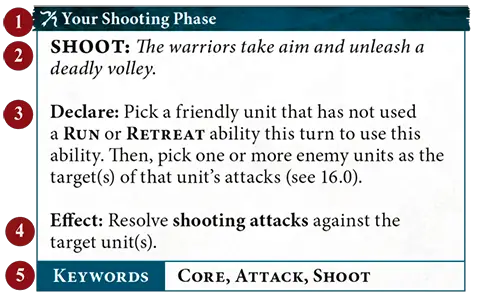
1
Timing2
Name and description3
Declare instructions4
Effect5
KeywordsAbility icons give you an idea what kind of effect the ability has at a glance.Movement AbilityOffensive AbilityDefensive AbilityShooting AbilityRallying Ability Special AbilityControl Ability Special AbilityControl Ability | ||
FAQ
| Q: | Some abilities (e.g. ‘All-out Attack’) have a red timing bar. Can these abilities only be used in the combat phase? |
| A: | No. The words in the timing bar or, in the case of reactions and passive abilities, the specific wording of the ability will let you know exactly when you can use it; the colour is just there as a play aid. If a phase is not specified, the colour indicates the most common phase it is used in or, if it is used in multiple phases equally, the timing bar is black. |
| Q: | Some abilities have a green timing bar. What does this mean? |
| A: | The green timing bar is used to indicate defensive abilities, many of which can be used in multiple phases. |
| Q: | Are non-passive abilities such as ‘Burning Wyrdflame’ optional to use? |
| A: | Yes. You must apply the effects of passive abilities and abilities that state that they must be used if it is possible to do so, but all other abilities are optional to use. |
1.0 Wizards and Priests
WIZARDS are special units that can cast spells, and PRIESTS are special units that can chant prayers. Spells and prayers are powerful abilities that can have a dramatic impact on the battle.
18.1 Ward Saves
Units with the WARD keyword have the ‘Ward Save’ passive ability. The number after the WARD keyword indicates the ward value for the ward save. If a unit had WARD (5+), for example, its ward value would be 5. If a unit has more than one ward save, only the ward save with the lowest value applies to it; the other has no effect.| Passive |
WARD SAVE: Whether through their uncanny reflexes, unnatural toughness or a source of mystical protection, these warriors can avoid otherwise lethal attacks.
Effect: In step 1 of the damage sequence (see 18.0), make a ward roll of D6 for each damage point in this unit’s damage pool. If the roll equals or exceeds this unit’s ward value, remove that damage point from the damage pool.
2.0 Spells
The declare step of each spell will tell you to make a casting roll of 2D6. If the roll does not equal or exceed the spell’s casting value (at the top-right corner of the spell), the spell fails and its effect is not resolved.If the unmodified casting roll includes 2 or more rolls of 1, the spell is miscast: the spell fails, its effect is not resolved, D3 mortal damage is inflicted on the WIZARD that used it, and that WIZARD cannot use any more spells in that phase.
Enemy reactions can only be used if the casting roll equals or exceeds the spell’s casting value. So long as the spell is not unbound (see 4.0), then it is successfully cast: resolve its effect.
EXAMPLE SPELL
| Your Hero Phase | 6 |
MYSTIC SHIELD: The caster's allies are bathed in an unearthly glow that protects them from harm.
Declare: Pick a visible friendly unit wholly within 12" of this WIZARD to be the target. Then, make a casting roll of 2D6.
Effect: The target has WARD (6+) this turn.
Effect: The target has WARD (6+) this turn.
| KEYWORDS | SPELL |
Unbind
| Reaction: Opponent declared a SPELL ability |
UNBIND: The wizard saps the energy from an enemy’s spell, nullifying its effects.
Used By: A friendly WIZARD within 30" of the enemy WIZARD casting the spell.
Effect: Make an unbinding roll of 2D6. If the roll exceeds the casting roll for the spell, then the spell is unbound and its effect is not resolved. This reaction cannot be used more than once per casting roll.
Effect: Make an unbinding roll of 2D6. If the roll exceeds the casting roll for the spell, then the spell is unbound and its effect is not resolved. This reaction cannot be used more than once per casting roll.
| KEYWORDS | UNBIND |
1.1 Wholly on Terrain and Behind Terrain
A model is wholly on a terrain feature if its base is on that terrain feature and no part of its base extends past the edge of that terrain feature. A unit is wholly on a terrain feature if every model in that unit is wholly on that terrain feature.When a unit is targeted by an attack, if it is impossible to draw a straight line from the closest point on the attacking model’s base to the closest point on the base of a model in the target unit that is in range without that line passing over that terrain feature, the target unit is considered to be behind a terrain feature for the attack made by that attacking model. Ignore parts of the terrain feature within the attacking unit’s combat range for the purposes of determining if the target is behind that terrain feature.
Universal Core Abilities - Charge Phase
| Your Charge Phase |
CHARGE: With a mighty battle cry, the warriors charge into combat with the enemy.
Declare: Pick a friendly unit that is not in combat and has not used a RUN or RETREAT ability this turn to use this ability. Then, make a charge roll of 2D6.
Effect: That unit can move a distance up to the value of the charge roll. That unit can move through the combat ranges of any enemy units and must end that move within 1/2" of a visible enemy unit. If it does so, the unit using this ability has charged.
Effect: That unit can move a distance up to the value of the charge roll. That unit can move through the combat ranges of any enemy units and must end that move within 1/2" of a visible enemy unit. If it does so, the unit using this ability has charged.
| KEYWORDS | CORE, MOVE, CHARGE |
Determine the Underdog
Whichever player has the fewest victory points is the underdog for the battle round. If the players are tied (e.g. in the first battle round), then there is no underdog, unless otherwise specified.32.2 Objective Control
In the deployment phase after all Deployment Phase abilities have been used and at the end of each turn, follow this sequence for each objective in an order chosen by the active player:- Starting with the active player, each player determines the control score of each of their units that is contesting that objective. A unit’s control score is the combined Control characteristics of all the models in that unit that are contesting the objective. Some abilities modify a unit’s control score, but it cannot be reduced to less than 1.
- Each player adds up the control scores of all of their units contesting that objective. This is their army control score for that objective.
- The players compare their army control scores for that objective. If one player’s score is higher, that player gains control of that objective. Once a player gains control of an objective, it remains under their control until their opponent gains control of it.
| Sometimes objective markers get accidentally nudged while you are moving models around. This is perfectly fine - just remember to put them back in their proper positions when determining objective control. | ||
Errata
32.2 Objective Control
Change the first sentence to:
‘In the deployment phase after all Deployment Phase abilities have been used and at the end of each turn, follow this sequence for each objective in an order chosen by the active player:’
‘In the deployment phase after all Deployment Phase abilities have been used and at the end of each turn, follow this sequence for each objective in an order chosen by the active player:’
32.0 Objectives
Many battleplans award victory points for controlling objectives, which are represented by objective markers. Unless otherwise specified, objective markers are round and 40mm wide. Models can move over and end their moves on objective markers. If an objective marker is on the border between territories, it is within all those territories but wholly within none of them. Objective markers don’t block visibility.
32.1 Contesting Objectives
Unless otherwise specified, if an objective is within a model’s combat range, that model is contesting that objective. If any models in a unit are contesting an objective, that unit is contesting that objective.Each unit can only count as contesting a single objective for the purposes of determining objective control (see 32.2). Before determining objective control, for each of their units contesting two or more objectives, the active player must pick one of those objectives for it to contest. Then, their opponent does the same.
Designer’s Note: For purposes other than determining objective control, a unit can contest more than one objective.
Errata
32.1 Contesting Objectives
Change the second paragraph to:
‘Each unit can only count as contesting a single objective for the purposes of determining objective control (see 32.2). Before determining objective control, for each of their units contesting two or more objectives, the active player must pick one of those objectives for it to contest. Then, their opponent does the same.
Designer’s Note: For purposes other than determining objective control, a unit can contest more than one objective.’
‘Each unit can only count as contesting a single objective for the purposes of determining objective control (see 32.2). Before determining objective control, for each of their units contesting two or more objectives, the active player must pick one of those objectives for it to contest. Then, their opponent does the same.
Designer’s Note: For purposes other than determining objective control, a unit can contest more than one objective.’
Contesting
Change the definition of contesting to:
‘contesting: Models contest objectives within their combat range (3"). When determining objective control, the same unit cannot contest more than 1 objective at the same time; the player must pick 1 if more than 1 is within range. (Core Rules, 32.1)’
‘contesting: Models contest objectives within their combat range (3"). When determining objective control, the same unit cannot contest more than 1 objective at the same time; the player must pick 1 if more than 1 is within range. (Core Rules, 32.1)’
| Passive |
SEED OF REBIRTH: Should the bearer of this seed ever fall, its rejuvenating energies will grant them new life.
Effect: The first time this unit would be destroyed, before removing it from play, roll a dice. On a 3+, this unit is not destroyed and any remaining damage points inflicted on it have no effect. Then, Heal (D3) this unit.
21.0 Healing
Some abilities allow you to heal a unit. To heal a unit, remove a number of damage points from the unit equal to the number in brackets after ‘Heal’, e.g. Heal (2).FAQ
| Q: | If an ability (e.g. ‘Seed of Rebirth’) would allow a unit that would be destroyed to negate all remaining damage points then heal to prevent that unit from being destroyed, and another ability (e.g. ‘Quenching the Flames’) prevents that unit from healing, would that unit still be destroyed? |
| A: | Yes. |
| Any Hero Phase | 1 |
RALLY: With an inspiring call to action, wounded soldiers get a second wind and fresh troops take the field to replace their fallen comrades.
Declare: Pick a friendly unit that is not in combat to use this ability.
Effect: Make 6 rally rolls of D6. For each 4+, you receive 1 rally point. Rally points can be spent in the following ways:
Effect: Make 6 rally rolls of D6. For each 4+, you receive 1 rally point. Rally points can be spent in the following ways:
- For each rally point spent, Heal (1) that unit.
- You can spend a number of rally points equal to the Health characteristic of that unit to return a slain model to that unit.
24.2 Replacement Units
Some abilities allow you to set up a replacement unit. When setting up that unit, it should have the same warscroll type, weapon options and number of models as the original unit, unless otherwise specified in the ability. Many of these abilities specify the proportion of models in the replacement unit (e.g. half the number of models from the original unit). In these cases, you can pick which models from the original unit are set up.The replacement unit is otherwise treated as a new unit; any keywords or abilities the original unit gained during the battle, and any persisting effects that applied to it, do not apply to the replacement unit. Each unit can only be replaced once, and you cannot replace replacement units.
If the original unit was reinforced and the replacement unit has more than half the number of models from the original unit, the replacement unit is considered to be reinforced.
| Because a replacement unit is treated as a completely new unit, it could, for instance, use a Once Per Battle ability on its warscroll even if the unit it replaced used that ability earlier in the battle. | ||
FAQ / Errata
FAQ
| Q: | If a destroyed unit had an enhancement, and an ability allows me to set up a replacement of that unit, would the replacement unit also have that enhancement? |
| A: | No. |
| Q: | If an ability allows a replacement unit to be set up with half the models from the original unit, and the original unit has to have a certain proportion of models equipped with specific weapons, does the new unit also need to adhere to the same restrictions? |
| A: | No. As stated in 24.2, you can pick any models from the original unit to be set up in the replacement unit. |
| Q: | If an ability allows a replacement unit to be set up with half the models from the original unit, could I then use an ability such as ‘Rally’ to return models to that unit until it reached the unit size of the original unit? |
| A: | No. A replacement unit is treated as a new unit with a new unit size. |
Errata
Addenda: 24.2 Replacement Units
Add the following:
‘If the original unit was reinforced and the replacement unit has more than half the number of models from the original unit, the replacement unit is considered to be reinforced.'
‘If the original unit was reinforced and the replacement unit has more than half the number of models from the original unit, the replacement unit is considered to be reinforced.'
Roll-off
If you are instructed to roll off, each player should roll a dice. Whichever player has a higher roll wins the roll-off. If the result is a tie, each player should roll off again until there is a clear winner, unless otherwise specified.12.0 Start of Battle Round
At the start of each battle round, follow these steps:1. Determine the Active Player: If it is the first battle round, the player who finished setting up their army first decides who will take the first turn (unless otherwise specified in the battlepack or battleplan).
If it is not the first battle round, the players make a roll-off called the priority roll and the winner decides who will take the first turn. If the roll-off is a tie, the player who took the first turn in the previous battle round decides who will take the first turn in the current battle round.
When it is a player’s turn, regardless of whether they take the first or second turn, they are referred to as the active player.
2. Determine the Underdog: Whichever player has the fewest victory points is the underdog for the battle round. If the players are tied (e.g. in the first battle round), then there is no underdog, unless otherwise specified.
3. Start of Battle Round Abilities: The active player can use any
Start of Battle Round
abilities first, then their opponent can do the same.FAQ / Errata
FAQ
| Q: | When determining the active player, how do you determine when a player has ‘finished setting up their army’? |
| A: | A player has finished setting up their army when all units in their army have been deployed. This means that non-DEPLOY Deployment Phase abilities (e.g. The Masque’s ‘The Endless Dance’ ability) happen after your army has ‘finished setting up’. |
Errata
Underdog
Change the definition of underdog to:
‘underdog: Player with fewest victory points. If tied, there is no underdog for that battle round.’
‘underdog: Player with fewest victory points. If tied, there is no underdog for that battle round.’
Anti-X (+1 Rend)
Add 1 to this weapon’s Rend characteristic if the target has the keyword after ‘Anti-’ or fulfils the condition after ‘Anti-’. Multiples of this ability are cumulative. For example, if a weapon has both Anti-charge (+1 Rend) and Anti-HERO (+1 Rend), then add 2 to the Rend characteristic of the weapon for attacks that target a HERO that charged in the same turn.13.1 Fight Abilities
Abilities with the FIGHT keyword follow a different sequence to other abilities. When the players are using Combat Phase
abilities as described in 13.0, they cannot use FIGHT abilities.After the players have finished using
Combat Phase
abilities that are not FIGHT abilities, they must alternate picking 1 eligible unit to use a FIGHT ability, starting with the active player. Each unit in combat must use a FIGHT ability if it is able to.Once a player has no more units that are eligible to use a FIGHT ability, the other player continues to pick units that are eligible to use a FIGHT ability, one after another, until there are no more units that are eligible to use a FIGHT ability.
| ||
Errata
Addenda: fought
Add the following definition:
‘fought: A unit has fought if it used any FIGHT abilities in the same turn.’
‘fought: A unit has fought if it used any FIGHT abilities in the same turn.’
19.0 Strike-first and Strike-last
If there are any STRIKE-FIRST units in combat after any non-FIGHT combat phase abilities have been used, other units cannot be picked to use a FIGHT ability until those units have been picked to use a FIGHT ability. After all those STRIKE-FIRST units have fought, the active player picks the next unit to fight.If there are any STRIKE-LAST units in combat, they cannot be picked to use a FIGHT ability if there are any units in combat that do not have STRIKE-LAST and have not yet used a FIGHT ability.
If a unit has STRIKE-FIRST and STRIKE-LAST, treat it as if it had neither.
| There may be situations when a unit that has STRIKE-FIRST is not in combat at the start of the phase, but because of moves such as pile-in moves, it is ‘pulled into combat’ later in the phase. In such cases, STRIKE-FIRST has no effect on that unit because it was not in combat at the start of the phase. Abilities that allow a unit to use a FIGHT ability immediately after another unit do not override the STRIKE-FIRST or STRIKE-LAST constraints, so you could not pick a unit with STRIKE-LAST to fight immediately after a unit with STRIKE-FIRST. | ||
FAQ / Errata
FAQ
| Q: | Can I use an ability that allows a friendly unit that does not have STRIKE-FIRST to fight immediately after a friendly unit that has STRIKE-FIRST if there are one or more enemy units with STRIKE-FIRST that have not yet been picked to fight? |
| A: | No. As mentioned in the sidebar next to 19.0, abilities that allow a unit to use a FIGHT ability immediately after another unit do not override the STRIKE-FIRST constraints, so you cannot pick a unit that does not have STRIKE-FIRST to fight until all other units that have STRIKE-FIRST have fought. |
| Q: | If a friendly unit is the only unit that has STRIKE-FIRST on the battlefield and it has an ability that allows a friendly unit to fight immediately after it, in what order would units be picked to fight? |
| A: | If you are the active player, the unit that has STRIKE-FIRST would fight first, then you could use the ability to allow another friendly unit to fight immediately after it, and then you would pick the next unit to fight (i.e. three friendly units would fight back to back). If your opponent is the active player, the unit that has STRIKE-FIRST would fight first, you could still use the ability to allow another friendly unit to fight, and then your opponent would pick the next unit to fight. |
| Q: | In the combat phase, if all eligible non-STRIKE‑LAST units have used a FIGHT ability, which player gets to pick the first STRIKE-LAST unit to fight? |
| A: | The alternating sequence of picking units to use a FIGHT ability would continue and so the player who did not pick the last non-STRIKE-LAST unit would get to pick the first eligible STRIKE-LAST unit in their army to use a FIGHT ability. |
Errata
19.0 STRIKE-FIRST and STRIKE-LAST
In the first sentence, replace ‘at the start of the phase’ with ‘after any non-FIGHT Combat Phase abilities have been used’.
STRIKE-LAST
Remove the following text from STRIKE-LAST:
‘If both players have units with STRIKE-LAST, they alternate fighting with those units after all other eligible units have fought, starting with the active player.’
‘If both players have units with STRIKE-LAST, they alternate fighting with those units after all other eligible units have fought, starting with the active player.’
STRIKE-LAST
In the glossary entry for STRIKE-LAST, remove ‘, starting with the active player’.
14.3 Charge Phase
| Your Charge Phase |
CHARGE: With a mighty battle cry, the warriors charge into combat with the enemy.
Declare: Pick a friendly unit that is not in combat and has not used a RUN or RETREAT ability this turn to use this ability. Then, make a charge roll of 2D6.
Effect: That unit can move a distance up to the value of the charge roll. That unit can move through the combat ranges of any enemy units and must end that move within 1/2" of a visible enemy unit. If it does so, the unit using this ability has charged.
Effect: That unit can move a distance up to the value of the charge roll. That unit can move through the combat ranges of any enemy units and must end that move within 1/2" of a visible enemy unit. If it does so, the unit using this ability has charged.
| KEYWORDS | CORE, MOVE, CHARGE |
FAQ
| Q: | When using the ‘Charge’ ability, does my unit need to end the charge move within 1⁄2" of an enemy unit that was visible to the charging unit at the start of that charge move? |
| A: | No. It must end the charge move within 1⁄2" of an enemy unit that is visible to the charging unit when it finishes that charge move. |
| Q: | If an ability adds to or subtracts from the number of dice that make up a charge roll, is that a modifier to the charge roll? |
| A: | No. |
15.1 Coherency
Any time a unit is set up or ends a move, it must be in a single group. A unit is considered to be in a coherent group if each model in that unit is within coherency range, measured horizontally, of at least 1 other model in that unit (ignore differences in height between the two models).For the majority of units, coherency range is 1/2", though some units (particularly those with large models with overhanging parts) have a longer coherency range noted on their warscroll for ease of play. While there are 7 or more models in a unit, that unit is considered to be in a coherent group if each model in that unit is within coherency range of at least 2 other models in that unit.
If it is not possible for a unit to end a move in a single coherent group, that move cannot be made.
| ||
18.3 Slain Models
The commander of a unit must pick which model(s) in the unit are slain. However, after each slain model is removed, the unit must be in a single coherent group (see 15.1). If this is not possible, continue to remove models, one at a time, until the unit is in a single coherent group. You must remove the fewest models possible to make the unit a single coherent group.FAQ / Errata
FAQ
| Q: | Do models removed as a result of a unit being out of coherency count as having been slain? |
| A: | Yes. |
Errata
Addenda: 18.3 Slain models
Add the following:
‘You must remove the fewest models possible to make the unit a single coherent group.’
‘You must remove the fewest models possible to make the unit a single coherent group.’
Addenda: removed from play/removed from the battlefield
Add the following definition:
‘removed from play/removed from the battlefield: When a model or unit is removed from the battlefield, it no longer has any effect on the battle, though it can still be relevant for abilities that allow you to return models or replace units.’
‘removed from play/removed from the battlefield: When a model or unit is removed from the battlefield, it no longer has any effect on the battle, though it can still be relevant for abilities that allow you to return models or replace units.’