General’s Handbook 2025-26

Books
|
Show History | ||||
| Book | Kind | Edition | Last update | |
 General’s Handbook 2025-26 General’s Handbook 2025-26 | ||||
| General’s Handbook 2025-26 | Expansion | 4 | June 2024 | |
| Rules Updates | ||||
| Rules Updates | Rulebook | 4 | September 2026 | |
 Using the Scourge of Ghyran Rules Using the Scourge of Ghyran Rules | ||||
| Using the Scourge of Ghyran Rules | Expansion | 4 | May 2025 | |
FAQ
| Q: | Can I complete the same battle tactic multiple times in a battle? |
| A: | No, unless specified otherwise. |
1.0 BATTLE TACTICS OVERVIEW
| Q: | If I have met the conditions to complete a battle tactic can I choose not to complete that tactic at the end of my turn? |
| A: | No. If the conditions are fulfilled and you have not already scored a battle tactic from that card this turn, you must score that battle tactic. |
| Q: | If I have met the conditions to complete a battle tactic can I choose not to complete that tactic at the end of my turn? |
| A: | No. If the conditions are fulfilled and you have not already scored a battle tactic from that card this turn, you must score that battle tactic. |
6.0 ATTACKING (SHOOTING AND COMBAT) COMMANDS
| Q: | If a unit uses ‘All-out Attack’ in the shooting phase and the combat phase, do I subtract 2 from save rolls for that unit? |
| A: | No. Persisting effects (see 28.1) count as the effects of passive abilities for their duration, so units cannot be affected by the same persisting effect more than once. |
1.2 UNIVERSAL TERRAIN ABILITIES
| Q: | While every model in a friendly non-MONSTER unit is within 1" of an Obscuring terrain feature, are they visible to friendly units? |
| A: | Yes. They are just not visible to enemy units outside of their combat range. |
| Q: | When a Hero uses ‘Activate Place of Power’ and picks Tap the Ley Lines, can they use both the ‘Unbind’ ability and the ‘Banish Manifestation’ ability in the same phase? |
| A: | No. |
1.5 FACTION TERRAIN
| Q: | If a hero is garrisoning a faction terrain feature, can it still be picked as the target of abilities other than attacks? |
| A: | Yes. |
BATTLEPLAN: CREEPING CORRUPTION
| Q: | How does damage inflicted by ‘Pulsing Life Energies’ interact with The Shadow Queen’s ‘Iron Heart of Khaine’ ability? |
| A: | Since the damage is inflicted in the Start of Battle Round timing window, before either player’s turn has started, ‘Iron Heart of Khaine’ would have no effect on those damage points. In addition, those damage points would not count towards the limit on damage allocation from ‘Iron Heart of Khaine’ in the next turn. |
| Q: | Can I use Scourge of Ghyran enhancements, lores and battle formations in an Army of Renown? |
| A: | No. |
Matched Play Battlepack
General’s Handbook 2025-26
1. Pick Your Armies
Each player picks an army using the rules in Army Composition 2025-26 (Advanced Rules).2. Determine the Battleplan
One player rolls a dice to determine which battleplan table to use. On a 1-3, use battleplan table 1. On a 4-6, use battleplan table 2. The other player then rolls a dice to determine the battleplan. Alternatively, feel free to pick the battleplan you wish to play.
| ||||||||||||||||||||||||||||||||
Attacker and Defender
The players roll off. The winner chooses which player is the attacker and which is the defender.Objectives and Terrain
This battlepack contains 6 special objectives called Ghyranite objectives: 2 Oakenbrow objectives, 2 Gnarlroot objectives, 1 Winterleaf objective and 1 Heartwood objective. The objective itself is the 40mm-diameter circle located in the centre, while the surrounding area extending 3" from the objective is the control zone. To contest a Ghyranite objective, a unit must be within the control zone of that Ghyranite objective.The defender sets up Ghyranite objectives in the locations indicated on the battlefield map. The objectives must be those indicated on the battlefield map; for example, if the map shows an Oakenbrow objective, the Oakenbrow objective must be set up in that location.
Then, the defender sets up terrain features. We recommend 4 small and 4 medium terrain features. Each terrain feature must be set up more than 3" from the battlefield edge, more than 3" from all Ghyranite objectives and more than 6" from all other terrain features. Alternatively, the battlefield can be set up as shown on the corresponding battlefield terrain layout map while maintaining the distance restrictions between the battlefield edge, objectives and other terrain features as detailed above.
Territory
After Ghyranite objectives and terrain have been set up, the attacker picks which territory is their territory. The other territory is the defender’s territory. The players then resolve the deployment phase. The attacker begins deployment (Core Rules, 10.0).Battle Length
Battles that use this battlepack last for 5 battle rounds.Glorious Victory
Each battleplan will describe how to score victory points. At the end of the battle, if one player has at least 5 victory points more than their opponent, they win a major victory. If one player has fewer than 5 more victory points than their opponent, they win a minor victory. If the players are tied on victory points, the player who completed the most battle tactics wins a minor victory. If the players are tied on victory points and completed the same number of battle tactics, the battle is a draw.Battle Tactics
If you are using this battlepack, you must pick battle tactics cards from this battlepack to add to your army roster during army composition.At the start of the battle, you must reveal your choice of battle tactics cards to your opponent. If the battle tactics card instructs you to pick something, you must tell your opponent what you pick and vice versa.
Matched Play Publications 2025-26
As Warhammer Age of Sigmar continues to grow, naturally, we will continue to write rules for the game. However, when you are playing competitively, sometimes it’s hard to know which of these rules are ‘legal’ – in other words, which rules you can use in Matched Play battles. On this page, we’ve provided a handy at-a-glance list that shows you all the publications whose rules you are allowed to use in Matched Play battles.
CORE
- Warhammer Age of Sigmar Core Book
- General’s Handbook 2025-26
- Warhammer Age of Sigmar Faction Packs
- Battle Profiles & Rules Updates
- Battletome publocations, excluding Warhammer Legends rules
BATTLETOMES
Throughout this edition of Warhammer Age of Sigmar, we will be releasing battletomes for each faction. Battletomes contain additional and/or updated faction rules, which include battle traits, battle formations and enhancements. When a battletome is released, it will supersede the rules set out in the Faction Pack for that faction.Season Rules 2025-26
Gyranite Objectives
The battleplans in the General’s Handbook 2025-26 battlepack use the following Ghyranite objective markers:
Each Ghyranite objective marker comprises a 40mm-diameter round objective that is wholly within and surrounded by a control zone.
Contesting Ghyranite Objectives
While a Ghyranite objective is within a model’s combat range, that model is contesting that objective. While any models in a unit are contesting a Ghyranite objective, that unit is contesting that Ghyranite objective.
Paired Objectives
Some battleplans will use more than one of the same type of Ghyranite objective. For example, they could include two Oakenbrow objectives and/or two Gnarlroot objectives. In these battleplans, the rules refer to two of the same type of Ghyranite objective as a pair or paired. When a rule requires a player to control a pair of objectives, the player has to control both objectives in that pair.When a player has to pick ‘a pair of objectives’, they can only pick a single pair of Ghyranite objectives of the same type. For example, that player could pick either both Oakenbrow objectives or both Gnarlroot objectives. They could not pick an Oakenbrow objective and a Gnarlroot objective, or both Oakenbrow objectives and both Gnarlroot objectives.
Obscured Ghyranite Objectives
Some abilities can confer the ‘Obscuring’ terrain ability on a Ghyranite objective, even though it is not a terrain feature. In these cases, replace the words ‘within 1" of this terrain feature’ in the ability with ‘wholly within this Ghyranite objective’s control zone’.Regimented Forces
If a player has more regiments than their opponent at the start of the battle, then once per battle, that player can re-roll their priority roll after seeing the result of both players’ rolls but before determining priority for that battle round. Using The Scourge of Ghyran Rules
The Scourge of Ghyran rules are a set of seasonal rules that include additional faction rules and alternative warscrolls for every faction. These rules are for use in battles that use the General’s Handbook 2025-26 battlepack.SCOURGE OF GHYRAN WARSCROLLS
If you wish to use a Scourge of Ghyran warscroll, every instance of that unit in your army must use that warscroll. You cannot use the printed (i.e. battletome or faction pack) version of the warscroll for one unit and the Scourge of Ghyran warscroll for another.If you decide to use the Scourge of Ghyran version of a warscroll, you do not have to use all other Scourge of Ghyran warscrolls for your faction.
In addition, other rules that interact with the printed version of that unit interact with the Scourge of Ghyran version too. For example, a rule (including regiment options) that calls out a unit type by the name on its warscroll interacts with both the printed version of that unit and the Scourge of Ghyran version; they are synonymous in this regard.
SCOURGE OF GHYRAN FACTION RULES
The additional faction rules consist of a variety of battle formations, artefacts of power tables, heroic traits tables, special enhancement tables (such as monstrous traits), spell lores and prayer lores.When picking your army’s battle formation, you can pick 1 of the Scourge of Ghyran battle formations available to your faction instead of any others available to it. In other words, you can still only pick 1 battle formation for your army.
If you pick from a Scourge of Ghyran artefacts of power or heroic traits table, you pick from that table instead of other such tables available to your faction, not in addition to. This is stated in the rules that accompany the relevant table.
Some of the Scourge of Ghyran enhancement tables are special enhancements unique to that faction, for example monstrous traits. This is an enhancement table available to your faction like any other; therefore, you can pick 1 enhancement from it for your army, as per the Army Composition rules, 4.1.
We hope that you enjoy using the Scourge of Ghyran rules and that they add a fun new dimension to your faction!
Battle Tactics 2025-26
| Q: | Can I complete the same battle tactic multiple times in a battle? |
| A: | No, unless specified otherwise. |
1.0 Battle Tactics Overview
During a battle, each player can score extra victory points by completing battle tactics from a battle tactics card. You can pick up to 2 battle tactics cards for your army during army composition, and the battle tactics cards you pick must be marked on your army roster.Before deployment, you must tell your opponent which battle tactics cards you have picked for your army.
Each battle tactics card has 3 battle tactics: 1 Affray battle tactic, 1 Strike battle tactic and 1 Domination battle tactic. You must complete the Affray battle tactic on that card before you can complete the Strike battle tactic on that card. Similarly, you must complete the Strike battle tactic on that card before you can complete the Domination battle tactic on that card.
You can complete 1 battle tactic on each of your battle tactics cards at the end of each of your turns unless specified otherwise on that battle tactics card.
2.0 Seizing The Initiative
If the player who went second in the previous battle round wins the priority roll and chooses to go first, unless their opponent is leading by 11 or more victory points, it is called seizing the initiative.When a player seizes the initiative, their opponent always counts as the underdog until that opponent seizes the initiative.
A player who seizes the initiative cannot complete any battle tactics in that turn.
3.0 Completing Battle Tactics
If, at the end of your turn, you have completed a battle tactic as described above, you score the number of victory points shown for that battle tactic.
| ||
BATTLE TACTICS CARD 1
Master the Paths
The verdant of Neos resist the stamp of armies and conquerors. To slip along those paths takes woodsmen of great skill.
|
BATTLE TACTICS CARD 2
Restless Energy
Do not rest upon your laurels. Expand. Grow. Conquer.
|
BATTLE TACTICS CARD 3
Intercept and Recover
There are many who would thieve Neos’s life-giving relics. Recover them - either for noble purposes or in furtherance of darker goals...
- At the start of the battle, your opponent must pick 3 of their units on the battlefield to be carrying a Ghyranite Treasure. They cannot pick faction terrain features or MANIFESTATIONS. A unit can only carry 1 Ghyranite Treasure. If your opponent has fewer than 3 units on the battlefield, you automatically complete a number of these battle tactics, starting with the Domination battle tactic (followed by the Strike and then the Affray) until the number of remaining uncompleted battle tactics equals the number of enemy units on the battlefield.
- If you went second in the previous battle round and choose to go first in the current battle round, your opponent can remove 1 Ghyranite Treasure from one of their units at the start of the battle round.
- If an ability would remove a unit that was carrying treasure from the battlefield and that unit is not set up again as part of the same ability (e.g. ‘Dark Apotheosis’ or ‘Red Ruin’), before removing that unit from the battlefield, your opponent must give the treasure it was carrying to another one of their units that does not have a Ghyranite treasure within 3" of that unit. If this is not possible, that unit counts as having been destroyed for the purpose of this battle tactics card.
|
| Q: | If your opponent has picked the Intercept and Recover battle tactic card and they destroy 2 or 3 of your units that are carrying Ghyranite Treasure in the same turn, and then they choose to go first after going second in the previous battle round, can you remove a Ghyranite Treasure that has not been scored yet from a destroyed unit? |
| A: | Yes. |
| Q: | If both players have the Intercept and Recover battle tactic card, what is the order in which players pick units to be carrying Ghyranite Treasures? |
| A: | The attacker picks all their units first, then the defender picks all their units. |
BATTLE TACTICS CARD 4
Wrathful Cycles
Even in joyous Neos, nature can change without warning. Embody its mercilessness as you turn the tide
|
BATTLE TACTICS CARD 5
Scouting Force
Focused tactics and small formations are key to triumph under the dense canopies of Neos.
At the start of the battle, pick each friendly non-HERO INFANTRY and non-HERO CAVALRY unit that was not set up in reserve using a Deploy ability to become a scout unit. You cannot complete these battle tactics with scout units that are in combat. Replacement units that replace scout units are also scout units.
|
BATTLE TACTICS CARD 6
Attuned to Ghyran
The air of Neos is strangely febrile, as if the will of the realm crackles there. One could heed it, perhaps...
|
Battleplan Maps
Overview
The battleplan maps show the player territories and the locations where terrain and objectives should be placed on the battlefield.Player Territories
Each battleplan map shows two territories: one red (Attacker’s Territory) and one blue (Defender’s Territory).Objectives Locations
The locations of Ghyranite objectives are indicated on the battleplan maps by the following icons.
Each icon represents the Ghyranite objective including its control zone. Where an objective icon is shown on the map, you must place the corresponding objective marker on the battlefield centred on the location of the objective icon shown on the map. For example, where the map shows an Oakenbrow objective icon, place an Oakenbrow objective on the battlefield in that location.
Terrain Locations
The terrain location icons show where terrain features should be set up and what type of terrain should be placed in each terrain location. The following key shows which terrain features correspond to which icons:
| |||||||||||

| |||||||||||


| |||||||||||


Scoring Sheet 2025-26
At the conclusion of a Matched Play battle, the player who has scored the most victory points is declared the winner.
Victory points can be scored in a variety of different ways, so it is vital to be able to track the methods by which victory points are scored and the number of victory points that have been scored by each player. We have provided a scoring sheet template opposite so that you can track the progress of your battles. You can find a scoring sheet printable copy below:

On the scoring sheet, there’s space at the top to record the battleplan being played and the points limit for the battle. Beneath that are two sections: one for the attacker’s information and one for the defender’s information.
After determining who will be the attacker and who will be the defender, write each player’s name and their army’s faction in the appropriate sections.
There are spaces in both the attacker and the defender sections to record the victory points scored in each battle round. In addition, there are tick boxes to track which battle tactics have been completed and which player had priority in each battle round. The abbreviations ’A’, ’S’ and ’D’ stand for Affray, Strike and Domination respectively.
At the end of the battle, both players can mark the result of the battle in the section at the bottom of the sheet.
Victory points can be scored in a variety of different ways, so it is vital to be able to track the methods by which victory points are scored and the number of victory points that have been scored by each player. We have provided a scoring sheet template opposite so that you can track the progress of your battles. You can find a scoring sheet printable copy below:
On the scoring sheet, there’s space at the top to record the battleplan being played and the points limit for the battle. Beneath that are two sections: one for the attacker’s information and one for the defender’s information.
After determining who will be the attacker and who will be the defender, write each player’s name and their army’s faction in the appropriate sections.
There are spaces in both the attacker and the defender sections to record the victory points scored in each battle round. In addition, there are tick boxes to track which battle tactics have been completed and which player had priority in each battle round. The abbreviations ’A’, ’S’ and ’D’ stand for Affray, Strike and Domination respectively.
At the end of the battle, both players can mark the result of the battle in the section at the bottom of the sheet.

Battleplan 2 (Table 1) Paths of the FeyTWIST: If you are the underdog, you must use the ‘The Spirit Paths Open’ ability. Both players can use the ‘Stumbling Forth’ ability.
THE SPIRIT PATHS OPENDeclare: Pick 2 objectives to be the targets. Effect: All units, excluding faction terrain and MANIFESTATIONS, within 6" of any target objectives must be removed from the battlefield by their commander. Those units are vanished. Then, starting with you, players must take it in turns to set up each friendly vanished unit wholly within 3" of either target objective and more than 3" from all enemy units. Those units cannot use MOVE abilities in the first movement phase of the battle round. If it is impossible for a unit to be set up in this way, it is set up in reserve as a lost unit.
STUMBLING FORTHDeclare: Pick a friendly lost unit (see above) to be the target. Effect: Set up the target on the battlefield, more than 9" from all enemy units and wholly within 7" of a battlefield edge.
 | ||||||||||||||||||||||||||
Battleplan 3 (Table 1) Roiling RootsTWIST: If you are the underdog, you must use the ‘Tangling Tendrils’ ability: Each player scores victory points at the end of each of their turns as follows:
TANGLING TENDRILSDeclare: Pick a pair of objectives to be the targets. Effect: For the rest of the battle round, units (friendly and enemy) have STRIKE-LAST while they are contesting either target objective.

| ||||||||||||||||||||||||||
Battleplan 4 (Table 1) Cyclic ShiftsTWIST: If you are the underdog, you can use the ‘Unpredictable Evolution’ ability: Each player scores victory points at the end of each of their turns as follows:
UNPREDICTABLE EVOLUTIONDeclare: Pick a pair of objectives to be the targets. Effect: The target objectives are no longer controlled by either player (if they were) and they cannot be controlled this battle round.
 | ||||||||||||||||||||||
Battleplan 5 (Table 1) Surge of SlaughterTWIST: If you are the underdog, you can use the ‘Defence of the Realm’ ability: Each player scores victory points at the end of each of their turns as follows:
DEFENCE OF THE REALMDeclare: Pick a pair of objectives to be the targets. Effect: For the rest of the battle round, add 1 to the Rend characteristic of friendly units’ melee weapons while they are contesting either of the target objectives.
 | ||||||||||||||||||||||
Battleplan 6 (Table 1) Linked Ley LinesTWIST: While you are the underdog, your army has the ‘Rooted in the Realm’ and ‘Full of Life’ abilities: A linked ley line is formed from the middle of one edge of the battlefield to the middle of the opposite edge while one player controls all the objectives on that line.
ROOTED IN THE REALMEffect: Friendly units’ weapons have Anti-MANIFESTATION (+1 Rend) while those units are a contesting an objective that is both controlled by you and on a linked ley line (see below).
FULL OF LIFEEffect: Friendly MANIFESTATIONS have STRIKE-FIRST. Each player scores victory points at the end of each of their turns as follows:
 | ||||||||||||||||||||||||||
Battleplan 1 (Table 2) Noxious NexusTWIST: If you are the underdog, you can use the ‘Caustic Sap’ ability: Objectives cannot be controlled in the first battle round.
CAUSTIC SAPDeclare: Pick an objective. Each unit contesting that objective is a target. Effect: Roll a D3 for each target. On a 2+, inflict an amount of mortal damage on the target equal to the roll. If you picked the Heartwood  objective, roll a D6 for each target instead. objective, roll a D6 for each target instead.Each player scores victory points at the end of each of their turns as follows:
In addition, at the end of the battle, a player scores 10 victory points if they control the Heartwood objective.
 | ||||||||||||||||||||||
Battleplan 2 (Table 2) The LiferootsTWIST: If you are the underdog, you can use the ‘Life Begets Life’ ability: Each player scores 1 liferoot point at the end of each of their turns for each terrain feature they control.
LIFE BEGETS LIFEDeclare: Pick a friendly unit that has all of its models within 1" of a terrain feature to be the target. Effect: Return 1 slain model to the target unit. Each player scores victory points at the end of each of their turns as follows:
 | ||||||||||||||||||||||
Battleplan 3 (Table 2) Bountiful EquinoxTWIST: If you are the underdog, you can use the ‘Rejuvenating Bloom’ ability: Each player scores victory points at the end of each of their turns as follows:
REJUVENATING BLOOMDeclare: Pick an objective to be the target. Effect: Heal (3) each unit (friendly and enemy) contesting the target objective.
 | ||||||||||||||||||||||
Battleplan 4 (Table 2) LifecycleTWIST: At the start of the second battle round, the underdog must use the ‘Lifecycle’ ability. If there is no underdog, the players roll off and the winner must use the ‘Lifecycle’ ability:
LIFECYCLEEffect: Pick either the Oakenbrow  or the Gnarlroot or the Gnarlroot  objective to be the primary objective. At the start of each subsequent battle round, the next objective in the cycle becomes the primary objective. The objectives before and after the primary objective in the cycle order (see below) are the secondary objectives. objective to be the primary objective. At the start of each subsequent battle round, the next objective in the cycle becomes the primary objective. The objectives before and after the primary objective in the cycle order (see below) are the secondary objectives.CYCLE ORDER  Each player scores victory points at the end of each of their turns as follows:
 | ||||||||||||||||||||||
Battleplan 5 (Table 2) Creeping CorruptionTWIST: If you are the underdog, you can use the ‘Pulsing Life Energies’ ability: Each player scores victory points at the end of each of their turns as follows:
PULSING LIFE ENERGIESDeclare: Pick an objective you control and 1 other objective (whether you control it or not). Draw a line between the centres of those objectives. Then, choose propagation or corruption. Effect: Apply the appropriate effect: Propagation: Add 1 to casting rolls, chanting rolls and banishment rolls for each unit crossed by the line for the rest of the battle round Corruption: Inflict D3 mortal damage on each unit crossed by the line.

| ||||||||||||||||||||||||||
Battleplan 6 (Table 2) Grasp of ThornsTWIST: If you are the underdog, you can use the ‘Carnivorous Flora’ ability: Each player scores victory points at the end of each of their turns as follows:
CARNIVOROUS FLORADeclare: Pick an objective to be grasping. Effect: Roll a dice for each unit contesting that objective. On a 3+, every model in that unit that is within the control zone of that objective is entangled for the rest of the battle round. Entangled models must stay within the control zone of the grasping objective for the rest of the battle round. While a unit has any entangled models, it cannot be removed from the battlefield by an ability that would allow it to be set up elsewhere on the battlefield. That objective cannot be moved while there are any entangled models contesting it.
 | ||||||||||||||||||||||
ADVANCED RULES 2025-26
Each Advanced Rules section is designed to be modular, allowing each battlepack to specify which Advanced Rules to use with that battlepack. The General’s Handbook 2025-26 battlepack uses the following Advanced Rules modules:
COMMANDS 2025-26
These rules explain how you can earn command points to use powerful commands that allow you to react to abilities and interact in your opponent’s turn. If you are not using the Commands rules, ignore any abilities that have the command point symbol in the corner.TERRAIN 2025-26
These rules go into more detail about how your models interact with terrain features, such as how they can take cover or even draw power from arcane nexuses.MAGIC 2025-26
If you’d like to wield unlimited mystical power by including WIZARDS, PRIESTS and manifestations in your battles, see Magic.ARMY COMPOSITION 2025-26
If you’re ready to build your own army roster and customise your army with regiments, battle formations and enhancements, see Army Composition.COMMAND MODELS
Here you will find rules for special models called champions, standard bearers and musicians, which are found in many Warhammer Age of Sigmar units.BATTLE TACTICS 2025-26
Add an additional tactical challenge to your games by including secondary objectives called Battle Tactics.BUILD YOUR OWN BATTLEPACK There are many, many ways to play Warhammer Age of Sigmar, from Path to Glory battlepacks, which focus on narrative-driven battles linked in an ongoing campaign, to Spearhead and Matched Play battlepacks, in which the emphasis is on balance and competitive play.In addition to using official battlepacks, we’d encourage you to use the rules in this section as a toolbox, mixing and matching the elements within to build your own battleplan or battlepack to play with your friends. Are you excited to field your entire collection against your friends or to see which monster reigns supreme? Maybe you want to design your own battleplans and special rules, or perhaps you want to keep things simple in order to teach a younger sibling how to play. These rules provide an open framework that makes each of these things possible. Here are some ideas to get you started:
| ||
Commands 2025-26
| ||
1.0 Commands Overview
Some abilities, called commands, require that you spend one or more command points ( ) to use that ability. Any ability that has a command point cost (indicated in the top right corner of the ability) is a command.
1.1 Earning Command Points
At the start of each battle round, after determining the underdog, each player gains 4 command points. If there is an underdog, they gain 1 extra command point. At the end of the battle round, the players’ command points are reset to 0 (any that have not been used are lost).2.0 Hero Phase Commands
 Any Hero Phase Any Hero Phase | 1 |
RALLY: With an inspiring call to action, wounded soldiers get a second wind and fresh troops take the field to replace their fallen comrades.
Declare: Pick a friendly unit that is not in combat to use this ability.
Effect: Make 6 rally rolls of D6. For each 4+, you receive 1 rally point. Rally points can be spent in the following ways:
Effect: Make 6 rally rolls of D6. For each 4+, you receive 1 rally point. Rally points can be spent in the following ways:
- For each rally point spent, Heal (1) that unit.
- You can spend a number of rally points equal to the Health characteristic of that unit to return a slain model to that unit.
 Enemy Hero Phase Enemy Hero Phase | 1 |
MAGICAL INTERVENTION: A warrior learned in the mystic arts utters a rapid incantation to disrupt the enemy’s plans.
Declare: Pick a friendly WIZARD or PRIEST to use this ability.
Effect: That friendly unit can use a SPELL or PRAYER ability (as appropriate) as if it were your hero phase. If you do so, subtract 1 from casting rolls or chanting rolls made as part of that ability.
Effect: That friendly unit can use a SPELL or PRAYER ability (as appropriate) as if it were your hero phase. If you do so, subtract 1 from casting rolls or chanting rolls made as part of that ability.
3.0 Movement Phase Commands
 Enemy Movement Phase Enemy Movement Phase | 1 |
REDEPLOY: Taking initiative, the warriors hastily reposition to respond to enemy movements.
Declare: Pick a friendly unit that is not in combat to use this ability.
Effect: Each model in that unit can move up to D6". That move cannot pass through or end within the combat range of an enemy unit.
Effect: Each model in that unit can move up to D6". That move cannot pass through or end within the combat range of an enemy unit.
| KEYWORDS | MOVE, RUN |
| Reaction: You declared a RUN ability | 1 |
AT THE DOUBLE: At a command from their general, the warriors sprint to a key position on the battlefield.
Used By: The unit using that RUN ability.
Effect: Do not make a run roll as part of that RUN ability. Instead, add 6" to that unit’s Move characteristic to determine the distance each model in that unit can move as part of that RUN ability.
Effect: Do not make a run roll as part of that RUN ability. Instead, add 6" to that unit’s Move characteristic to determine the distance each model in that unit can move as part of that RUN ability.
4.0 Shooting Phase Commands
 Enemy Shooting Phase Enemy Shooting Phase | 1 |
COVERING FIRE: The warriors unleash a quick volley at a nearby enemy unit before it charges into combat.
Declare: Pick a friendly unit that did not use a RUN ability this turn and that is not in combat to use this ability, then pick the closest enemy unit (to that unit) that can be picked as the target of shooting attacks to be the target. You cannot pick MANIFESTATIONS or faction terrain features as the target of this ability.
Effect: Resolve shooting attacks for the unit using this ability against the target. You must subtract 1 from the hit rolls for those attacks.
Effect: Resolve shooting attacks for the unit using this ability against the target. You must subtract 1 from the hit rolls for those attacks.
| KEYWORDS | SHOOT, ATTACK |
5.0 Charge Phase Commands
| Enemy Charge Phase | 2 |
COUNTER-CHARGE: Seeing the need for decisive action, the warriors charge forth to stall the enemy’s advance or enact a bold interception.
Declare: Pick a friendly unit that is not in combat to use this ability.
Effect: That unit can use a CHARGE ability as if it were your charge phase.
Effect: That unit can use a CHARGE ability as if it were your charge phase.
| Reaction: You declared a CHARGE ability | 1 |
FORWARD TO VICTORY: With their charge faltering, a rousing command gives the unit renewed energy to reach their foes.
Used By: The unit using that CHARGE ability.
Effect: You can re-roll the charge roll.
Effect: You can re-roll the charge roll.
6.0 Attacking (Shooting and Combat) Commands
 Reaction: You declared an ATTACK ability Reaction: You declared an ATTACK ability | 1 |
ALL-OUT ATTACK: The warriors fight with a frenzied vigour.
Used By: The unit using that ATTACK ability.
Effect: Add 1 to hit rolls for attacks made as part of that ATTACK ability. This also affects weapons that have the Companion weapon ability. For the rest of the turn, subtract 1 from save rolls for the unit using this ability.
Effect: Add 1 to hit rolls for attacks made as part of that ATTACK ability. This also affects weapons that have the Companion weapon ability. For the rest of the turn, subtract 1 from save rolls for the unit using this ability.
7.0 Defensive Commands
 Reaction: Opponent declared an ATTACK ability Reaction: Opponent declared an ATTACK ability | 1 |
ALL-OUT DEFENCE: The soldiers close ranks to hold off an incoming attack.
Used By: A unit targeted by that ATTACK ability.
Effect: Add 1 to save rolls for that unit until that ATTACK ability has been resolved.
Effect: Add 1 to save rolls for that unit until that ATTACK ability has been resolved.
8.0 End of Turn Commands
| End of Any Turn | 1 |
POWER THROUGH: The warriors use their sheer mass or resilience to drive through a group of weaker foes, leaving broken bodies in their wake.
Declare: Pick a friendly unit that charged this turn to use this ability, then you must pick an enemy unit in combat with it to be the target. The target must have a lower Health characteristic than the unit using this ability.
Effect: Inflict D3 mortal damage on the target. Then, the unit using this ability can move a distance up to its Move characteristic. It can pass through and end that move within the combat ranges of enemy units that were in combat with it at the start of the move, but not those of other enemy units. It does not have to end the move in combat.
Effect: Inflict D3 mortal damage on the target. Then, the unit using this ability can move a distance up to its Move characteristic. It can pass through and end that move within the combat ranges of enemy units that were in combat with it at the start of the move, but not those of other enemy units. It does not have to end the move in combat.
| KEYWORDS | MOVE |
Terrain 2025-26
1.0 Terrain Overview
Terrain features add interest and tactical challenges to the battlefield. The battleplan or battlepack you are using will explain how to set up terrain.| The Citadel Terrain List includes a list of Warhammer Age of Sigmar terrain features and tells you which terrain abilities each of them has. | ||
1.1 Wholly on Terrain and Behind Terrain
A model is wholly on a terrain feature if its base is on that terrain feature and no part of its base extends past the edge of that terrain feature. A unit is wholly on a terrain feature if every model in that unit is wholly on that terrain feature.When a unit is targeted by an attack, if it is impossible to draw a straight line from the closest point on the attacking model’s base to the closest point on the base of a model in the target unit that is in range without that line passing over that terrain feature, the target unit is considered to be behind a terrain feature for the attack made by that attacking model. Ignore parts of the terrain feature within the attacking model’s combat range for the purposes of determining if the target is behind that terrain feature.
1.2 Universal Terrain Abilities
Each terrain feature has one or more of the following passive abilities:
|
| Once Per Turn (Army), Start of Any Turn |
ACTIVATE PLACE OF POWER: The hero draws on the power of a nearby mythical landmark.
Declare: Pick a friendly HERO within 3" of a Place of Power to use this ability, then pick that Place of Power to be the target.
Effect: Pick 1 of the following effects:
Effect: Pick 1 of the following effects:
- Cauterising Pollen: Roll a dice. On a 1, inflict 1 mortal damage on each unit (friendly and enemy) within 6" of any Places of Power. On a 3+, Heal (2) each unit (friendly and enemy) wholly within 6" of the target.
- Rapid Sprouting: Pick a Ghyranite objective or visible non-FACTION TERRAIN terrain feature within 12" of that HERO and roll a dice. On a 3+, that objective or terrain feature has the ‘Obscuring’ ability (see 1.2) for the rest of the battle.
- Tap the Ley Lines: For the rest of the turn, if that HERO is not a WIZARD or PRIEST, they can use the ‘Unbind’ or ‘Banish Manifestation’ ability as if they had WIZARD (1).
| KEYWORDS | CORE |
1.3 Terrain Sizes
- Terrain that fits into an area no larger than 7" x 7" is small.
- Terrain that is not small and fits into an area no larger than 7" x 12" is medium.
- Terrain that is too big to fit into an area 7" x 12" is large.
1.4 Terrain Types
Each terrain feature in Warhammer Age of Sigmar is one of the following types:- Obstacle
- Obscuring Terrain
- Area Terrain
- Place of Power
- Faction Terrain
Before the battle begins, players must agree on which type applies to each terrain feature.
1.5 Faction Terrain
Some factions have special terrain features called faction terrain features. Faction terrain features have their own warscrolls. They are not considered to be units, with the following exceptions:- In the combat phase, they are treated as if they were units for the purposes of movement, combat range and being in combat. Units can finish a charge move within ½" of an enemy faction terrain feature as if it were a unit.
- They are affected by all enemy abilities as if they were units.
- They can be damaged in the same manner as units. However, when they are removed from play, they count as being demolished instead of slain or destroyed (this means that they do not count as destroyed units for the purposes of abilities, scoring battle tactics etc.).
- Faction terrain features cannot contest objectives even while they are garrisoned.
- If a terrain feature has any melee or ranged weapons, it can use the ‘Fight’ and ‘Shoot’ CORE abilities as if it were a unit.
- Terrain features that have a Move characteristic of 0" (‘-’) cannot move (note that pile-in moves are a type of move).
- Faction terrain features with a Move characteristic greater than ‘-’ are treated as if they were units in all phases for the purposes of movement, combat range, being in combat and setting up terrain features, other manifestations and other units.
Some faction terrain features allow you to place a unit on them (this will be clearly specified in that terrain feature’s rules). When doing so, instead of measuring range or visibility to and from the unit that is on that terrain feature, measure to and from the terrain feature instead. Unless otherwise specified, units on a faction terrain feature cannot use FIGHT abilities.
If a unit placed on a terrain feature is removed from it (e.g. if an ability removes them from the battlefield), that unit counts as having left that terrain feature and loses any special role or benefits it had as a result of being placed on it.
| The Citadel Terrain List shows the number of scenery pieces each terrain feature can consist of. If you are using terrain features that are not included on that list, agree with your opponent before setting up the battlefield how many scenery pieces make up each terrain feature. | ||
1.5.1 Garrisoning Faction Terrain Features
Some faction terrain features allow you to place another unit on them using an ability on the terrain feature’s warscroll. While a faction terrain feature has another unit on it that was placed there in this way, that terrain feature is garrisoned.Garrisoned terrain features can use abilities and be affected by enemy abilities, but they cannot be affected by friendly abilities other than CORE abilities, abilities on their warscroll and abilities that specifically affect terrain features. Any time you would measure range or visibility to or from a unit that is on a garrisoned terrain feature (including if that unit is contesting an objective), measure to and from the terrain feature instead. Unless otherwise specified, units on a faction terrain feature are not eligible to use FIGHT abilities.
Units cannot move while they are garrisoned on a terrain feature.
1.6 Charging Units on Terrain
In some cases, it is not possible to reach an enemy unit using a CHARGE ability when they are wholly on a terrain feature (e.g. a unit on top of a tower) because the charging unit is unable to end their move mid-way up the terrain feature and there is not enough room for the models to be placed at the top. In these cases, the charging unit can end their charge within ½" of that terrain feature instead if this would result in the charging unit ending their move in combat with any enemy units wholly on a terrain feature.1.7 Scenery Pieces
Some terrain features, such as wyldwoods or collections of smaller timeworn ruins, are made up of multiple scenery pieces. Each scenery piece that makes up a part of the same terrain feature must be set up so that all of the scenery pieces fit into the area that corresponds to the terrain feature’s size (see 1.3). The full collection of scenery pieces is considered to be a single terrain feature.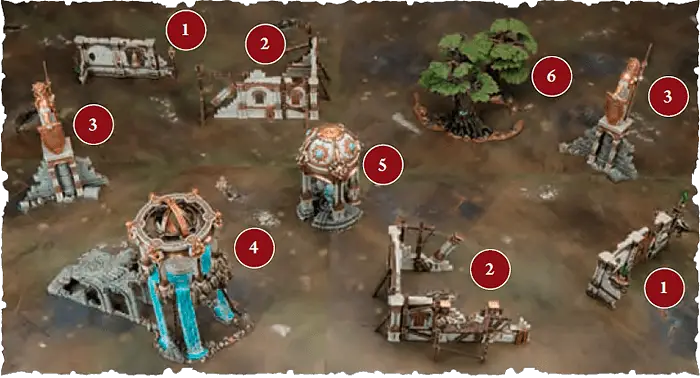
| This battlefield uses Citadel terrain, so the players were able to simply look up the terrain type of each terrain feature in the Citadel Terrain List. 1 Ruined Domicile (Obstacle)2 Domicile Shell (Obstacle)3 Guardian Idol (Obstacle)4 Cleansing Aqualith (Place of Power)5 Nexus Syphon (Place of Power) 6 Wyldwood (Obscuring Terrain) | ||
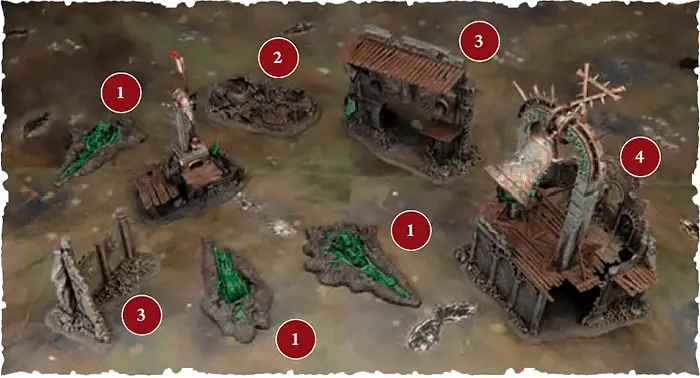
| The second battlefield uses scratch-built terrain. Before setting up the terrain, both players discussed and agreed on the terrain type of each terrain feature they were using, as shown below. 1 Place of Power2 Area Terrain3 Obstacle4 Obscuring Terrain | ||
Citadel Terrain List
This list shows you which terrain types apply to which sets of Citadel Terrain and the number of scenery pieces (Terrain, 1.7) that make up each terrain feature. New terrain will be added to this list as it is released. Note that not all of this terrain is currently available, but it is included here for players who have those terrain features in their collections. If a terrain feature lists multiple options for its number of scenery pieces and size, pick which apply to it before setting it up.
|
Magic 2025-26
| ||
1.0 Wizards and Priests
WIZARDS are special units that can cast spells, and PRIESTS are special units that can chant prayers. Spells and prayers are powerful abilities that can have a dramatic impact on the battle.1.1 Power Level
Each WIZARD and PRIEST has a power level shown after the keyword, e.g. WIZARD (2). A WIZARD’s casting power level determines how many Spell abilities they can use per phase. A PRIEST’s chanting power level determines how many PRAYER abilities they can use per phase.MULTIPLE POWER LEVELS
- If an ability references a unit’s power level and that unit has more than one power level, use whichever power level is higher.
- If an ability modifies a unit’s power level and that unit has more than one power level, it modifies both.
2.0 Spells
The declare step of each spell will tell you to make a casting roll of 2D6. If the roll does not equal or exceed the spell’s casting value (at the top-right corner of the spell), the spell fails and its effect is not resolved.If the unmodified casting roll includes 2 or more rolls of 1, the spell is miscast: the spell fails, its effect is not resolved, D3 mortal damage is inflicted on the WIZARD that used it, and that WIZARD cannot use any more spells in that phase.
Enemy reactions can only be used if the casting roll equals or exceeds the spell’s casting value. So long as the spell is not unbound (see 4.0), then it is successfully cast: resolve its effect.
EXAMPLE SPELL
| Your Hero Phase | 6 |
MYSTIC SHIELD: The caster's allies are bathed in an unearthly glow that protects them from harm.
Declare: Pick a visible friendly unit wholly within 12" of this WIZARD to be the target. Then, make a casting roll of 2D6.
Effect: The target has WARD (6+) this turn.
Effect: The target has WARD (6+) this turn.
| KEYWORDS | SPELL |
3.0 Prayers
The declare step of each prayer will tell you to make a chanting roll of D6. On an unmodified chanting roll of 1, the prayer fails, its effect is not resolved and you must remove D3 ritual points from the PRIEST using the prayer.Otherwise, pick one of the following
- Give a number of ritual points to the PRIEST equal to the chanting roll (ritual points can be accumulated over multiple turns).
- Add the PRIEST’s ritual points to the chanting roll. If the chanting roll equals or exceeds the prayer’s chanting value (at the top-right corner of the prayer), it is answered: resolve the effect of the prayer, then reset the PRIEST’s ritual points total to 0.
All PRIESTS know the following prayer:
| Your Hero Phase |
SACRED RITES: The priest focuses on safely setting their ritual into motion.
Declare: Pick a friendly PRIEST to use this ability, then make a chanting roll of D6. On an unmodified chanting roll of 1, remove 1 ritual point from that PRIEST instead of D3.
Effect: Give a number to ritual points to the PRIEST equal to the unmodified chanting roll and do not reset the PRIEST’s ritual points to 0.
Effect: Give a number to ritual points to the PRIEST equal to the unmodified chanting roll and do not reset the PRIEST’s ritual points to 0.
| KEYWORDS | PRAYER, UNLIMITED |
EXAMPLE PRAYER
| Once Per Battle, Your Hero Phase | 7 |
RESURRECTION: A fallen hero is brought back from death, their vitality fully restored.
Declare: Make a chanting roll of D6.
Effect: Pick a friendly INFANTRY HERO that has been slain and return them to the battlefield. Set up that HERO wholly within 3" of this PRIEST.
Effect: Pick a friendly INFANTRY HERO that has been slain and return them to the battlefield. Set up that HERO wholly within 3" of this PRIEST.
| KEYWORDS | PRAYER |
4.0 Unbinding Spells
Each WIZARD can use the ‘Unbind’ reaction a number of times per phase equal to their power level. This is an exception to The Rules of One (Core Rules, 5.3).| Reaction: Opponent declared a SPELL ability |
UNBIND: The wizard saps the energy from an enemy’s spell, nullifying its effects.
Used By: A friendly WIZARD within 30" of the enemy WIZARD casting the spell.
Effect: Make an unbinding roll of 2D6. If the roll exceeds the casting roll tor the spell, then the spell is unbound and its effect is not resolved. This reaction cannot be used more than once per casting roll.
Effect: Make an unbinding roll of 2D6. If the roll exceeds the casting roll tor the spell, then the spell is unbound and its effect is not resolved. This reaction cannot be used more than once per casting roll.
| KEYWORDS | UNBIND |
5.0 Jealous Mages and Fickle Gods
No more than 1 friendly WIZARD can cast the same spell per turn, unless that spell has the UNLIMITED keyword. Likewise, no more than 1 friendly PRIEST can chant the same prayer per turn, unless that prayer has the UNLIMITED keyword. Keep in mind that each unit can still only use any given spell or prayer ability once per phase (see The Rules of One, Core Rules, 5.3).6.0 Known Spells and Prayers
WIZARDS and PRIESTS can only use spells or prayers that they know. Each WIZARD and PRIEST knows any spells or prayers on its warscroll, plus all of the spells and prayers in the spell lores, manifestation lores and prayer lores you take for your army (see the Army Composition module).7.0 Manifestations
There are two types of manifestation: endless spells, which can be summoned by WIZARDS, and invocations, which can be summoned by PRIESTS. Each manifestation has its own warscroll, and the spell or prayer that allows that manifestation to be summoned will be found in the appropriate manifestation lore. No more than 1 friendly WIZARD or PRIEST can attempt to summon the same manifestation per turn, and a friendly WIZARD or PRIEST cannot attempt to summon a friendly manifestation that was removed from play in the same turn.
|
|
|
7.1 Severed Connection
If the WIZARD or PRIEST that summoned a manifestation is destroyed, that manifestation is removed from the battlefield.7.2 Banishing Manifestations
Instead of using a SPELL or PRAYER ability (including when using the ‘Magical Intervention’ ability), each WIZARD and PRIEST can use the ‘Banish Manifestation’ ability:| Your Hero Phase |
BANISH MANIFESTATION: The wizard or priest disrupts the arcane forces sustaining a manifestation, wiping it from existence.
Declare: Pick a friendly WIZARD or PRIEST to use this ability, pick a MANIFESTATION within 30" of them that was not summoned this turn to be the target, then make a banishment roll of 2D6. Add 1 to the banishment roll for each additional enemy MANIFESTATION on the battlefield after the first. You cannot pick the same MANIFESTATION to be the target of this ability more than once per turn.
Effect: If the banishment roll equals or exceeds the banishment value listed on the MANIFESTATION’s warscroll, it is banished and removed from play.
Effect: If the banishment roll equals or exceeds the banishment value listed on the MANIFESTATION’s warscroll, it is banished and removed from play.
| KEYWORDS | BANISH |
Army Composition 2025-26
| ||
1.0 Getting Started
1.1 Army Roster
These rules will explain how to create an army roster to prepare for a battle. You can find a blank army roster printable copy below:1.2 Points Limit
Before you start filling your roster, you and your opponent must agree on a points limit for the battle. You can agree on any points limit, but most players use a limit of 1000 points, 2000 points or somewhere in between. If a unit, Regiment of Renown, faction terrain feature, enhancement or lore has a points value, you must spend that number of points to include it on your army roster. The total points value of the options you have picked in your army must not exceed the agreed points limit of the battle. No more than half of your points can be spent on a single unit.1.2.1 Underspending
In many cases, the total points cost of your army will not add up to the exact points limit, but you might not have enough points left to add something else. If the points cost of your army is 50 or more points lower than the points limit of the battle, you gain 1 extra command point at the start of the first battle round.1.3 Battle Profiles
The information you’ll need when building your army roster is found in each unit’s battle profile. The battle profile for a unit will be in the same publication as its warscroll (usually a battletome).| Battle profiles are regularly updated to improve balance. When we republish them, the new version takes precedence over versions with an earlier publication date or no publication date. | ||
2.0 Factions
The first thing you need to do when building your army roster is to pick your faction (e.g. Stormcast Eternals or Skaven).Each faction has its own warscrolls, battle profiles and faction rules. These can be found in various publications but most commonly in the faction’s battletome.
3.0 Adding Units
3.1 Regiments
Armies are made up of one or more regiments, each of which is led by a Hero. You must have at least 1 regiment in your army, and you can include a maximum of 5 regiments. To add a regiment, pick 1 HERO from your faction, then pick up to 3 non‑HERO units to accompany them.Each HERO’s battle profile lists which units can be added to their regiment, and each non-HERO unit’s battle profile lists any relevant keywords it has. The battle profiles of some HEROES may say that they can be added to the regiment of another HERO in place of a non-HERO unit in that regiment.
3.2 The General
You must pick 1 HERO in your army that is leading a regiment to be your general. If any units in your army have the WARMASTER keyword, you must pick one of those units to be your general. Your general’s regiment can include up to 4 non-HERO units in addition to your general.3.3 Reinforced Units
When you add a unit to your army roster, you can add it as a reinforced unit. A reinforced unit has twice as many models as its minimum unit size and costs twice as many points. If a unit has a minimum unit size of 1, it cannot be reinforced. In addition, some units with a unit size of more than 1 can not be reinforced. This will be noted on their battle profile.3.4 Unique Units
You cannot include the same UNIQUE unit more than once in your army. UNIQUE units cannot be reinforced.3.5 Regiments of Renown
In addition to creating your own regiments, you can also spend points to include 1 Regiment of Renown. Regiments of Renown are pre-built regiments, each with their own special abilities. The rules for each Regiment of Renown will specify which factions can include it. A unit in a Regiment of Renown cannot be your general even if it is a WARMASTER.- You cannot include more than one Regiment of Renown in your army unless otherwise specified in the notes column of that regiment’s battle profile.
- Units in a Regiment of Renown cannot use (but can be picked as the target of, if otherwise eligible) any faction rules from the faction they are allied into, including enhancements and lores.
- If an ability allows you to set up a replacement unit (Core Rules, 24.2) for a unit in a Regiment of Renown, that unit also counts as being part of that Regiment of Renown.
3.6 Auxiliary Units
Auxiliary units allow you to take any units from your faction without the constraints of regiments, at the cost of potentially giving your opponent an advantage. You can add any number of units to the auxiliary units section of your army roster. However, the player with the fewest auxiliary units on their roster gains 1 extra command point at the start of each battle round (if the players have the same number of auxiliary units, neither player receives an extra command point). HEROES that have compulsory regiment options cannot be taken as auxiliary units.Each auxiliary unit after the first that is added to your roster will incur a cumulative surcharge of 20 points. For example, the second auxiliary unit will cost +20 points, the third will cost +40 points, the fourth will cost +60 points and so on.
3.7 Faction Terrain Features
If your faction has a faction terrain feature, or a set of faction terrain features, you can pick 1 to include on your army roster. Faction terrain features do not cost any points.4.0 Finishing Touches
4.1 Enhancements
Each set of faction rules include a number of enhancements that can be given to units, e.g. heroic traits and artefacts of power. You can take 1 enhancement from each enhancement table in your faction rules. Each enhancement table lists which units are eligible to be given that enhancement. UNIQUE units cannot be given enhancements.While some abilities allow you to take extra enhancements, the same unit can never have more than 1 enhancement of the same type, and you can never include the same enhancement in your army more than once. Enhancements cannot be given to Regiment of Renown units unless they have a keyword that matches that faction’s name.
4.2 Lores
You can pick 1 spell lore available to your faction. If you do, all WIZARDS in your army with the same faction keyword as your general know all spells from that lore.You can pick 1 prayer lore available to your faction. If you do, all PRIESTS in your army with the same faction keyword as your general know all prayers from that lore.
You can pick 1 manifestation lore available to your faction. If you do, all WIZARDS in your army know all spells from that lore, and all PRIESTS know all prayers from that lore.
4.3 Battle Tactics Cards
You can pick up to 2 battle tactics cards from the Battle Tactics 2025-26 module for your army. Make a note of these battle tactics in the appropriate section on your army roster.Command Models
1.0 Champions
Units with the CHAMPION keyword have one or more champion models. If there is a number after the CHAMPION keyword, that number indicates the proportion of models in that unit that can be champions. In any other case, 1 model in the unit can be a champion. Units with the CHAMPION keyword have the following passive ability:| Passive |
CHAMPION: A veteran fighter leads the charge.
Effect: Add 1 to the Attacks characteristic of weapons used by champions in this unit.
| If a unit had CHAMPION (1/10) on its keywords bar, then 1 model in that unit could be a champion for every 10 models in the unit. | ||
2.0 Musicians
Units with the MUSICIAN keyword have one or more musician models. The number after the MUSICIAN keyword indicates the proportion of models in that unit that can be musicians. Units with the MUSICIAN keyword have the following passive ability:| Passive |
MUSICIAN: The beat of a drum or the blast of a horn drives the soldiers ever onward.
Effect: While this unit contains any musicians, if it uses the ‘Rally’ command, you can make one additional rally roll of D6.
3.0 Standard Bearers
Units with the STANDARD BEARER keyword have one or more standard bearer models. The number after the STANDARD BEARER keyword indicates the proportion of models in that unit that can be standard bearers. Units with the STANDARD BEARER keyword have the following passive ability: Passive Passive |
STANDARD BEARER: The unit’s standard provides a rallying point in the chaos of battle.
Effect: While this unit contains any standard bearers, add 1 to this unit’s control score.
| Let your opponent know which models in a unit are champions, musicians and standard bearers if it’s not already clear from the miniatures. | ||
Hit Roll
Roll a dice. If the roll equals or exceeds the attacking weapon’s Hit characteristic, the attack scores a successful hit: move on to the next step. If not, the attack fails and the attack sequence ends. Unmodified hit rolls of 1 always fail. If an unmodified hit roll for an attack made with a weapon is a 6, that attack is a critical hit.| Critical hits have no effect on their own but often trigger additional effects (see 20.0 Weapon Abilities). | ||
Companion
Unless otherwise specified, attacks made by this weapon are not affected by friendly abilities that modify hit rolls, wound rolls or weapon characteristics, except for those that apply negative modifiers (e.g. ‘Covering Fire’).Save Roll
The commander of the target unit rolls a dice, subtracting the attacking weapon’s Rend characteristic from the roll. Unmodified save rolls of 1 always fail. If the roll equals or exceeds the Save characteristic of the target unit, the attack fails and the attack sequence ends. If not, it is a successful attack: move on to the next step.| Reaction: You declared an ATTACK ability | 1 |
ALL-OUT ATTACK: The warriors fight with a frenzied vigour.
Used By: The unit using that ATTACK ability.
Effect: Add 1 to hit rolls for attacks made as part of that ATTACK ability. This also affects weapons that have the Companion weapon ability. For the rest of the turn, subtract 1 from save rolls for the unit using this ability.
Effect: Add 1 to hit rolls for attacks made as part of that ATTACK ability. This also affects weapons that have the Companion weapon ability. For the rest of the turn, subtract 1 from save rolls for the unit using this ability.
1.4.2 Obscuring Terrain
Examples: Wyldwood, fortress wallTerrain Abilities: Cover, Obscuring, Unstable
6.0 Visibility
A target model is visible to another model (which we’ll call the ‘observing model’) if you can draw a straight line through the air (whether horizontal, diagonal or vertical) from any point on the observing model to any point on the target model that does not intersect any objects except for other models in the observing model’s unit. A target unit is visible to an observing unit if at least 1 model in the target unit is visible to at least 1 model in the observing unit. A model is always considered to be visible to itself.If a rule or ability requires a target to be both within a given range of and visible to the unit using that ability, or to a model in that unit, both conditions must be met by the same model in the target. You could not, for instance, target a unit where one model is within range but not visible and another model is not in range but is visible.
| ||
| In some cases, it might not be immediately clear whether a model is visible. If so, stoop down to get a look from behind the observing model. If any part of the other model is visible, even if it is just the tip of a spear, then that model is visible for rules purposes. | ||
7.0 Combat Range
Each model has a combat range that extends 3" horizontally from its base and any distance vertically from that circle to form a cylinder. The combat range of a unit extends 3" horizontally and any distance vertically from every model in that unit. Units from opposing armies that are within each other’s combat range and that are visible to each other are in combat with each other. When a unit that is not in combat enters the combat range of a visible enemy unit, it moves into combat.
A model is considered to be in combat with an enemy unit if that unit is within the model’s combat range and visible to it’
A model is considered to be in combat with an enemy unit if that unit is within the model’s combat range and visible to it’
| ||
17.2 Mortal Damage
Some abilities inflict mortal damage. If an ability inflicts mortal damage on a unit, add that number of damage points to the unit’s damage pool for that ability (see 18.2 Allocating Damage).
18.1 Ward Saves
Units with the WARD keyword have the ‘Ward Save’ passive ability. The number after the WARD keyword indicates the ward value for the ward save. If a unit had WARD (5+), for example, its ward value would be 5. If a unit has more than one ward save, only the ward save with the lowest value applies to it; the other has no effect.| Passive |
WARD SAVE: Whether through their uncanny reflexes, unnatural toughness or a source of mystical protection, these warriors can avoid otherwise lethal attacks.
Effect: In step 1 of the damage sequence (see 18.0), make a ward roll of D6 for each damage point in this unit’s damage pool. If the roll equals or exceeds this unit’s ward value, remove that damage point from the damage pool.
2.0 Spells
The declare step of each spell will tell you to make a casting roll of 2D6. If the roll does not equal or exceed the spell’s casting value (at the top-right corner of the spell), the spell fails and its effect is not resolved.If the unmodified casting roll includes 2 or more rolls of 1, the spell is miscast: the spell fails, its effect is not resolved, D3 mortal damage is inflicted on the WIZARD that used it, and that WIZARD cannot use any more spells in that phase.
Enemy reactions can only be used if the casting roll equals or exceeds the spell’s casting value. So long as the spell is not unbound (see 4.0), then it is successfully cast: resolve its effect.
EXAMPLE SPELL
| Your Hero Phase | 6 |
MYSTIC SHIELD: The caster's allies are bathed in an unearthly glow that protects them from harm.
Declare: Pick a visible friendly unit wholly within 12" of this WIZARD to be the target. Then, make a casting roll of 2D6.
Effect: The target has WARD (6+) this turn.
Effect: The target has WARD (6+) this turn.
| KEYWORDS | SPELL |
3.0 Prayers
The declare step of each prayer will tell you to make a chanting roll of D6. On an unmodified chanting roll of 1, the prayer fails, its effect is not resolved and you must remove D3 ritual points from the PRIEST using the prayer.Otherwise, pick one of the following:
- Give a number of ritual points to the PRIEST equal to the chanting roll (ritual points can be accumulated over multiple turns).
- Add the PRIEST’s ritual points to the chanting roll. If the chanting roll equals or exceeds the prayer’s chanting value (at the top-right corner of the prayer), it is answered: resolve the effect of the prayer, then reset the PRIEST’s ritual points total to 0.
All PRIESTS know the following prayer:
| Your Hero Phase |
SACRED RITES: The priest focuses on safely setting their ritual into motion.
Declare: Pick a friendly PRIEST to use this ability, then make a chanting roll of D6. On an unmodified chanting roll of 1, remove 1 ritual point from that PRIEST instead of D3.
Effect: Give a number to ritual points to the PRIEST equal to the unmodified chanting roll and do not reset the PRIEST’s ritual points to 0.
Effect: Give a number to ritual points to the PRIEST equal to the unmodified chanting roll and do not reset the PRIEST’s ritual points to 0.
| KEYWORDS | PRAYER, UNLIMITED |
EXAMPLE PRAYER
| Once Per Battle, Your Hero Phase | 7 |
RESURRECTION: A fallen hero is brought back from death, their vitality fully restored.
Declare: Make a chanting roll of D6.
Effect: Pick a friendly INFANTRY HERO that has been slain and return them to the battlefield. Set up that HERO wholly within 3" of this PRIEST.
Effect: Pick a friendly INFANTRY HERO that has been slain and return them to the battlefield. Set up that HERO wholly within 3" of this PRIEST.
| KEYWORDS | PRAYER |
Unbind
| Reaction: Opponent declared a SPELL ability |
UNBIND: The wizard saps the energy from an enemy’s spell, nullifying its effects.
Used By: A friendly WIZARD within 30" of the enemy WIZARD casting the spell.
Effect: Make an unbinding roll of 2D6. If the roll exceeds the casting roll tor the spell, then the spell is unbound and its effect is not resolved. This reaction cannot be used more than once per casting roll.
Effect: Make an unbinding roll of 2D6. If the roll exceeds the casting roll tor the spell, then the spell is unbound and its effect is not resolved. This reaction cannot be used more than once per casting roll.
| KEYWORDS | UNBIND |
1.0 Wizards and Priests
WIZARDS are special units that can cast spells, and PRIESTS are special units that can chant prayers. Spells and prayers are powerful abilities that can have a dramatic impact on the battle.
Banish Manifestation
| Your Hero Phase |
BANISH MANIFESTATION: The arcane forces sustaining a manifestation are disrupted.
Declare: Pick a friendly WIZARD or PRIEST to use this ability, pick a MANIFESTATION within 30" of them that was not summoned this turn to be the target, then make a banishment roll of 2D6. Add 1 to the banishment roll for each additional enemy MANIFESTATION on the battlefield after the first. You cannot pick the same MANIFESTATION to be the target of this ability more than once per turn.
Effect: If the banishment roll equals or exceeds the banishment value listed on the MANIFESTATION’s warscroll, it is banished and removed from play.
Effect: If the banishment roll equals or exceeds the banishment value listed on the MANIFESTATION’s warscroll, it is banished and removed from play.
| KEYWORDS | BANISH |
1.1 Power Level
Each WIZARD and PRIEST has a power level shown after the keyword, e.g. WIZARD (2). A WIZARD’s casting power level determines how many Spell abilities they can use per phase. A PRIEST’s chanting power level determines how many PRAYER abilities they can use per phase.
| Once Per Turn (Army), Start of Any Turn |
ACTIVATE PLACE OF POWER: There are many locus points of volcanic magic in Aqshy. From these simmering fonts of passion and fury, one can draw great strength or unleash a dizzying wave of anger that causes spellcasters to lose control of their magic.
Declare: Pick a friendly HERO within 3" of any Places of Power to use this ability.
Effect: Roll a dice. On a 1, inflict D3 mortal damage on that HERO. On a 2+, pick 1 of the following effects:
Effect: Roll a dice. On a 1, inflict D3 mortal damage on that HERO. On a 2+, pick 1 of the following effects:
- Ignite Fury: Gain 2 rage dice, then increase your fury level by 2, to a maximum of 7.
- Channel Wrath: If that HERO is a WIZARD or PRIEST, add 1 to casting rolls or chanting rolls for that HERO for the rest of the turn.
- Dizzying Rage: For the rest of the turn, if that HERO is not a WIZARD or PRIEST, they can use the ’Unbind’ or ’Banish Manifestation’ ability as if they had WIZARD (1).
| KEYWORDS | CORE |
1.5 Faction Terrain
Some factions have special terrain features called faction terrain features. Faction terrain features have their own warscrolls. They are not considered to be units, with the following exceptions:- In the combat phase, they are treated as if they were units for the purposes of movement, combat range and being in combat.
- They are affected by all enemy abilities as if they were units.
- They can be damaged in the same manner as units. However, when they are removed from play, they count as being demolished instead of slain or destroyed (this means that they do not count as destroyed units for the purposes of abilities, scoring battle tactics, etc.).
- Enemy units can finish a charge move within ½" of a terrain feature that is garrisoned (see 1.5.1). Faction terrain features cannot contest objectives even while they are garrisoned.
- If a terrain feature has any melee or ranged weapons, it can use the 'Fight' and 'Shoot' CORE abilities as if it were a unit.
- Terrain features that have a Move characteristic of 0" ('-') cannot move (note that pile-in moves are a type of move).
- Faction terrain features with a Move characteristic greater than '-' are treated as if they were units in all phases for the purposes of movement, combat range, being in combat and setting up terrain features, other manifestations and other units.
Some faction terrain features allow you to place a unit on them (this will be clearly specified in that terrain feature’s rules). When doing so, instead of measuring range or visibility to and from the unit that is on that terrain feature, measure to and from the terrain feature instead. Unless otherwise specified, units on a faction terrain feature cannot use FIGHT abilities.
If a unit placed on a terrain feature is removed from it (e.g. if an ability removes them from the battlefield), that unit counts as having left that terrain feature and loses any special role or benefits it had as a result of being placed on it.
| The Citadel Terrain List shows the number of scenery pieces each terrain feature can consist of. If you are using terrain features that are not included on that list, agree with your opponent before setting up the battlefield how many scenery pieces make up each terrain feature. | ||
12.0 Start of Battle Round
At the start of each battle round, follow these steps:1. Determine the Active Player: If it is the first battle round, the player who finished setting up their army first decides who will take the first turn (unless otherwise specified in the battlepack or battleplan).
If it is not the first battle round, the players make a roll-off called the priority roll and the winner decides who will take the first turn. If the roll-off is a tie, the player who took the first turn in the previous battle round decides who will take the first turn in the current battle round.
When it is a player’s turn, regardless of whether they take the first or second turn, they are referred to as the active player.
2. Determine the Underdog: Whichever player has the fewest victory points is the underdog for the battle round. If the players are tied (e.g. in the first battle round), then there is no underdog, unless otherwise specified.
3. Start of Battle Round Abilities: The active player can use any
Start of Battle Round
abilities first, then their opponent can do the same.4.1 Enhancements
Each set of faction rules include a number of enhancements that can be given to units, e.g. heroic traits and artefacts of power. You can take 1 enhancement from each enhancement table in your faction rules. Each enhancement table lists which units are eligible to be given that enhancement. UNIQUE units cannot be given enhancements.While some abilities allow you to take extra enhancements, the same unit can never have more than 1 enhancement of the same type, and you can never include the same enhancement in your army more than once. Enhancements cannot be given to Regiment of Renown units, unless they have a keyword that matches that faction’s name.
Roll-off
If you are instructed to roll off, each player should roll a dice. Whichever player has a higher roll wins the roll-off. If the result is a tie, each player should roll off again until there is a clear winner, unless otherwise specified.32.0 Objectives
Many battleplans award victory points for controlling objectives, which are represented by objective markers. Unless otherwise specified, objective markers are round and 40mm wide. Models can move over and end their moves on objective markers. If an objective marker is on the border between territories, it is within all those territories but wholly within none of them. Objective markers don’t block visibility.
32.1 Contesting Objectives
Unless otherwise specified, if an objective is within a model’s combat range, that model is contesting that objective. If any models in a unit are contesting an objective, that unit is contesting that objective.Each unit can only count as contesting a single objective for the purposes of determining objective control (see 32.2). Before determining objective control, for each of their units contesting two or more objectives, the active player must pick one of those objectives for it to contest. Then, their opponent does the same.
Designer’s Note: For purposes other than determining objective control, a unit can contest more than one objective.
1.1 Army Roster
These rules will explain how to create an army roster to prepare for a battle. You can find a blank army roster printable copy below:
Obscuring
While every model in a non-MONSTER non‐WAR MACHINE unit that does not have the FLY keyword is within 1" of this terrain feature, the following apply:- That unit is only visible to enemy units that are within its combat range.
- The Range characteristic of that unit’s ranged weapons is halved (rounding down to the nearest inch).
3.1 Regiments
Armies are made up of one or more regiments, each of which is led by a Hero. You must have at least 1 regiment in your army, and you can include a maximum of 5 regiments. To add a regiment, pick 1 HERO from your faction, then pick up to 3 non‑HERO units to accompany them.Each HERO’s battle profile lists which units can be added to their regiment, and each non-HERO unit’s battle profile lists any relevant keywords it has. The battle profiles of some HEROES may say that they can be added to the regiment of another HERO in place of a non-HERO unit in that regiment.
2.1 Battle Formations
Many factions contain one or more battle formations. Each battle formation grants unique benefits to your army. The faction rules for your faction will explain any battle formation options.
4.2 Lores
You can pick 1 spell lore available to your faction. If you do, all WIZARDS in your army with the same faction keyword as your general know all spells from that lore.You can pick 1 prayer lore available to your faction. If you do, all PRIESTS in your army with the same faction keyword as your general know all prayers from that lore.
You can pick 1 manifestation lore available to your faction. If you do, all WIZARDS in your army know all spells from that lore, and all PRIESTS in your army know all prayers from that lore.
Determine the Underdog
Whichever player has the fewest victory points is the underdog for the battle round. If the players are tied (e.g. in the first battle round), then there is no underdog, unless otherwise specified.Universal Core Abilities - Charge Phase
| Your Charge Phase |
CHARGE: With a mighty battle cry, the warriors charge into combat with the enemy.
Declare: Pick a friendly unit that is not in combat and has not used a RUN or RETREAT ability this turn to use this ability. Then, make a charge roll of 2D6.
Effect: That unit can move a distance up to the value of the charge roll. That unit can move through the combat ranges of any enemy units and must end that move within 1/2" of a visible enemy unit. If it does so, the unit using this ability has charged.
Effect: That unit can move a distance up to the value of the charge roll. That unit can move through the combat ranges of any enemy units and must end that move within 1/2" of a visible enemy unit. If it does so, the unit using this ability has charged.
| KEYWORDS | CORE, MOVE, CHARGE |
18.4 Destroyed Units
When the last model in a unit is slain, the unit is destroyed and all remaining damage points inflicted on that unit have no effect. Similarly, if something causes a unit to be destroyed, all models in the unit are slain and removed from play.
16.0 Picking Targets
When declaring an ATTACK ability for a unit, you must pick the target unit(s) for its attacks. The number of attacks each model can make is equal to the Attacks characteristic of the weapons it is using. In most cases, models attack with every weapon on their warscroll (melee weapons for combat attacks, ranged weapons for shooting attacks), though some warscrolls specify that certain models in the unit are armed with special weapons or that the unit must pick between multiple weapons when it attacks.If the unit is in combat, it can only target units that are in combat with it. If a model has more than one attack, you can split the attacks between eligible targets as you wish.
- Combat attacks are made with melee weapons. The target unit(s) must be within the combat range of the attacking model and visible to it. The model must attack with all of the melee weapons it is armed with.
- Shooting attacks are made with ranged weapons. The target unit(s) must be within a distance equal to the Range characteristic of the weapon being used and visible to the attacking model. Models cannot make shooting attacks if their unit is in combat, unless otherwise specified (see 20.0 Weapon Abilities).
Shooting attacks
Shooting attacks are made with ranged weapons. The target unit(s) must be within a distance equal to the Range characteristic of the weapon being used and visible to the attacking model. Models cannot make shooting attacks if their unit is in combat, unless otherwise specified (see 20.0 Weapon Abilities).| Your Shooting Phase |
SHOOT: The warriors take aim and unleash a deadly volley.
Declare: Pick a friendly unit that has not used a RUN or RETREAT ability this turn to use this ability. Then, pick one or more enemy units as the target(s) of that unit’s attacks (see 16.0).
Effect: Resolve shooting attacks against the target unit(s).
Effect: Resolve shooting attacks against the target unit(s).
| KEYWORDS | CORE, ATTACK, SHOOT |
Combat attacks
Combat attacks are made with melee weapons. The target unit(s) must be within the combat range of the attacking model and visible to it. The model must attack with all of the melee weapons it is armed with.| Any Combat Phase |
FIGHT: Locked in a deadly melee, the fighters strike out at their foes.
Declare: Pick a friendly unit that is in combat or that charged this turn to use this ability. That unit can make a pile-in move. Then, if that unit is in combat, you must pick one or more enemy units as the target(s) of that unit’s attacks.
Effect: Resolve combat attacks against the target unit(s).
Effect: Resolve combat attacks against the target unit(s).
| KEYWORDS | CORE, ATTACK, FIGHT |
Shoot in Combat
This weapon can be used to make shooting attacks even if the attacking unit is in combat.7.0 Manifestations
There are two types of manifestation: endless spells, which can be summoned by WIZARDS, and invocations, which can be summoned by PRIESTS. Each manifestation has its own warscroll, and the spell or prayer that allows that manifestation to be summoned will be found in the appropriate manifestation lore. No more than 1 friendly WIZARD or PRIEST can attempt to summon the same manifestation per turn, and a friendly WIZARD or PRIEST cannot attempt to summon a friendly manifestation that was removed from play in the same turn. Manifestations are not units but can be interacted with in similar ways, as explained next:
|
|
|
21.0 Healing
Some abilities allow you to heal a unit. To heal a unit, remove a number of damage points from the unit equal to the number in brackets after ‘Heal’, e.g. Heal (2).3.2 The General
You must pick 1 HERO in your army that is leading a regiment to be your general. If any units in your army have the WARMASTER keyword, you must pick one of those units to be your general. Your general’s regiment can include up to 4 non-HERO units in addition to your general.
| Once Per Battle (Army), Any Hero Phase |
DARK APOTHEOSIS: Favoured by the Dark Gods, this champion is bestowed with fell glory.
Declare: Pick a friendly unit with 8 or more Dark Apotheosis points to be the target.
Effect: Pick 1 of the following:
Aura of Chaos: Heal (X) the target, where X is the number of damage points allocated to the target. In addition, the target has WARD (5+) for the rest of the battle.
Daemonhood: Set up a Daemon Prince within 1" of the target. Then, remove the target from the battlefield. If the target is your general, the Daemon Prince becomes your general instead and is added to your general’s regiment. If the target has any enhancements, the Daemon Prince has those enhancements instead. If the target has a Pledge to Chaos keyword, the Daemon Prince has the same keyword. Otherwise, pick 1 Pledge to Chaos keyword for the Daemon Prince to have for the rest of the battle. If any MANIFESTATIONS that were summoned by the target are on the battlefield, those MANIFESTATIONS are removed from play.
Effect: Pick 1 of the following:
Aura of Chaos: Heal (X) the target, where X is the number of damage points allocated to the target. In addition, the target has WARD (5+) for the rest of the battle.
Daemonhood: Set up a Daemon Prince within 1" of the target. Then, remove the target from the battlefield. If the target is your general, the Daemon Prince becomes your general instead and is added to your general’s regiment. If the target has any enhancements, the Daemon Prince has those enhancements instead. If the target has a Pledge to Chaos keyword, the Daemon Prince has the same keyword. Otherwise, pick 1 Pledge to Chaos keyword for the Daemon Prince to have for the rest of the battle. If any MANIFESTATIONS that were summoned by the target are on the battlefield, those MANIFESTATIONS are removed from play.
13.1 Fight Abilities
Abilities with the FIGHT keyword follow a different sequence to other abilities. When the players are using Combat Phase
abilities as described in 13.0, they cannot use FIGHT abilities.After the players have finished using
Combat Phase
abilities that are not FIGHT abilities, they must alternate picking 1 eligible unit to use a FIGHT ability, starting with the active player. Each unit in combat must use a FIGHT ability if it is able to.Once a player has no more units that are eligible to use a FIGHT ability, the other player continues to pick units that are eligible to use a FIGHT ability, one after another, until there are no more units that are eligible to use a FIGHT ability.
| ||
24.1 Reserve Units
Some abilities allow you to set up units in reserve. These units are placed to one side instead of being set up on the battlefield. At the start of the fourth battle round, units that were set up in reserve using a DEPLOY ability and that are still in reserve are destroyed.
24.2 Replacement Units
Some abilities allow you to set up a replacement unit. When setting up that unit, it should have the same warscroll type, weapon options and number of models as the original unit, unless otherwise specified in the ability. Many of these abilities specify the proportion of models in the replacement unit (e.g. half the number of models from the original unit). In these cases, you can pick which models from the original unit are set up.The replacement unit is otherwise treated as a new unit; any keywords or abilities the original unit gained during the battle, and any persisting effects that applied to it, do not apply to the replacement unit. Each unit can only be replaced once, and you cannot replace replacement units.
If the original unit was reinforced and the replacement unit has more than half the number of models from the original unit, the replacement unit is considered to be reinforced.
| Because a replacement unit is treated as a completely new unit, it could, for instance, use a Once Per Battle ability on its warscroll even if the unit it replaced used that ability earlier in the battle. | ||
| Passive |
WARD SAVE: Whether through their uncanny reflexes, unnatural toughness or a source of mystical protection, these warriors can avoid otherwise lethal attacks.
Effect: In step 1 of the damage sequence (see 18.0), make a ward roll of D6 for each damage point in this unit’s damage pool. If the roll equals or exceeds this unit’s ward value, remove that damage point from the damage pool.
Wound Roll
Roll a dice. If the roll equals or exceeds the attacking weapon’s Wound characteristic, the attack successfully wounds: move on to the next step. If not, the attack fails and the attack sequence ends. Unmodified wound rolls of 1 always fail.15.3 Pile-in Moves
Some abilities, such as FIGHT abilities, allow a unit to make a short move called a pile-in move to get into a better position for combat. To do so:If your unit is in combat: Pick an enemy unit your unit is in combat with to be the target of the pile-in move. Each model in your unit can move up to 3". That move can pass through the combat ranges of any enemy units, but each model must end that move no further from the target unit. At the end of the move, your unit must still be in combat with all units that it was in combat with at the start of the move.
If your unit is not in combat: Each model in your unit can move 3" in any direction. That move can pass through and end within the combat ranges of any enemy units.
| ||
19.0 Strike-first and Strike-last
If there are any STRIKE-FIRST units in combat after any non-FIGHT combat phase abilities have been used, other units cannot be picked to use a FIGHT ability until those units have been picked to use a FIGHT ability. After all those STRIKE-FIRST units have fought, the active player picks the next unit to fight.If there are any STRIKE-LAST units in combat, they cannot be picked to use a FIGHT ability if there are any units in combat that do not have STRIKE-LAST and have not yet used a FIGHT ability.
If a unit has STRIKE-FIRST and STRIKE-LAST, treat it as if it had neither.
| There may be situations when a unit that has STRIKE-FIRST is not in combat at the start of the phase, but because of moves such as pile-in moves, it is ‘pulled into combat’ later in the phase. In such cases, STRIKE-FIRST has no effect on that unit because it was not in combat at the start of the phase. Abilities that allow a unit to use a FIGHT ability immediately after another unit do not override the STRIKE-FIRST or STRIKE-LAST constraints, so you could not pick a unit with STRIKE-LAST to fight immediately after a unit with STRIKE-FIRST. | ||
Anti-X (+1 Rend)
Add 1 to this weapon’s Rend characteristic if the target has the keyword after ‘Anti-’ or fulfils the condition after ‘Anti-’. Multiples of this ability are cumulative. For example, if a weapon has both Anti-charge (+1 Rend) and Anti-HERO (+1 Rend), then add 2 to the Rend characteristic of the weapon for attacks that target a HERO that charged in the same turn.18.3 Slain Models
The commander of a unit must pick which model(s) in the unit are slain. However, after each slain model is removed, the unit must be in a single coherent group (see 15.1). If this is not possible, continue to remove models, one at a time, until the unit is in a single coherent group. You must remove the fewest models possible to make the unit a single coherent group.1.0 Champions
Units with the CHAMPION keyword have one or more champion models. If there is a number after the CHAMPION keyword, that number indicates the proportion of models in that unit that can be champions. In any other case, 1 model in the unit can be a champion. Units with the CHAMPION keyword have the following passive ability:| Passive |
CHAMPION: A veteran fighter leads the charge.
Effect: Add 1 to the Attacks characteristic of weapons used by champions in this unit. If this unit is a BEAST, this ability affects this unit’s Companion weapons.
32.2 Objective Control
In the deployment phase after all Deployment Phase abilities have been used and at the end of each turn, follow this sequence for each objective in an order chosen by the active player:- Starting with the active player, each player determines the control score of each of their units that is contesting that objective. A unit’s control score is the combined Control characteristics of all the models in that unit that are contesting the objective. Some abilities modify a unit’s control score, but it cannot be reduced to less than 1.
- Each player adds up the control scores of all of their units contesting that objective. This is their army control score for that objective.
- The players compare their army control scores for that objective. If one player’s score is higher, that player gains control of that objective. Once a player gains control of an objective, it remains under their control until their opponent gains control of it.
| Sometimes objective markers get accidentally nudged while you are moving models around. This is perfectly fine - just remember to put them back in their proper positions when determining objective control. | ||
3.0 Standard Bearers
Units with the STANDARD BEARER keyword have one or more standard bearer models. The number after the STANDARD BEARER keyword indicates the proportion of models in that unit that can be standard bearers. Units with the STANDARD BEARER keyword have the following passive ability:| Passive |
STANDARD BEARER: The unit’s standard provides a rallying point in the chaos of battle.
Effect: While this unit contains any standard bearers, add 1 to this unit’s control score.
| Any Hero Phase | 1 |
RALLY: With an inspiring call to action, wounded soldiers get a second wind and fresh troops take the field to replace their fallen comrades.
Declare: Pick a friendly unit that is not in combat to use this ability.
Effect: Make 6 rally rolls of D6. For each 4+, you receive 1 rally point. Rally points can be spent in the following ways:
Effect: Make 6 rally rolls of D6. For each 4+, you receive 1 rally point. Rally points can be spent in the following ways:
- For each rally point spent, Heal (1) that unit.
- You can spend a number of rally points equal to the Health characteristic of that unit to return a slain model to that unit.
2.0 Musicians
Units with the MUSICIAN keyword have one or more musician models. The number after the MUSICIAN keyword indicates the proportion of models in that unit that can be musicians. Units with the MUSICIAN keyword have the following passive ability:| Passive |
MUSICIAN: The beat of a drum or the blast of a horn drives the soldiers ever onward.
Effect: While this unit contains any musicians, if it uses the ‘Rally’ command, you can make one additional rally roll of D6.
9.1.1 Setting Up Objectives and Terrain Features
Many battlefields have key locations called objectives, and almost all battlefields have terrain features such as buildings, ruins and woods. Unless otherwise specified, players should first set up objective markers at the locations indicated by a gold circles ( ) on the deployment map, then set up terrain features in a mutually agreeable manner. Many battlepacks and battleplans include further instructions for setting up terrain.
5.4 Passive Abilities
Abilities that have the Passive timing are called passive abilities. Passive abilities are not declared. The effects of passive abilities always apply if the conditions of the ability are met, and they must be applied if it is possible to do so.
1.1 Wholly on Terrain and Behind Terrain
A model is wholly on a terrain feature if its base is on that terrain feature and no part of its base extends past the edge of that terrain feature. A unit is wholly on a terrain feature if every model in that unit is wholly on that terrain feature.When a unit is targeted by an attack, if it is impossible to draw a straight line from the closest point on the attacking model’s base to the closest point on the base of a model in the target unit that is in range without that line passing over that terrain feature, the target unit is considered to be behind a terrain feature for the attack made by that attacking model. Ignore parts of the terrain feature within the attacking model’s combat range for the purposes of determining if the target is behind that terrain feature.
| Passive |
FLY: Soaring above the battlefield, this unit can reach destinations that are inaccessible to other troops.
Effect: As this unit moves, it ignores other models, terrain features and the combat ranges of enemy units. It cannot end its move in combat unless specified in the ability that allowed it to move. Ignore any vertical distance moved for this unit.
1.4.4 Places of Power
Examples: Realmgate, Cleansing Aqualith, Nexus SyphonTerrain Abilities: Cover, Place of Power, Unstable
1.4.3 Area Terrain
Examples: Hills, Stormvault TerrainTerrain Abilities: Cover
Cover
Subtract 1 from hit rolls for attacks that target a unit that is behind or wholly on this terrain feature, unless that unit charged this turn or has the FLY keyword.Unstable
Models can move across but cannot be set up on or end any type of move on any part of this terrain feature that is more than 1" tall.Place of Power
HEROES within 3" of this terrain feature can use the ‘Activate Place of Power’ ability.15.1 Coherency
Any time a unit is set up or ends a move, it must be in a single group. A unit is considered to be in a coherent group if each model in that unit is within coherency range, measured horizontally, of at least 1 other model in that unit (ignore differences in height between the two models).For the majority of units, coherency range is 1/2", though some units (particularly those with large models with overhanging parts) have a longer coherency range noted on their warscroll for ease of play. While there are 7 or more models in a unit, that unit is considered to be in a coherent group if each model in that unit is within coherency range of at least 2 other models in that unit.
If it is not possible for a unit to end a move in a single coherent group, that move cannot be made.
| ||
15.0 Movement
Some abilities allow a unit to move. When a unit moves, each model in that unit can move, one at a time, in the order chosen by that unit’s commander.When a model moves, it can pivot and change direction as often as you like, but no part of that model’s base can move a greater total distance than the maximum allowed by the ability used. Models cannot move beyond the edge of the battlefield or through other models, and they can never end a move standing on top of another model (the base counts as part of the model).
A model’s base is assumed to remain parallel with the battlefield as it moves. If a model ends its move on an uneven surface, it must be able to stand up by itself with its base as close to parallel with the battlefield as possible (in other words, models cannot lie flat on the battlefield or lean against terrain to stop them from falling over).
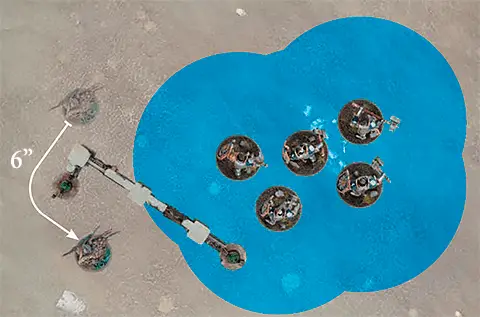
| ||
| Any Combat Phase |
FIGHT: Locked in a deadly melee, the fighters strike out at their foes.
Declare: Pick a friendly unit that is in combat or that charged this turn to use this ability. That unit can make a pile-in move (see 15.3). Then, if that unit is in combat, you must pick one or more enemy units as the target(s) of that unit’s attacks (see 16.0).
Effect: Resolve combat attacks against the target unit(s).
Effect: Resolve combat attacks against the target unit(s).
| KEYWORDS | CORE, ATTACK, FIGHT |
1.4 Terrain Types
Each terrain feature in Warhammer Age of Sigmar is one of the following types:- Obstacle
- Obscuring Terrain
- Area Terrain
- Place of Power
- Faction Terrain
Before the battle begins, players must agree on which type applies to each terrain feature.
5.0 Abilities
The vast majority of things that units can do in Warhammer Age of Sigmar are called abilities. This is an example of an ability: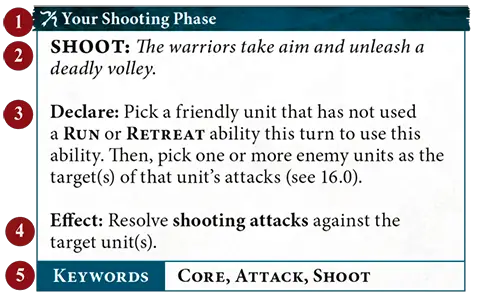
1
Timing2
Name and description3
Declare instructions4
Effect5
Keywords| Ability icons give you an idea what kind of effect the ability has at a glance.Movement AbilityOffensive AbilityDefensive AbilityShooting AbilityRallying AbilitySpecial AbilityControl Ability | ||
4.0 Unbinding Spells
Each WIZARD can use the ‘Unbind’ reaction a number of times per phase equal to their power level. This is an exception to The Rules of One (Core Rules, 5.3).| Reaction: Opponent declared a SPELL ability |
UNBIND: The wizard saps the energy from an enemy’s spell, nullifying its effects.
Used By: A friendly WIZARD within 30" of the enemy WIZARD casting the spell.
Effect: Make an unbinding roll of 2D6. If the roll exceeds the casting roll tor the spell, then the spell is unbound and its effect is not resolved. This reaction cannot be used more than once per casting roll.
Effect: Make an unbinding roll of 2D6. If the roll exceeds the casting roll tor the spell, then the spell is unbound and its effect is not resolved. This reaction cannot be used more than once per casting roll.
| KEYWORDS | UNBIND |
5.3 The Rules of One
- A unit cannot use more than 1 CORE ability per phase (see 14.0).
- A unit cannot use the same ability more than once per phase, unless specified otherwise.
- A unit cannot be affected by the same passive ability more than once at the same time. For example, if a unit is within range of two different terrain features that have the ‘Cover’ passive ability, the effect only applies to it once.
| Enemy Hero Phase | 1 |
MAGICAL INTERVENTION: A warrior learned in the mystic arts utters a rapid incantation to disrupt the enemy’s plans.
Declare: Pick a friendly WIZARD or PRIEST to use this ability.
Effect: That friendly unit can use a SPELL, PRAYER or BANISH ability (as appropriate) as if it were your hero phase. If you do so, subtract 1 from casting rolls or chanting rolls made as part of that ability.
Effect: That friendly unit can use a SPELL, PRAYER or BANISH ability (as appropriate) as if it were your hero phase. If you do so, subtract 1 from casting rolls or chanting rolls made as part of that ability.
3.6 Auxiliary Units
Auxiliary units allow you to take any units from your faction without the constraints of regiments, at the cost of potentially giving your opponent an advantage. You can add any number of units to the auxiliary units section of your army roster. However, the player with the fewest auxiliary units on their roster gains 1 extra command point at the start of each battle round (if the players have the same number of auxiliary units, neither player receives an extra command point). HEROES that have compulsory regiment options cannot be taken as auxiliary units.Each auxiliary unit after the first that is added to your roster will incur a cumulative surcharge of 20 points. For example, the second auxiliary unit will cost +20 points, the third will cost +40 points, the fourth will cost +60 points and so on.
3.5 Regiments of Renown
In addition to creating your own regiments, you can also spend points to include 1 Regiment of Renown. Regiments of Renown are pre-built regiments, each with their own special abilities. The rules for each Regiment of Renown will specify which factions can include it. A unit in a Regiment of Renown cannot be your general even if it is a WARMASTER.- You cannot include more than one Regiment of Renown in your army unless otherwise specified in the notes column of that regiment’s battle profile.
- Units in a Regiment of Renown cannot use (but can be picked as the target of, if otherwise eligible) any faction rules from the faction they are allied into, including enhancements and lores.
- If an ability allows you to set up a replacement unit (Core Rules, 24.2) for a unit in a Regiment of Renown, that unit also counts as being part of that Regiment of Renown.
1.3 Battle Profiles
The information you’ll need when building your army roster is found in each unit’s battle profile. The battle profile for a unit will be in the same publication as its warscroll (usually a battletome).| Battle profiles are regularly updated to improve balance. When we republish them, the new version takes precedence over versions with an earlier publication date or no publication date. | ||
5.1 Keywords
Some abilities have one or more keywords listed at the bottom of the ability on their keywords bar, e.g. the ‘Shoot’ ability shown above has the CORE, ATTACK and SHOOT keywords. Units also have a keywords bar on their warscroll.Keywords let you know which abilities can be used or which units can be picked as targets for an ability. For example, the ‘Charge’ ability can only be used by a unit if it did not use an ability with the RUN or RETREAT keyword earlier in the turn. The singular and plural forms of a keyword are synonymous for rules purposes.
3.3 Reinforced Units
When you add a unit to your army roster, you can add it as a reinforced unit. A reinforced unit has twice as many models as its minimum unit size and costs twice as many points. If a unit has a minimum unit size of 1, it cannot be reinforced. In addition, some units with a unit size of more than 1 can not be reinforced. This will be noted on their battle profile.
3.4 Unique Units
You cannot include the same UNIQUE unit more than once in your army. UNIQUE units cannot be reinforced.