
Test_
Contents


Stratagens Key

Used in:
Either player’s turn
Either player’s turn

Used in:
Your turn
Your turn

Used in:
Opponent’s turn
Opponent’s turn
Phases
1
START OF TURN STEPRules that are triggered at the start of a turn are resolved now.
2
COMMAND PHASEYou marshal strategic resources and check your units’ morale.
3
MOVEMENT PHASEYour units move across the battlefield and strategic reserves arrive.
4
SHOOTING PHASEYour units make attacks with their ranged weapons.
5
CHARGE PHASEYour units make charge moves to engage the enemy.
6
FIGHT PHASEBoth players’ units make attacks with their melee weapons.
7
END OF TURN STEPRules that are triggered at the end of a turn are resolved now, in the following order:
- First resolve rules triggered at this point other than mission rules.
- Both players then consult their mission; if one or both players have achieved any aspects of their mission that are triggered at this point, resolve them now.
Images
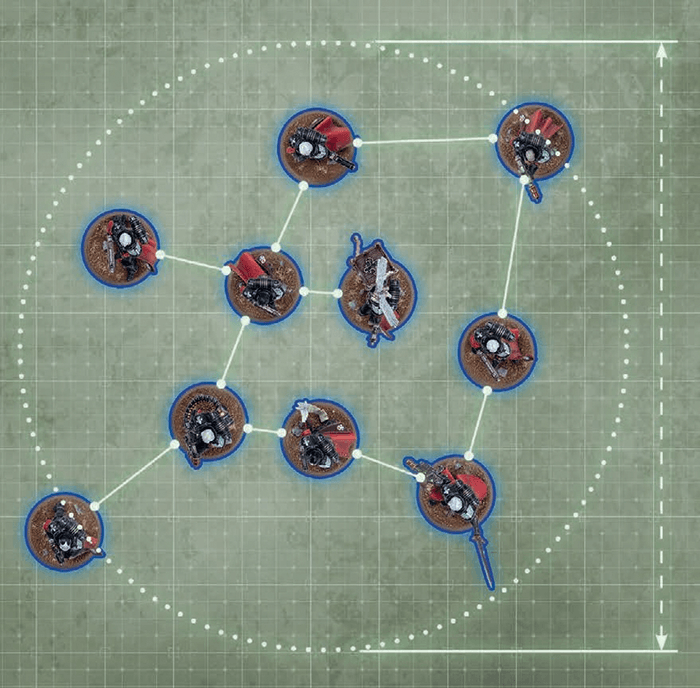
COHERENCY
Every model in this unit is within 2" of at least one other model in its unit, and every model is within 9" of every other model in its unit. This unit is therefore in coherency.
Center
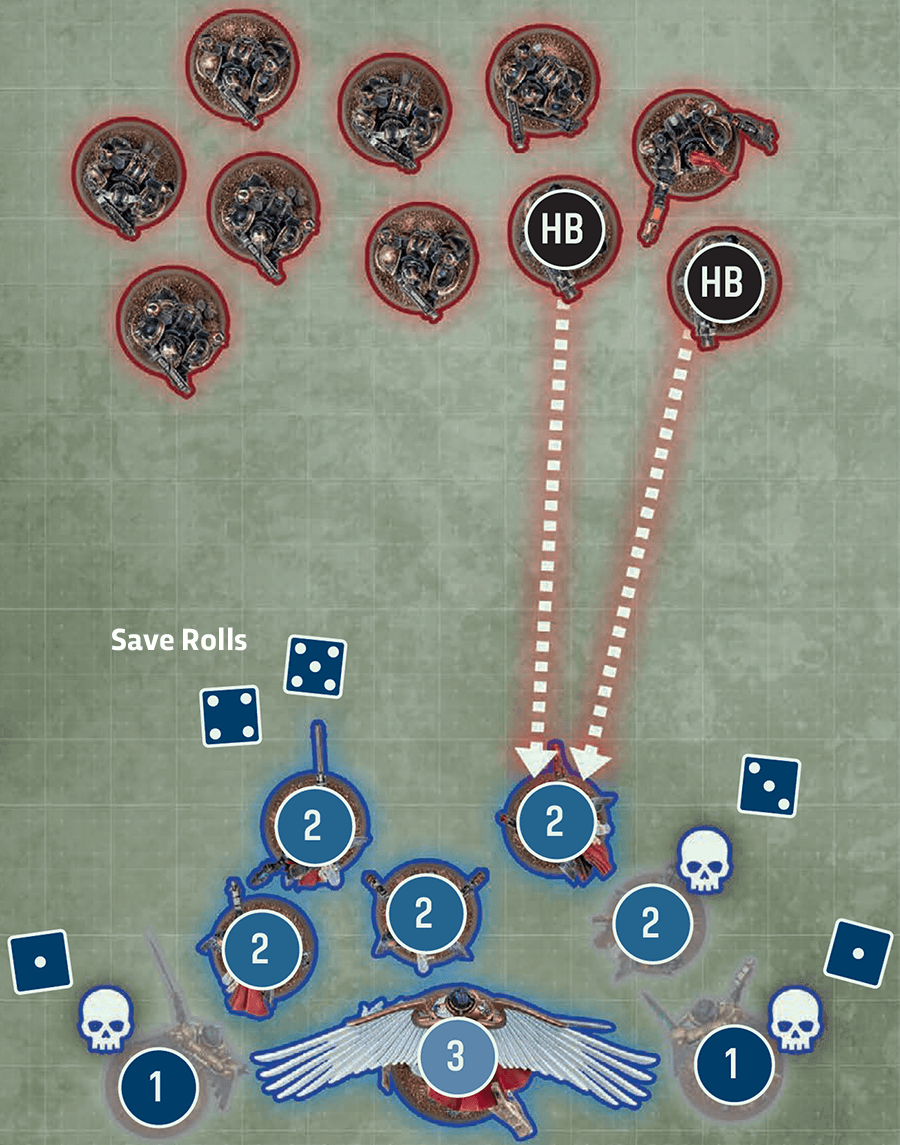
ALLOCATION GROUPS
1. CREATE GROUPS AND DECLARE ORDER
The target unit’s controlling player divides it into groups: one containing Saint Celestine, one containing the Geminae Superia, and one containing the Seraphim. They then declare the allocation order, choosing the Geminae Superia first (1), hoping their better Sv and InSv characteristics will weather the attacks. The Seraphim must be chosen second (2), as Saint Celestine is a CHARACTER model so must be last in the order (3).
2. RESOLVE ATTACK DICE
The heavy bolters’ attacks wound the target five times, so the target unit’s controlling player makes five save rolls.
The attacks are resolved one at a time, from lowest save rolls to highest:The target unit’s controlling player divides it into groups: one containing Saint Celestine, one containing the Geminae Superia, and one containing the Seraphim. They then declare the allocation order, choosing the Geminae Superia first (1), hoping their better Sv and InSv characteristics will weather the attacks. The Seraphim must be chosen second (2), as Saint Celestine is a CHARACTER model so must be last in the order (3).
2. RESOLVE ATTACK DICE
The heavy bolters’ attacks wound the target five times, so the target unit’s controlling player makes five save rolls.
- The two results of 1 are allocated first, to the current allocation group (the Geminae Superia). They both inflict damage, and both Geminae Superia are destroyed.
- The result of 3 is now allocated to the Seraphim, who have become the current allocation group. When modified by the attacking weapon’s AP characteristic of -1, this also inflicts damage, destroying one Seraphim model.
- The remaining attacks fail, so no further damage is inflicted.
3. SELECT NEXT GROUP OF ATTACK DICE AND REPEAT
Stratagem
COMMAND RE-ROLL15.02
1CP
Core Stratagem
A great commander can bend even the vagaries of fate and fortune to their will, the better to ensure victory.
WHEN: Any phase, just after you make one of the following rolls for a friendly unit or model:
TARGET: That unit or model.
EFFECT: You re-roll that roll. If you are rolling more than one dice together, select one of those dice to re-roll (excluding charge rolls, which you must re-roll in full).
- Advance roll
- Charge roll
- Damage roll
- Hazard roll
- Hit roll
- Save roll
- Wound roll
- A roll to determine the number of attacks generated with a weapon.
TARGET: That unit or model.
EFFECT: You re-roll that roll. If you are rolling more than one dice together, select one of those dice to re-roll (excluding charge rolls, which you must re-roll in full).
EPIC CHALLENGE15.03
1CP
Core Stratagem
The legends of the 41st millennium are replete with deadly duels between mighty champions.
WHEN: Fight phase, just after a friendly CHARACTER unit is selected to fight.
TARGET: That CHARACTER unit.
EFFECT: Select one CHARACTER model in your unit. Until the end of the phase, that model’s melee weapons have the [PRECISION] ability.
TARGET: That CHARACTER unit.
EFFECT: Select one CHARACTER model in your unit. Until the end of the phase, that model’s melee weapons have the [PRECISION] ability.
INSANE BRAVERY15.04
1CP
Core Stratagem
Indifferent to their own survival, these warriors hold their ground against seemingly impossible odds.
WHEN: Battle-shock step of your Command phase, just before you make a battle-shock roll for a friendly unit.
TARGET: That unit.
EFFECT: That battle-shock roll is automatically successful.
RESTRICTIONS: You cannot use this stratagem more than once per battle.
TARGET: That unit.
EFFECT: That battle-shock roll is automatically successful.
RESTRICTIONS: You cannot use this stratagem more than once per battle.
EXPLOSIVES15.05
1CP
Core Stratagem
Priming grenades or other explosives, these warriors draw back and hurl death into the enemy’s midst.
WHEN: Your Shooting phase.
TARGET: One friendly unengaged EXPLOSIVES/GRENADES unit that is eligible to shoot and did not make an advance move this turn.
EFFECT: Resolve the following sequence:
TARGET: One friendly unengaged EXPLOSIVES/GRENADES unit that is eligible to shoot and did not make an advance move this turn.
EFFECT: Resolve the following sequence:
- Select one EXPLOSIVES/GRENADES model in your unit.
- Select one unengaged enemy unit within 8" of and visible to that model.
- Roll six D6: for each 4+, that enemy unit suffers 1 mortal wound (06.02).
CRUSHING IMPACT15.06
1CP
Core Stratagem
In extremis, armoured vehicles and rampaging monsters can use their sheer size as a weapon, ramming and crushing enemies beneath their colossal bulk, though doing so risks sustaining damage in return.
WHEN: Your Charge phase, just after a friendly MONSTER/VEHICLE unit ends a charge move.
TARGET: That MONSTER/VEHICLE unit.
EFFECT: Resolve the following sequence:
TARGET: That MONSTER/VEHICLE unit.
EFFECT: Resolve the following sequence:
- Select one enemy unit engaged with your unit.
- Select one model in your unit engaged with that enemy unit.
- Roll a number of D6 equal to the T characteristic of that model: for each 1, your unit suffers 1 mortal wound; for each 5+, that enemy unit suffers 1 mortal wound (to a maximum of 6 mortal wounds per unit).
RAPID INGRESS15.07
1CP
Core Stratagem
Be it cunning strategy, potent technology or supernatural ritual, there are many means by which a commander may hasten their warriors’ onset.
WHEN: End of your opponent’s Movement phase.
TARGET: One friendly unit that is in strategic reserves (excluding AIRCRAFT).
EFFECT: Your unit makes an ingress move (20.04).
RESTRICTIONS: You cannot use this stratagem during the first battle round.
TARGET: One friendly unit that is in strategic reserves (excluding AIRCRAFT).
EFFECT: Your unit makes an ingress move (20.04).
RESTRICTIONS: You cannot use this stratagem during the first battle round.
FIRE OVERWATCH15.08
1CP
Core Stratagem
A hail of fire can drive back advancing foes.
WHEN: End of your opponent’s Movement phase.
TARGET: One friendly unengaged unit (excluding TITANIC units).
EFFECT: Your unit shoots using snap shooting.
TARGET: One friendly unengaged unit (excluding TITANIC units).
EFFECT: Your unit shoots using snap shooting.
SNAP SHOOTING15.09
ELIGIBLE IF: As stated in the rule allowing this shooting type.
EFFECT: Your unit shoots as described in Making Attacks (04).
WHILE SHOOTING:
EFFECT: Your unit shoots as described in Making Attacks (04).
WHILE SHOOTING:
- You can only target one visible enemy unit within 24" of your unit (and only if it is an eligible target).
- Each attack only hits on an unmodified hit roll of 6 (irrespective of the attacking weapon’s BS characteristic or any modifiers).
- You cannot re-roll hit rolls.
SMOKESCREEN15.10
1CP
Core Stratagem
Even the most skilled marksmen struggle to hit targets veiled by billowing screens of smoke.
WHEN: Start of your opponent’s Shooting phase.
TARGET: One friendly SMOKE unit.
EFFECT: Until the end of the phase, each time an attack targets either your SMOKE unit, or a unit that is not fully visible to the attacking model because of one or more models in your SMOKE unit, the target has the benefit of cover against that attack (13.08).
TARGET: One friendly SMOKE unit.
EFFECT: Until the end of the phase, each time an attack targets either your SMOKE unit, or a unit that is not fully visible to the attacking model because of one or more models in your SMOKE unit, the target has the benefit of cover against that attack (13.08).
HEROIC INTERVENTION15.11
1CP
Core Stratagem
Voices raised in furious war cries, your warriors surge forth to meet the enemy’s onslaught head-on.
WHEN: End of your opponent’s Charge phase.
TARGET: One friendly unengaged unit within 12" of one or more enemy units. You can only select a VEHICLE unit if it is a CHARACTER/WALKER unit.
EFFECT: Resolve a charge with your unit (11.02). While doing so, before making the charge roll, you must select one of the following modes:
TARGET: One friendly unengaged unit within 12" of one or more enemy units. You can only select a VEHICLE unit if it is a CHARACTER/WALKER unit.
EFFECT: Resolve a charge with your unit (11.02). While doing so, before making the charge roll, you must select one of the following modes:
- Leap to Defend: When selecting charge targets, you can only select enemy units that made a charge move this phase and are within the maximum distance.
+1CP
- Into the Fray:
- When making the charge roll, if the result is greater than 6 (after modifiers), change it to 6.
- When selecting charge targets, you can select any enemy units that are within 6" of your unit and within the maximum distance.
COUNTEROFFENSIVE15.12
2CP
Core Stratagem
In close-quarters combat, the slightest hesitation can leave an opening for a swift foe to exploit.
WHEN: Fight step of your opponent’s Fight phase, just after an enemy unit has resolved its attacks.
TARGET: One friendly unit that is eligible to fight.
EFFECT: Until the end of the phase, your unit has the Fights First ability and it must be the next unit you select to fight (12.04).
TARGET: One friendly unit that is eligible to fight.
EFFECT: Until the end of the phase, your unit has the Fights First ability and it must be the next unit you select to fight (12.04).
Open on new Tab

Dice 01.05
You will require some six-sided dice (often abbreviated to D6).There are many ways dice rolls are referred to, including:
- 2+, 3+, and so on: 2+ means a result of 2 or more, 3+ means a result of 3 or more, and so on.
- 1-3, 4-6, and so on: Any result within the specified range will interact with the rule stated.
- 2D6, 3D6, and so on: Roll the stated number of D6 and add the individual values together (e.g. to roll 2D6, roll two D6 and add the values together).
- D3: Roll one D6 and halve the result (rounding up).
- D6+1, 2D6+3, and so on: Roll the stated number of dice and add the stated value to the result.
BATTLEFIELD MORALE
The morale and organisation of troops can waver and break during battle. This is checked using battle-shock rolls, most commonly in the Command phase. Failing such a roll represents the unit’s courage faltering due to taking casualties or through other disruption, reducing its battlefield effectiveness. Similarly, some rules will require you to check a unit’s readiness by making a leadership roll.Designer’s Note:
This rule ensures that models are not visible while sheltering in ground-level terrain, irrespective of small openings such as doors, windows or bullet holes, or because of small gaps between adjacent terrain features. 3" is the height of the first floor of many terrain features, but some missions may adjust the height at which this rule takes effect.5. KEYWORDS 02.05
Datasheets have a list of keywords,separated into faction keywords and
other keywords. The former are used
when deciding which models to include
in your army, but otherwise both are
functionally the same. Keywords appear
in full capitals, in KEYWORD BOLD.
Headers
Header H2 Outlined
Header H2
Header H3
Header H4
Header H
Header HI
Crusade Rules
INCURSION
+5
HONOUR POINTS
HONOUR
Ability
FIRING DECK24.14
Some transports have dedicated platforms or firing ports from which embarked passengers can lay down a withering hail of munitions.
This ability always takes the form Firing Deck X. In your Shooting phase, each time this TRANSPORT is selected to shoot, if one or more units are embarked within it, resolve the following sequence:- Select up to X models embarked within this TRANSPORT (excluding models whose units have already been selected to shoot this phase).
- For each selected model, select one of its ranged weapons (excluding [ONE SHOT] weapons).
- Until this TRANSPORT has resolved all of its attacks, it has all of those selected weapons in addition to its other weapons.
- Until the end of the turn, units embarked within this TRANSPORT are not eligible to shoot.
Squares
1
2
BATTLE ROUND
1
1
The Detachment rule listed here will apply to either your whole army or to particular units within it.
1
Block
Action
BURN OBJECTIVE (ACTION)
Red squares
|
- If there are no Fights First units that are eligible to fight, move to the Resolve Remaining Combats step where this player will select their next unit.
- Otherwise, the other player selects their next unit.
Phase


Corners
Grey10
Your Movement phase is split into two steps. First you can move your units, then you can set up reinforcements.213
|
Dark10
The Von Ryan’s Leaper Advances towards the building. It moves a total of 9", moving freely over the pipe as it is only 2" in height.See Also
PROFILES AND WEAPONS► Characteristic Modifiers
► Destroyed
► Random Characteristics
ABILITIES
▪ Aura Abilities 22.01
▪ Faction Abilities 22.02
▪ Psychic Abilities 22.03
▪ Wargear Abilities 22.04
KEYWORDS
► Mixed Keywords in Units
Dark Green Corner
Every model in this unit is within 2" of at least one other model in its unit, and every model is within 9" of every other model in its unit. This unit is therefore in coherency.Save Rolls
The opposing player resolves the following sequence:- Create Groups: Divide all models in the target unit into the following groups, as many times as required:
- One group for each CHARACTER model.
- One group for all other models with the same W, Sv and InSv characteristics.
- Allocation Order: Declare the order in which those groups will have attacks allocated to them, applying all of the following:
- If a non-CHARACTER group contains a model that has lost one or more wounds, that group must be first in the allocation order.
- No CHARACTER group can be earlier in the allocation order than a non-CHARACTER group.
- CHARACTER groups containing a model that has lost one or more wounds must be earlier in the allocation order than CHARACTER groups containing no wounded models.
- Make Save Rolls: The opposing player makes one save roll for each attack that wounded the target by rolling one D6.
05.04.01 Current Allocation Group
The first group in the allocation order begins as the current group. Once all models in an allocation group are destroyed, the next group in the allocation order becomes the current one.
Inflict Damage
The opposing player resolves the following sequence for each save roll, working from lowest result(s) to highest result(s), until all attacks are resolved or all models in the target unit are destroyed – in the latter case, any excess attacks are lost.- Select Model: Select one model in the current allocation group (see below); this must be a model that has lost one or more wounds if possible.
- Check Save Roll: For each result, check if that attack inflicts damage or fails by matching the first condition below that applies:

Unmodified INFLICTS DAMAGE Invulnerable Save: The models in the current allocation group have an InSv characteristic, and the result is equal to or greater than that characteristic. FAILS Save and AP: After modifying the result by the attacking weapon’s AP characteristic, it is equal to or greater than the Sv characteristic of models in the current allocation group.
Example: An AP characteristic of -1 would modify a save roll of 3 to a 2. For models with a Sv characteristic of 2+ or better, that attack would fail.FAILS Any other result INFLICTS DAMAGE - Resolve Damage: If that attack inflicts damage, the selected model loses a number of wounds equal to that attack’s D characteristic. If this reduces that model’s remaining wounds to 0 or fewer, it is destroyed.
CURRENT ALLOCATION GROUP
The first group in the allocation order begins as the current group. Once all models in an allocation group are destroyed, the next group in the allocation order becomes the current one.05.04.04 Destroyed
Throughout a battle, models will suffer damage, lose wounds and be destroyed. When every model in a unit has been destroyed, that unit is destroyed.When a model is destroyed, first resolve any rules that are triggered when it is destroyed, then it is removed from the battlefield. If any such rules apply, and if the model was destroyed as the result of an attack, unless otherwise stated, those rules are only resolved and that model is only removed after the attacking unit’s attacks have been resolved. Unless otherwise stated, destroyed models and units cannot use abilities or be selected or targeted by rules.
Some rules only trigger if an enemy model or unit was destroyed by you, or by a model or unit from your army. This means that the enemy model or unit was destroyed by an attack made by a model from your army, or by a player rule you have. Enemy models or units that are destroyed by any other means are not destroyed by you, or by a model or unit from your army.
03.04 Engagement
A model’s engagement range is the area of the battlefield within 2" horizontally and 5" vertically of it.
- While a friendly model is within engagement range of one or more enemy models, those models – and the units they belong to – are engaged with each other.
- While a unit contains no engaged models, that unit is unengaged.
WHAT IS ENGAGEMENT?
While opposing models are within each other’s engagement range, they are able to fight in vicious melee, so unless they are seeking to make melee attacks, models should keep out of their foes’ reach.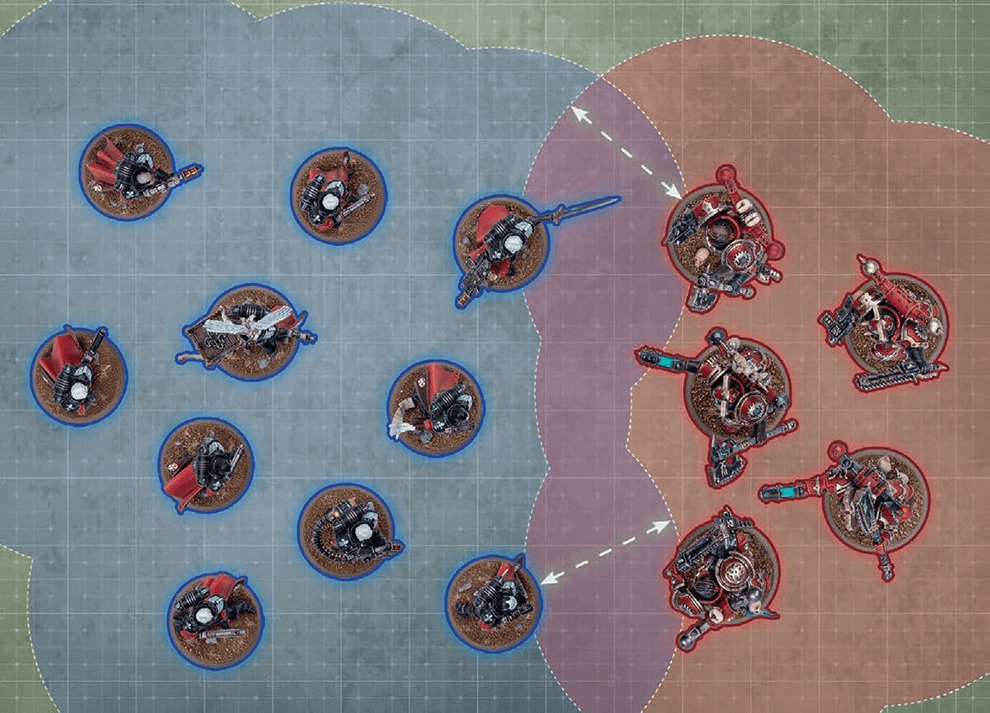
ENGAGEMENT
These two units have at least one model within 2" of the opposing unit, and are therefore engaged with each other.
ADVANCE MOVE09.06
MAXIMUM DISTANCE: Advance roll + your unit’s M characteristic.
ELIGIBLE IF: Your unit is on the battlefield and unengaged.EFFECT: Your unit moves as described in Moving (03).
BEFORE MOVING: Make an advance roll by rolling one D6.
AFTER MOVING:
- Your unit must be unengaged.
- Until the end of the turn, unless otherwise stated, your unit is not eligible to declare a charge or start an action.
06.03 Hazard Rolls
To make a hazard roll for a unit, roll one D6: on a 1-2, that roll fails and that unit suffers 1 mortal wound, or 3 mortal wounds instead if each model in that unit is a MONSTER/VEHICLE model. If more than one hazard roll is required for a unit, make all of those rolls simultaneously.
[LETHAL HITS]24.23
Many deadly weapons can inflict fatal injuries on any foe, no matter their resilience.
Each time an attack made with a [LETHAL HITS] weapon results in a critical hit, you can choose for that attack to automatically wound the target.Designer’s Note: Choosing to automatically wound the target means that no wound roll is made for that attack. You may decide against this, as it means that attack cannot result in a critical wound and so cannot trigger other abilities such as [DEVASTATING WOUNDS].
Hit Roll
Make one hit roll for each attack dice by rolling one D6. For each result, check if it fails or is a hit by matching the first condition below that applies:
|
CRITICAL HITS
Critical hits are still hits. In addition, other rules can be triggered by a critical hit, such as [LETHAL HITS] (24).[DEVASTATING WOUNDS]24.10
The most potent weapons strike with such power that they make a mockery of armour and can cleave through several foes.
Each time an attack made with a [DEVASTATING WOUNDS] weapon results in a critical wound, the attack sequence for that attack ends and the target unit suffers a number of mortal wounds equal to the D characteristic of that weapon. These are inflicted after resolving any normal damage inflicted by those attacks.Mortal wounds inflicted by [DEVASTATING WOUNDS] weapons can damage a maximum of one model for each critical wound; any remaining mortal wounds inflicted by that attack are lost.
Example: An attack made with a [DEVASTATING WOUNDS] weapon with a D characteristic of 3 results in a critical wound against an Intercessor Squad, so inflicts 3 mortal wounds. The first 2 mortal wounds are sufficient to destroy 1 Intercessor model, so the remaining mortal wound is lost.
Wound Roll
Make one wound roll for each hit by rolling one D6. For each result, check if it fails or is a wound by matching the first condition below that applies:
| ||||||||||||||||||||||||||||||
CRITICAL WOUNDS
Critical wounds are still wounds. In addition, other rules can be triggered by a critical wound, such as [DEVASTATING WOUNDS] (24).06.01 Visibility
Line of sight is used to determine visibility between models. For an observing model to have line of sight, it must be possible to draw an imaginary straight line, 1 mm wide, from any part of that model to any part of the model being observed. This line is the line of sight. While doing so, other models in the observing model’s unit and in the observed model’s unit are ignored.Other models and units can be either visible or fully visible to the observing model, as shown below. Note that terrain applies additional rules to visibility (13.07).
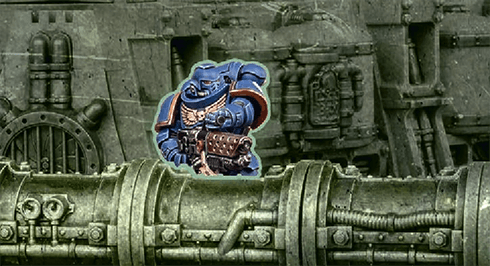
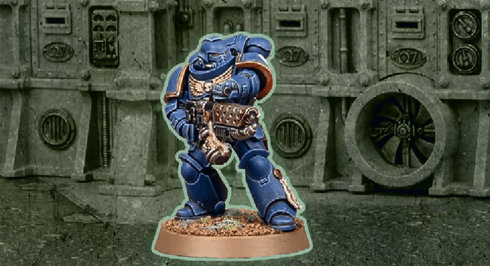
Model Visible
If any part of another model is visible to the observing model, that model is visible.
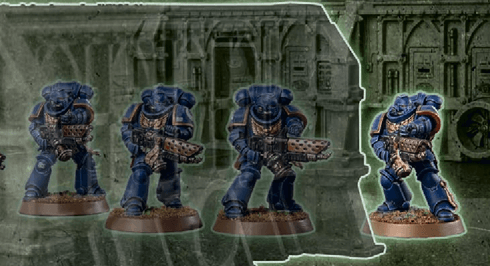
Model Fully Visible
If every part of another model that is facing the observing model is visible to the observing model (so the only thing blocking visibility to any part of that other model is that model itself), that model is fully visible.
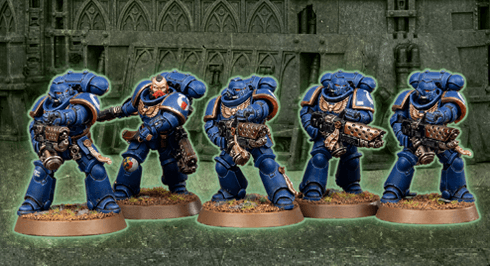
Unit Visible
If one or more models in a unit are visible to the observing model, that unit is visible.
Unit Fully Visible
If every model in a unit is fully visible to the observing model, that unit is fully visible. When determining this, the observing model can see through other models in that unit.
[PRECISION]24.28
Precision attacks can pick high-value targets out in a crowd.
While resolving attacks made with one or more [PRECISION] weapons, at the start of the Allocation Order step (05.03), if the target unit contains one or more CHARACTER models visible to one or more of the attacking models, the active player can select one allocation group that contains one of those visible CHARACTER models. If they do, until those attacks are resolved, or until that CHARACTER group is destroyed (whichever happens first), that CHARACTER group is the current allocation group.01.07 Battle-shock Rolls
To make a battle-shock roll for a unit, its controlling player makes a leadership roll for it (see above).- If that roll succeeds, that unit does not become battle-shocked.
- If that roll fails, that unit, and each model in it, is battle-shocked.
While a unit is battle-shocked:
- The Objective Control (OC) characteristic of all of its models is modified to ‘-’ (02.02).
- Its controlling player cannot target that unit with stratagems (15).
- It is not eligible to start an action (16), and any action it has started cannot be completed.
BATTLEFIELD MORALE
The morale and organisation of troops can waver and break during battle. This is checked using battle-shock rolls, most commonly in the Command phase. Failing such a roll represents the unit’s courage faltering due to taking casualties or through other disruption, reducing its battlefield effectiveness. Similarly, some rules will require you to check a unit’s readiness by making a leadership roll.01.05.01 Automatically Successful/Passes/Hits/Wounds
When a dice roll or test is automatically successful or automatically passes/hits/wounds, do not roll the dice and instead move to the next step of the sequence for that roll as if the required result had been rolled. Any rules that take effect on a particular dice result or roll result do not take effect.Example: If a hit roll is automatically successful, move straight to the Wound Rolls step for that attack. Such a hit roll is not a critical hit.
Example: If a wound roll is automatically successful, move straight to the Save Rolls step for that attack. Such a wound roll is not a critical wound.
06.02 Mortal Wounds
Some attacks or rules inflict mortal wounds on units. Each time a unit suffers one or more mortal wounds, its controlling player must resolve the following sequence for each of those mortal wounds, until either all of them have been inflicted or that unit is destroyed:- Select Model: Select one model in that unit by following the first instruction below that applies:
If a non-CHARACTER model in that unit has lost one or more wounds, you must select that model. Otherwise, if that unit contains one or more non-CHARACTER models, you must select one of those models. Otherwise, if one or more CHARACTER models in that unit have lost one or more wounds, you must select one of those models. Otherwise, you must select one CHARACTER model in that unit. - Resolve Damage: The selected model loses 1 wound. If this reduces that model’s remaining wounds to 0, it is destroyed.
MORTAL WOUNDS AND NORMAL DAMAGE
When resolving attack dice, if those attacks inflict a mixture of both mortal wounds and normal damage, resolve all of the normal damage first, then resolve all of the mortal wounds.
FIGHTS FIRST24.13
Those possessed of lightning-fast reactions may strike before the opponent can react.
While every model in a unit has this ability, that unit is a Fights First unit.See the Resolve Fights First Combats step in the Fight phase (12.04).
CHARGE MOVE11.04
MAXIMUM DISTANCE: Charge roll.
ELIGIBLE IF: Your unit declared a charge this phase.EFFECT: Your unit moves as described in Moving (03).
BEFORE MOVING: Select one or more enemy units that are within 12" of your unit and within the maximum distance of your unit; until the end of this move, each of those enemy units is a charge target.
WHILE MOVING:
- Each model must end its move closer to one or more charge targets.
- Each model that can end its move within 1" of one or more charge targets must do so.
- Each model that can end its move engaged with one or more charge targets must do so.
- Your unit must be engaged with all of the charge targets.
- Your unit cannot be engaged with one or more enemy units that are not charge targets.
- Until the end of the turn, each model in your unit has the Fights First ability (24.13).
INGRESS MOVE20.04
SET-UP DISTANCE: 6"
ELIGIBLE IF: Your unit is in strategic reserves (excluding units that are embarked within TRANSPORTS that are themselves in strategic reserves).EFFECT: Your unit is set up as described in Set Up (03.02).
BEFORE MOVING: Your unit is set up as described in Set Up (03.02).
WHILE MOVING: Set up your unit wholly within the set-up distance of one or more battlefield edges and more than 8" horizontally from all enemy units.
- Before the Third Battle Round: While doing so, no models can be set up within your opponent’s deployment zone.
SNAP SHOOTING15.09
ELIGIBLE IF: As stated in the rule allowing this shooting type.
EFFECT: Your unit shoots as described in Making Attacks (04).
WHILE SHOOTING:
EFFECT: Your unit shoots as described in Making Attacks (04).
WHILE SHOOTING:
- You can only target one visible enemy unit within 24" of your unit (and only if it is an eligible target).
- Each attack only hits on an unmodified hit roll of 6 (irrespective of the attacking weapon’s BS characteristic or any modifiers).
- You cannot re-roll hit rolls.
13.08 Benefit of Cover
Each time a ranged attack targets a unit, if every model in that unit meets one or more of the following conditions, that unit has the benefit of cover against that attack:- That model has the INFANTRY/BEASTS/SWARM keyword and is within a terrain area.
- That model is not fully visible to the attacking model due to one or more intervening terrain features and/or one or more intervening obscuring terrain areas (see below).
Each time a ranged attack targets a unit that has the benefit of cover against it, worsen the BS characteristic of that attack by 1.
[ONE SHOT]24.26
Some weapons are so rare, or so complex and slow to reload, that they can only be used once.
Each weapon with this ability can only be selected to make attacks with once per battle.If a destroyed model is returned to a unit, all of its [ONE SHOT] weapons that have already been selected to make attacks with during the battle cannot be selected to make attacks with again.
If a new unit is added to an army, all [ONE SHOT] weapons in that unit can be selected to make attacks with once per battle.
The CHARACTER keyword is used in the following Imperial Agents datasheets:
Characters

Battle Honours
Each time a unit gains a rank, it can gain one Battle Honour. Units can also gain additional Battle Honours by other means (such as by winning certain missions, fulfilling certain Agendas, etc.). Each time a unit gains a Battle Honour, increase its Crusade points total by 1 (if the unit is TITANIC, increase its Crusade points total by 2 instead). Make a note of each Battle Honour a unit has on its Crusade card. A unit can never have more than three Battle Honours unless it is a CHARACTER, in which case it can have up to six Battle Honours. Once the maximum is reached, each time a unit gains a new Battle Honour it must first remove one of its existing Battle Honours.There are several categories of Battle Honours that can be bestowed upon a unit, such as Battle Traits, Weapon Modifications and Crusade Relics. Other categories of Battle Honour may be found in other publications. Each time a unit gains a Battle Honour, you can select from any category.
- Once a unit gains enough XP it will gain a rank.
- Only CHARACTER units can gain the Heroic or Legendary ranks.
- Each time a unit gains a rank, it can gain a Battle Honour.
- There are several categories of Battle Honours, which include:
- Battle Traits: New skills and abilities.
- Weapon Modifications: Upgrade an item of wargear.
- Crusade Relic: Gain a rare and powerful artefact.
- Each time a unit gains a Battle Honour, increase its Crusade points total by 1 (or by 2 if TITANIC).