Adeptus Titanicus
Titans are amongst the largest war engines to be found anywhere in the galaxy, ponderous battleships of the land whose weapon batteries are capable of obliterating entire formations of enemy troops. Created before the dawn of the Imperium, each god-engine is a miracle of forgotten technology. During the catastrophic wars of the Horus Heresy, the once-mighty Titan Legions warred against one another in great numbers, but their numbers are now much diminished. While loyalist Titans still defend the forge worlds of the Adeptus Mechanicus and march against the Emperor’s foes, their traitorous brethren were consigned to the Eye of Terror where they became Chaos Titans – twisted mockeries of their former glory who now fight alongside traitors and renegades.
Books
|
Show History | ||||
| Book | Kind | Edition | Version | Last update |
 Adeptus Titanicus (Forge World) Adeptus Titanicus (Forge World) | ||||
| Adeptus Titanicus (Forge World) | App | 11 | 2.8.1 | October 2026 |
 Munitorum Field Manual Munitorum Field Manual | ||||
| Munitorum Field Manual | Expansion | 11 | 1.4 | |
Keywords
The keywords presented in this section have a number of special features:
- CLICK on the link to open the tooltip.
- The number in parentheses indicates the number of datasheets containing this keyword. This number represents the total number of datasheets in the faction, regardless of the filter.
- The list does not include named keywords that match the datasheet’s name (unless there are other datasheets with such a keyword).
Army Rules
Towering Example
When mustering your army, if your Army Faction is ADEPTUS TITANICUS, ignore the Select Detachment Rules step. In the Select Warlord step, select one ADEPTUS TITANICUS model from your army to be your WARLORD, even though that model does not have the CHARACTER keyword. Your army has the Take and Hold force disposition.Titanic Support
If every model in your army has the IMPERIUM keyword, you can include 1 ADEPTUS TITANICUS model in your army, even if it does not have the Faction keyword you selected in the Select Army Faction step.Super-heavy Walker
Each time a model with this ability makes a Normal, Advance or Fall Back move, it can move over models (excluding TITANIC models) and terrain features that are 4" or less in height as if they were not there.Titanicus Traitoris
You can use the ADEPTUS TITANICUS datasheets in this document to represent TITANICUS TRAITORIS models if you wish. To do so, on those datasheets and on this Army Rules card, replace all instances of the IMPERIUM keyword with CHAOS, and replace all instances of the ADEPTUS TITANICUS Faction keyword with TITANICUS TRAITORIS. For the purposes of points values, use those published for the equivalent ADEPTUS TITANICUS models.The ADEPTUS TITANICUS keyword is used in the following Adeptus Titanicus datasheets:
- Place a well-defined boundary (such as a base or mat) in each location you want to furnish with terrain, then place one or more terrain features wholly within that boundary.
- Place one terrain feature directly on the battlefield.
- Place two or more terrain features directly on the battlefield in such a way that together they define the boundary of an area.
In each case, the area of the battlefield occupied by that boundary or terrain feature is known as a terrain area. A mission’s deployment map may define the location and dimensions of each terrain area. Otherwise, players must agree on this before the battle.
FAQ
| Q: | Are models that are within the boundary of a terrain area, but not on the ground floor of a terrain area (e.g. overhanging parts of FRAME VEHICLES or models on terrain features that are within that terrain area) within that terrain area? |
| A: | Yes |
When rotating a FRAME model as part of a move, if that model does not have a base, turn it any amount around its central axis, while keeping it upright.
FAQ
| Q: | Are models that are within the boundary of a terrain area, but not on the ground floor of a terrain area (e.g. overhanging parts of FRAME VEHICLES or models on terrain features that are within that terrain area) within that terrain area? |
| A: | Yes |
The FRAME keyword is used in the following Adeptus Titanicus datasheets:
The IMPERIUM keyword is used in the following Adeptus Titanicus datasheets:
The TITANIC keyword is used in the following Adeptus Titanicus datasheets:
- The attacking model is on a section of a terrain feature that is 3" or more in height.
- The attacking model has the TOWERING keyword and the target unit is within 12".
The TOWERING keyword is used in the following Adeptus Titanicus datasheets:
The VEHICLE keyword is used in the following Adeptus Titanicus datasheets:
The WALKER keyword is used in the following Adeptus Titanicus datasheets:
- A unit has all the keywords of all models in that unit. A model only has its own keywords.
- If a rule specifies that it applies to a unit with a keyword, it applies to a unit which includes one or more models with that keyword.
- If a rule specifies that it applies to a model with a keyword, it only applies to a model with that keyword.
- If a rule specifies that it applies to ‘non-KEYWORD’ models/units, it only applies to models/units that do not have that keyword. For example, if a rule applies to non-VEHICLE units, it only applies to units that do not have the VEHICLE keyword.
- Some units can contain models that have different keywords. While this is the case, such a unit is considered to have all of the keywords of all of its models, and so is affected by any rule that applies to units with any of those keywords. Remember that attacks are made against units, not models.
- If a rule only applies to models with a specific keyword, then it instead only applies to models in such a unit that have the correct keyword.
- A rule with a comma-separated list of keywords, or a series of keywords separated by slashes (‘/’), or two keywords separated by the word ‘or’ (e.g. ‘an IMMORTALS, DEATHMARKS or LYCHGUARD unit’) refers to a model/unit that has any one of those keywords.
- A rule with multiple adjacent keywords (e.g. ‘an AELDARI GUARDIANS unit’) only refers to a model/unit that has all of those keywords.
- Some older rules use keywords without specifying model or unit: for example, MONSTER/VEHICLE or TRANSPORT. These rules refer to units with those keywords.
- Singular and plural instances of the same keyword function in the same way.
Some rules are linked to one or more keywords. For example, a rule might say that it applies to INFANTRY units. This means it only applies to units that have the INFANTRY keyword. Singular and plural instances of the same keyword function in the same way.
- Using Keywords & Mixed Keywords in Units 02.05.01
FAQ
| Q: | Do rules that affect a keyword include multi-word keywords that contain that keyword? For example, would rules that affect COMMISSAR units affect a unit that has the COMMISSAR GRAVES keyword? |
| A: | No. |
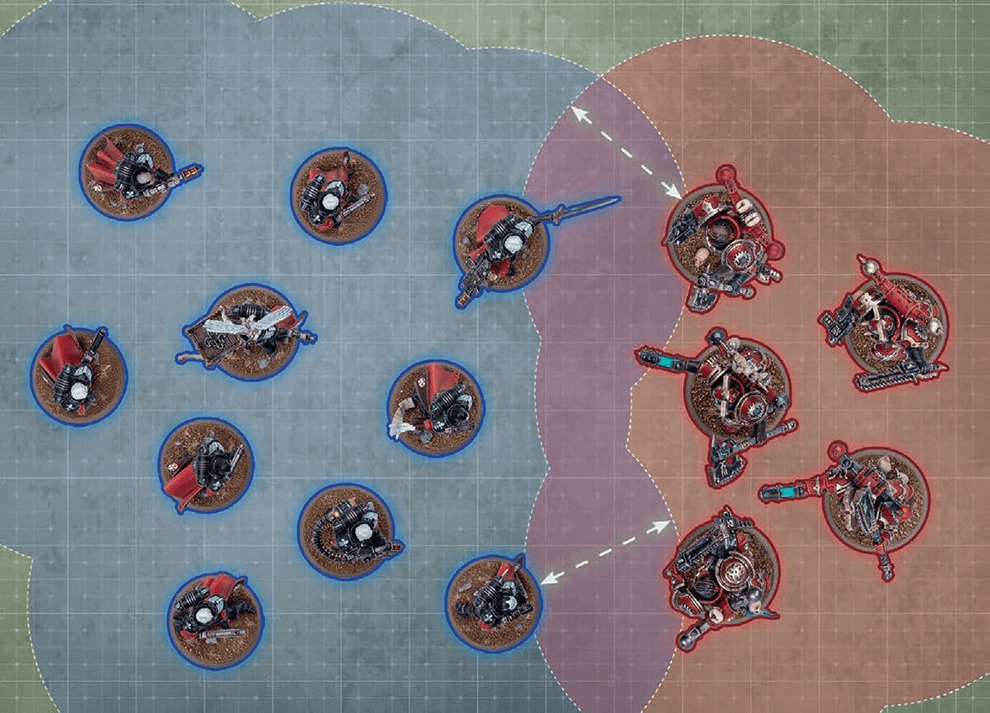
- While a friendly model is within engagement range of one or more enemy models, those models – and the units they belong to – are engaged with each other.
- While a unit contains no engaged models, that unit is unengaged.
FAQ
| Q: | Does my model or unit become engaged while moving through a enemy units engagement range during a move? |
| A: | No |
EFFECT: Your unit moves as described in Moving (03).
AFTER MOVING: Your unit must be unengaged.
EFFECT: Your unit moves as described in Moving (03).
BEFORE MOVING: Make an advance roll by rolling one D6.
AFTER MOVING:
- Your unit must be unengaged.
- Until the end of the turn, unless otherwise stated, your unit is not eligible to declare a charge or start an action.
Weapons powered by unstable and dangerous energy sources pose a substantial risk to the wielder and those that stand beside them.
Each time a unit is selected to shoot or selected to fight, after that unit has resolved all of its attacks, make a number of hazard rolls (06.03) for that unit equal to the number of [HAZARDOUS] weapons you selected in the Select Weapons step.- Select Model: Select one model in that unit by following the first instruction below that applies:

If a non-CHARACTER model in that unit has lost one or more wounds, you must select that model. Otherwise, if that unit contains one or more non-CHARACTER models, you must select one of those models. Otherwise, if one or more CHARACTER models in that unit have lost one or more wounds, you must select one of those models. Otherwise, you must select one CHARACTER model in that unit. - Resolve Damage: The selected model loses 1 wound. If this reduces that model’s remaining wounds to 0, it is destroyed.
MORTAL WOUNDS AND NORMAL DAMAGE
When resolving attack dice, if those attacks inflict a mixture of both mortal wounds and normal damage, resolve all of the normal damage first, then resolve all of the mortal wounds.
- Normal Damage 06.02.01
FAQ
| Q: | I have a rule that triggers when a mortal wound is allocated to a model, when does this happen? |
| A: | When you select a model in the Select Model step of Mortal Wounds (06.02). |
FAQ
| Q: | I failed hazard rolls from [Hazardous] weapons, do those mortal wounds have to be allocated to the models with the [HAZARDOUS] weapons? |
| A: | No, you allocate the mortal wounds to the unit as per Mortal Wounds (06.02). (This represents Bob the guardsmen picking up his fallen squad mates plasma gun or that the twisting power of James the Chaos Sorcerer pulling his followers into the warp.) |
| Q: | If a rule says my unit must make a hazard roll does every model in the unit make a hazard roll? |
| A: | No, the unit would make 1 single hazard roll. |
EFFECT: Your unit moves as described in Moving (03).
BEFORE MOVING: Select fall-back mode:
- Ordered Retreat: If your unit is not battle-shocked, you can select this mode.
- Desperate Escape: Otherwise, you must select this mode. Make a hazard roll for each model in your unit (06.03).
- Desperate Escape: Each model that is moved can be moved through enemy models.
- Your unit must be unengaged.
- Until the end of the turn, unless otherwise stated, your unit is not eligible to shoot, declare a charge or start an action.
- Desperate Escape: If your unit is not battle-shocked, you must make a battle-shock roll for your unit (01.07).