Astra Militarum – Sabre Weapons Battery

RANGED WEAPONS | RANGE | A | BS | S | AP | D | |
| Twin autocannon twin-linked | |||||||
| Twin autocannon twin-linked | 48" | 2 | 4+ | 9 | -1 | 3 | |
| Twin heavy bolter sustained hits 1 twin-linked | |||||||
| Twin heavy bolter sustained hits 1 twin-linked | 36" | 3 | 4+ | 5 | -1 | 2 | |
| Twin heavy stubber rapid fire 3 twin-linked | |||||||
| Twin heavy stubber rapid fire 3 twin-linked | 36" | 3 | 4+ | 4 | 0 | 1 | |
| Twin lascannon twin-linked | |||||||
| Twin lascannon twin-linked | 48" | 1 | 4+ | 12 | -3 | D6+1 | |
MELEE WEAPONS | RANGE | A | WS | S | AP | D | |
| Close combat weapon | |||||||
| Close combat weapon | Melee | 1 | 4+ | 3 | 0 | 1 | |
- Any number of models’ twin heavy bolters can each be replaced with one of the following:
- 1 defence searchlight
- 1 twin autocannon
- 1 twin heavy stubber
- 1 twin lascannon
- That unit can still be selected as the target of ranged attacks, but each time such an attack is made, unless it is made with a Pistol, subtract 1 from the Hit roll.
- Models in that unit do not need to take Desperate Escape tests due to Falling Back while Battle- shocked, except for those that will move over enemy models when doing so.
- 1-2 Sabre Gun Platforms
| YOUR UNIT COSTS | |
| 1 model | 45 |
| 2 models | 90 |
ASTRA MILITARUM

The OFFICER keyword is used in the following Astra Militarum datasheets:

The TRANSPORT keyword is used in the following Astra Militarum datasheets:
Rapid fire weapons are capable of long-ranged precision shots or controlled bursts at nearby targets.
This ability always takes the form [RAPID FIRE X]. Each time you gather attack dice for a [RAPID FIRE] weapon, add X additional attack dice if the target unit was within half range of that weapon in the Select Targets step.Example: If a [RAPID FIRE 1] weapon with an A characteristic of 1 targets a unit that is within half range, you would gather one additional attack dice for that weapon (for a total of two for that weapon).
Raised and trained to instil unwavering obedience, officers of the Imperial Guard command authority and respect, and issue orders with imperious bellows that cut through the clamour of war.
OFFICER models can issue Orders in your Command phase and at the end of a phase in which they disembarked from a TRANSPORT or were set up on the battlefield.
Until the start of your next Command phase, the unit you selected is affected by that Order. Unless otherwise stated, a unit can only be affected by one Order at a time (any Order subsequently issued to that unit replaces the current one). Orders cannot be issued to Battle-shocked units, and if a unit being affected by an Order becomes Battle-shocked, that Order ceases to affect that unit.
Only ASTRA MILITARUM models gain the benefit of an Order issued to their unit.
Move! Move! Move! M +3" |
Fix Bayonets! WS +1 |
Take Aim! BS +1 |
First Rank, Fire! Second Rank, Fire! A +1 |
Take Cover! SV +1 |
Duty and Honour! LD +1 OC +1 |
FAQ
| Q: | If a unit becomes affected by the same Order multiple times, do those Orders affect that unit multiple times? |
| A: | No. |
EFFECT: Your unit is set up as described in Set Up (03.02).
BEFORE MOVING: Your unit is set up as described in Set Up (03.02).
WHILE MOVING: Set up your unit wholly within the set-up distance of one or more battlefield edges and more than 8" horizontally from all enemy units.
- Before the Third Battle Round: While doing so, no models can be set up within your opponent’s deployment zone.
The ARTILLERY keyword is used in the following Astra Militarum datasheets:
The ASTRA MILITARUM keyword is used in the following Astra Militarum datasheets:


The FORTIFICATION keyword is used in the following Astra Militarum datasheets:
- Place a well-defined boundary (such as a base or mat) in each location you want to furnish with terrain, then place one or more terrain features wholly within that boundary.
- Place one terrain feature directly on the battlefield.
- Place two or more terrain features directly on the battlefield in such a way that together they define the boundary of an area.
In each case, the area of the battlefield occupied by that boundary or terrain feature is known as a terrain area. A mission’s deployment map may define the location and dimensions of each terrain area. Otherwise, players must agree on this before the battle.
FAQ
| Q: | Are models that are within the boundary of a terrain area, but not on the ground floor of a terrain area (e.g. overhanging parts of FRAME VEHICLES or models on terrain features that are within that terrain area) within that terrain area? |
| A: | Yes |
The IMPERIUM keyword is used in the following Astra Militarum datasheets:
The TITANIC keyword is used in the following Astra Militarum datasheets:
- While a friendly model is within engagement range of one or more enemy models, those models – and the units they belong to – are engaged with each other.
- While a unit contains no engaged models, that unit is unengaged.
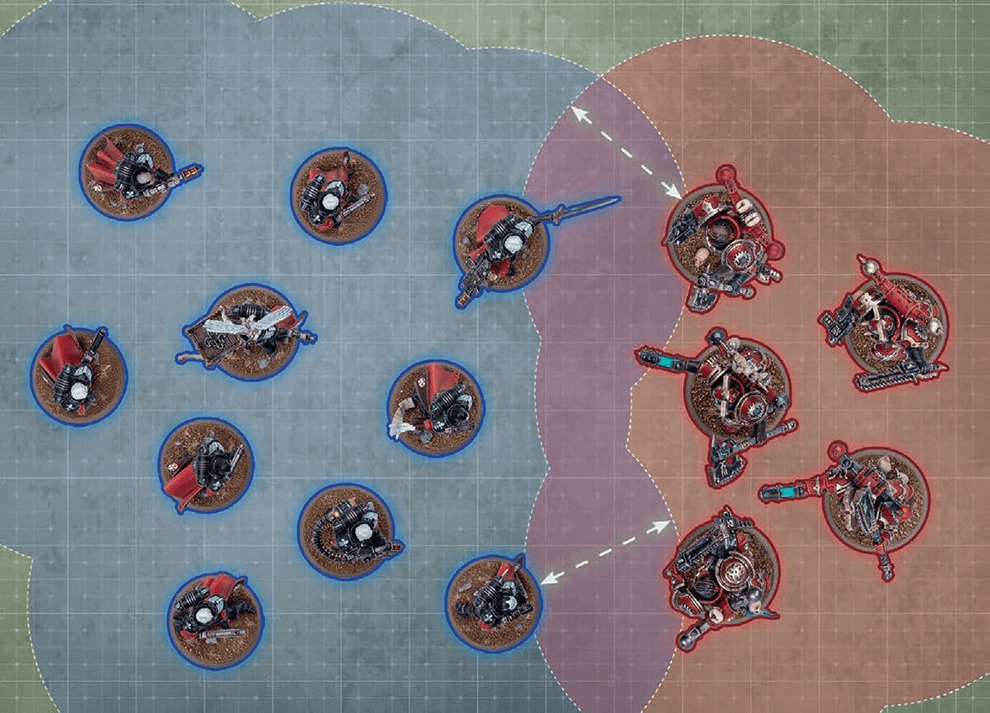
FAQ
| Q: | Does my model or unit become engaged while moving through a enemy units engagement range during a move? |
| A: | No |
EFFECT: Your unit moves as described in Moving (03).
BEFORE MOVING: Make an advance roll by rolling one D6.
AFTER MOVING:
- Your unit must be unengaged.
- Until the end of the turn, unless otherwise stated, your unit is not eligible to declare a charge or start an action.
Weapons powered by unstable and dangerous energy sources pose a substantial risk to the wielder and those that stand beside them.
Each time a unit is selected to shoot or selected to fight, after that unit has resolved all of its attacks, make a number of hazard rolls (06.03) for that unit equal to the number of [HAZARDOUS] weapons you selected in the Select Weapons step.- Select Model: Select one model in that unit by following the first instruction below that applies:

If a non-CHARACTER model in that unit has lost one or more wounds, you must select that model. Otherwise, if that unit contains one or more non-CHARACTER models, you must select one of those models. Otherwise, if one or more CHARACTER models in that unit have lost one or more wounds, you must select one of those models. Otherwise, you must select one CHARACTER model in that unit. - Resolve Damage: The selected model loses 1 wound. If this reduces that model’s remaining wounds to 0, it is destroyed.
MORTAL WOUNDS AND NORMAL DAMAGE
When resolving attack dice, if those attacks inflict a mixture of both mortal wounds and normal damage, resolve all of the normal damage first, then resolve all of the mortal wounds.
- Normal Damage 06.02.01
FAQ
| Q: | I have a rule that triggers when a mortal wound is allocated to a model, when does this happen? |
| A: | When you select a model in the Select Model step of Mortal Wounds (06.02). |
FAQ
| Q: | I failed hazard rolls from [Hazardous] weapons, do those mortal wounds have to be allocated to the models with the [HAZARDOUS] weapons? |
| A: | No, you allocate the mortal wounds to the unit as per Mortal Wounds (06.02). (This represents Bob the guardsmen picking up his fallen squad mates plasma gun or that the twisting power of James the Chaos Sorcerer pulling his followers into the warp.) |
| Q: | If a rule says my unit must make a hazard roll does every model in the unit make a hazard roll? |
| A: | No, the unit would make 1 single hazard roll. |
EFFECT: Your unit moves as described in Moving (03).
BEFORE MOVING: Select fall-back mode:
- Ordered Retreat: If your unit is not battle-shocked, you can select this mode.
- Desperate Escape: Otherwise, you must select this mode. Make a hazard roll for each model in your unit (06.03).
- Desperate Escape: Each model that is moved can be moved through enemy models.
- Your unit must be unengaged.
- Until the end of the turn, unless otherwise stated, your unit is not eligible to shoot, declare a charge or start an action.
- Desperate Escape: If your unit is not battle-shocked, you must make a battle-shock roll for your unit (01.07).
EFFECT: Your unit moves as described in Moving (03).
AFTER MOVING: Your unit must be unengaged.
EFFECT: No models are moved (either in straight lines or rotated). Units that remain stationary do not trigger any rules that are triggered when a unit starts or ends a move.
When a model is destroyed, first resolve any rules that are triggered when it is destroyed, then it is removed from the battlefield. If any such rules apply, and if the model was destroyed as the result of an attack, unless otherwise stated, those rules are only resolved and that model is only removed after the attacking unit’s attacks have been resolved. Unless otherwise stated, destroyed models and units cannot use abilities or be selected or targeted by rules.
Some rules only trigger if an enemy model or unit was destroyed by you, or by a model or unit from your army. This means that the enemy model or unit was destroyed by an attack made by a model from your army, or by a player rule you have. Enemy models or units that are destroyed by any other means are not destroyed by you, or by a model or unit from your army.
If a persisting effect applies to a unit when you place it in strategic reserves or when it embarks within a TRANSPORT, make a note of that effect and its duration; if that unit is set up on the battlefield again, any persisting effects continue to apply to that unit for their full duration.
If you have a rule that specifies when it is triggered (e.g. ‘In the Shooting phase’) and it does not specify how long it is active for, it is only active for the duration of that specified period (e.g. until the end of that Shooting phase). After that period, that effect is no longer applicable/active.
If a rule or effect is given to a unit and it does not specify how long it is active for, it is only active for the phase in which it was given.
- Rapid/Tactical Disembark: 3"
- Combat Disembark: 6"
- Embarked within a TRANSPORT model that is on the battlefield.
- Did not embark within that TRANSPORT this phase.
- That TRANSPORT has not made an advance or fall-back move this phase.
BEFORE MOVING: Select disembark mode:
- Rapid Disembark:If that TRANSPORT made a normal or ingress move this phase, you must select this mode.
- Tactical Disembark:Otherwise, If that TRANSPORT remained stationary or has not yet been selected to move this phase, and if you can set up your unit as described below, you must select this mode.
- Combat Disembark:Otherwise, you must select this mode. Make a hazard roll for each model in your unit.
- Rapid Disembark:If that TRANSPORT made an ingress move this turn, each model must follow the same rules that TRANSPORT had to follow while resolving that move.
- Combat Disembark:Each model can be set up engaged with one or more enemy units that TRANSPORT is engaged with.
- Rapid Disembark:Until the end of the turn, your unit is not eligible to declare a charge.
- Tactical Disembark:Select your unit to make a normal or advance move.
- Combat Disembark:Your unit is battle-shocked and, until the end of the turn, it is not eligible to declare a charge.
If a TRANSPORT model is destroyed, before removing it from the battlefield, the active player must make an emergency disembark move (see below) with each unit embarked within it.
- Persisting Rules Effects 01.02.02
- Hazard Rolls 06.03
- Rapid Disembark And Limitations 18.04.01
- Rapid/Tactical Disembark: 3"
- Combat Disembark: 6"
- Embarked within a TRANSPORT model that is on the battlefield.
- Did not embark within that TRANSPORT this phase.
- That TRANSPORT has not made an advance or fall-back move this phase.
BEFORE MOVING: Select disembark mode:
- Rapid Disembark:If that TRANSPORT made a normal or ingress move this phase, you must select this mode.
- Tactical Disembark:Otherwise, If that TRANSPORT remained stationary or has not yet been selected to move this phase, and if you can set up your unit as described below, you must select this mode.
- Combat Disembark:Otherwise, you must select this mode. Make a hazard roll for each model in your unit.
- Rapid Disembark:If that TRANSPORT made an ingress move this turn, each model must follow the same rules that TRANSPORT had to follow while resolving that move.
- Combat Disembark:Each model can be set up engaged with one or more enemy units that TRANSPORT is engaged with.
- Rapid Disembark:Until the end of the turn, your unit is not eligible to declare a charge.
- Tactical Disembark:Select your unit to make a normal or advance move.
- Combat Disembark:Your unit is battle-shocked and, until the end of the turn, it is not eligible to declare a charge.
EFFECT: Your unit is set up as described in Set Up (03.02).
BEFORE MOVING: Make a hazard roll for each model in your unit (06.03).
WHILE MOVING: Set up each model in your unit: (1) Wholly within the set-up distance of that TRANSPORT, and as close as possible to that TRANSPORT. OR: (2) If the above is not possible while remaining unengaged, set up that model wholly within the set-up distance of that TRANSPORT, as close as possible to that TRANSPORT, and engaged. Each model that still cannot be set up is destroyed.
AFTER MOVING: Your unit is battle-shocked and, until the end of the turn, it is not eligible to declare a charge.
- Embarked within a TRANSPORT on the battlefield
- Did not embark within that TRANSPORT this phase
- That TRANSPORT has not made an advance/fall-back move this phase
WHILE MOVING: Set up each model wholly within the set-up distance of that TRANSPORT.
- Embarked within a TRANSPORT on the battlefield
- Did not embark within that TRANSPORT this phase
WHILE MOVING: Set up each model wholly within the set-up distance of that TRANSPORT.
AFTER MOVING: Your unit is not eligible to declare a charge until the end of the turn.
FAQ
| Q: | If a unit makes any disembark move in a turn (i.e. Disembark move, Emergency Disembark move etc.) has it disembarked that turn? |
| A: | Yes. |
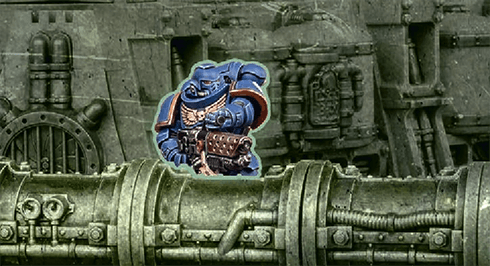
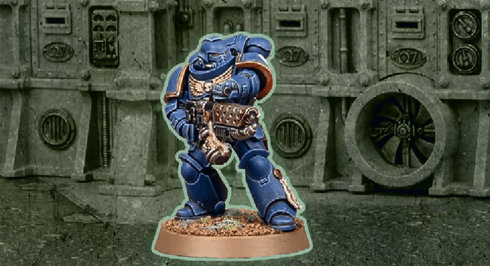
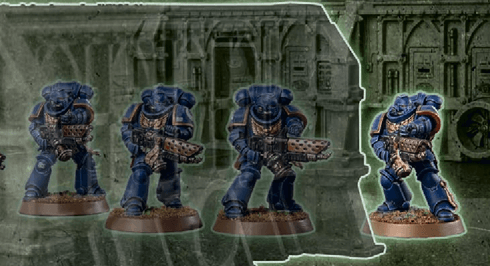
Other models and units can be either visible or fully visible to the observing model, as shown below. Note that terrain applies additional rules to visibility (13.07).
FAQ
| Q: | When checking line of sight from one model to another, is this drawn between the bases of those models, or between any part of them? |
| A: | Line of sight is drawn from any part of the observing model to any part of the model being observed. |
| Q: | When a model overhangs the edge of the battlefield, how does that affect its visibility? |
| A: | That model’s controlling player can draw line of sight from any part of that model that is not overhanging the edge of the battlefield. Their opponent can draw line of sight to any part of that model. |
Many deadly weapons can inflict fatal injuries on any foe, no matter their resilience.
Each time an attack made with a [LETHAL HITS] weapon results in a critical hit, you can choose for that attack to automatically wound the target.EFFECT: Your unit shoots as described in Making Attacks (04).
WHILE SHOOTING:
- You can only target one visible enemy unit within 24" of your unit (and only if it is an eligible target).
- Each attack only hits on an unmodified hit roll of 6 (irrespective of the attacking weapon’s BS characteristic or any modifiers). Those hits are not critical hits.
- You cannot re-roll hit rolls.
|
FAQ
| Q: | My attack has a rule that means it results in a critical hit on a hit roll of 4+. Does this work when snap shooting? |
| A: | Unless otherwise stated, no: when snap shooting, each attack only hits on a roll of 6. |
| Q: | My attack has a rule that means it results in a critical hit on a hit roll of 4+, and I would otherwise need a 5+ to hit. Does a 4+ hit? |
| A: | Yes, except when snap shooting: when snap shooting, each attack only hits on a roll of 6. |
The ASTRA MILITARUM and OFFICER keywords are used in the following Astra Militarum datasheets:
- That model has the INFANTRY/BEASTS/SWARM keyword and is within a terrain area.
- That model is not fully visible to the attacking model due to one or more intervening terrain features and/or one or more intervening obscuring terrain areas (see below).
Each time a ranged attack targets a unit that has the benefit of cover against it, worsen the BS characteristic of that attack by 1.
FAQ
| Q: | When my unit shoots at another unit, how does it work if some models in the target unit are fully visible to some models in my unit, while others are within a terrain area/not fully visible? |
| A: | For each attacking model in your unit, determine whether the target unit has the benefit of cover, as described in Terrain and Visibility. In this scenario, the target unit will likely have the benefit of cover against some of the attacking models, but not all. This means that, in an example unit where all attacking models are using the same weapon, when you get to the Resolve Attacks step of the Attack Sequence, you will collect dice for attacks made by models against which the target unit has the benefit of cover separately from the dice for attacks made by models against which the target unit does not have the benefit of cover. |
The stealthiest warriors can evade the attentions, and the bullets, of their foes.
If every model in a unit has this ability, each time a ranged attack targets that unit, that unit has the benefit of cover against that attack (13.08).EFFECT: Your unit shoots as described in Making Attacks (04).
WHILE SHOOTING:
- You can only target one visible enemy unit within 24" of your unit (and only if it is an eligible target).
- Each attack only hits on an unmodified hit roll of 6 (irrespective of the attacking weapon’s BS characteristic or any modifiers). Those hits are not critical hits.
- You cannot re-roll hit rolls.
TARGET: One friendly unengaged unit (excluding TITANIC units).
EFFECT: Your unit shoots using snap shooting.
High-explosive rounds can fell several warriors in a single blast, but firing them too close to comrades is unwise.
Each time you gather attack dice for a [BLAST] weapon, add one additional attack dice for every five models that were in the target unit in the Select Targets step (rounding down).If this ability takes the form [BLAST X], each time you gather attack dice for such a weapon, add X additional attack dice for every five models that were in the target unit in the Select Targets step (rounding down) instead.
- Engaged and did not make an advance move this turn.
- Has one or more [CLOSE-QUARTERS] weapons or is a MONSTER/VEHICLE unit.
WHILE SHOOTING: Models in your unit can target enemy units your unit is engaged with.
- MONSTER/VEHICLE Models: Each time a MONSTER/VEHICLE model in your unit makes an attack:
- Unless that attack is made with a [CLOSE-QUARTERS] weapon and targets a unit your unit is engaged with, subtract 1 from the hit roll.
- If that attack is made with a [BLAST] weapon, it still cannot target a unit your unit is engaged with.
- Non-MONSTER/Non-VEHICLE Models: You can only select [CLOSE-QUARTERS] weapons to make attacks with and you can only select enemy units that are engaged with your unit as targets.
Weapons designed for close-quarters fighting can be wielded effectively even in the press of melee combat.
Units containing one or more models with a [CLOSE-QUARTERS] weapon can shoot using close-quarters shooting (10.06).When using another shooting type, for each model in that unit (excluding MONSTER/VEHICLE models), you can only select one of the following to make attacks with:
- One or more of its [CLOSE-QUARTERS] weapons.
- One or more of its other ranged weapons.
Pistols can be wielded even at point-blank range.
[PISTOL] and [CLOSE-QUARTERS] are identical for all rules purposes. See [CLOSE-QUARTERS].Artillery barrages lay the ground for the assault to come.
At the start of the battle round, select one of the following types of artillery support.- Creeping Barrage: Roll one D6 for each enemy unit that is more than 12" from every model from your army that is on the battlefield: On a 5+, until the end of the battle round, that unit is shaken. While a unit is shaken, subtract 2" from its Move characteristic and subtract 2 from Charge rolls made for it. The maximum number of units that can be shaken by this rule in each battle round depends on the battle size, as shown below.
- Incendiary Bombardment: Select a number of enemy units more than 12" from every model from your army that is on the battlefield. Until the end of the battle round, those enemy units are scattered. While a unit is scattered, it cannot have the Benefit of Cover. The maximum number of units you can select in this way depends on the battle size, as shown below.
- Smoke Shells: Select a number of units from your army. Until the end of the battle round, those units have the Stealth ability. The maximum number of units you can select in this way depends on the battle size, as shown below.
BATTLE SIZE MAXIMUM NUMBER OF UNITS Incursion 2 Strike Force 3 Onslaught 4 Errata
Siege Regiment Detachment, Artillery Support Detachment Rule, Creeping BarrageChange to:
‘Roll one D6 for each enemy unit that is more than 12" from every model from your army that is on the battlefield: On a 5+, until the end of the battle round, that unit is shaken. While a unit is shaken, subtract 2" from its Move characteristic and subtract 2 from Charge rolls made for it. The maximum number of units that can be shaken by this rule in each battle round depends on the battle size, as shown below.’
The most potent weapons strike with such power that they make a mockery of armour and can cleave through several foes.
Each time an attack made with a [DEVASTATING WOUNDS] weapon results in a critical wound, the attack sequence for that attack ends and the target unit suffers a number of mortal wounds equal to the D characteristic of that weapon. These are inflicted after resolving any normal damage inflicted by those attacks.Mortal wounds inflicted by [DEVASTATING WOUNDS] weapons can damage a maximum of one model for each critical wound; any remaining mortal wounds inflicted by that attack are lost.
- If the target unit is an attached unit, use the highest T characteristic amongst bodyguard models in that unit that are on the battlefield.
- Use the highest T characteristic amongst models in that unit that are on the battlefield.
| ||||||||||||||||||||||||||||||
- Multiple Toughness Characteristics 05.02.01
Weapons powered by unstable and dangerous energy sources pose a substantial risk to the wielder and those that stand beside them.
Each time a unit is selected to shoot or selected to fight, after that unit has resolved all of its attacks, make a number of hazard rolls (06.03) for that unit equal to the number of [HAZARDOUS] weapons you selected in the Select Weapons step.- If that roll succeeds, that unit does not become battle-shocked.
- If that roll fails, that unit, and each model in it, is battle-shocked.
While a unit is battle-shocked:
- The Objective Control (OC) characteristic of all of its models is modified to ‘-’ (02.02).
- Its controlling player cannot target that unit with stratagems (15).
- It is not eligible to start an action (16), and any action it has started cannot be completed.
- Battlefield Morale 01.07.01
- Battle-shock Test 01.07.02
FAQ
| Q: | If a unit has a rule that allows it to start an action when it is battle-shocked can it also continue doing that action if it becomes battle-shocked after starting an action? |
| A: | Yes |
| Q: | If a unit becomes battle-shocked after starting an action does it stop performing that action? |
| A: | Yes |
- Create Groups: Divide all models in the target unit into the following groups, as many times as required:
- One group for each CHARACTER model.
- One group for all other models with the same W, Sv and InSv characteristics.
- Allocation Order: Declare the order in which those groups will have attacks allocated to them, applying all of the following:
- If a non-CHARACTER group contains a model that has lost one or more wounds, that group must be first in the allocation order.
- No CHARACTER group can be earlier in the allocation order than a non-CHARACTER group.
- CHARACTER groups containing a model that has lost one or more wounds must be earlier in the allocation order than CHARACTER groups containing no wounded models.
- Make Save Rolls: The opposing player makes one save roll for each attack that wounded the target by rolling one D6.
FAQ
| Q: | When declaring the allocation order of groups in my unit I have more than one non-CHARACTER groups that contain a model with a missing wound, how must I select the order? |
| A: | Those groups can be selected in an order of your choosing but must be in an order that makes them come before any non-CHARACTER groups that do not contain a model with a missing wound. |
| Q: | I have a unit being attacked with weapons that will modify some of their save rolls to be worse then 6 should I make those save rolls? |
| A: | Yes, because other models in your unit may have Sv’s that are better those models you’ve mentioned, this means that enough save rolls could be allocated to the those models that the rest of the results are not greater then the Sv’s of the other models in your unit. |
| Q: | Can I group or allocate a wound to a destroyed model? |
| A: | No. |
Some weapons are designed to root enemy formations out of entrenched positions.
Each time an attack is made with an [IGNORES COVER] weapon, the target cannot have the benefit of cover against that attack (13.08), including from rules that give a model or unit the benefit of cover (e.g. Stealth).TARGET: That unit.
EFFECT: That battle-shock roll is automatically successful.
RESTRICTIONS: You cannot use this stratagem more than once per battle.
Those possessed of lightning-fast reactions may strike before the opponent can react.
While every model in a unit has this ability, that unit is a Fights First unit.See the Resolve Fights First Combats step in the Fight phase (12.04).
TARGET: One friendly unengaged unit within 12" of one or more enemy units. You can only select a VEHICLE unit if it is a CHARACTER/WALKER unit.
EFFECT: Resolve a charge with your unit (11.02). While doing so, before making the charge roll, you must select one of the following modes:
- Leap to Defend: When selecting charge targets, you can only select enemy units that made a charge move this phase and are within the maximum distance.
- Into the Fray:
- When making the charge roll, if the result is greater than 6 (after modifiers), change it to 6.
- When selecting charge targets, you can select any enemy units that are within 6" of your unit and within the maximum distance.
Some weapons possess a punishing rate of fire, or can land devastating flurries of blows, tearing the foe apart with relentless ferocity.
This ability always takes the form [SUSTAINED HITS X]. Each time an attack made with a [SUSTAINED HITS] weapon results in a critical hit, that attack results in a number of additional hits on the target as denoted by X.Random Attacks: If a weapon has a random A characteristic, that characteristic is determined when generating attacks for that weapon at the Resolve Attacks step (04.03). If several weapons with random A characteristics are making identical attacks, generate the attacks for each of those weapons individually, and group them all together.
Random Damage: If a weapon has a random D characteristic, then each time an attack made with it inflicts damage, the controlling player determines that weapon’s characteristic when the opposing player has selected a model in the target unit to allocate that attack to.
When determining a random D characteristic, the dice roll made is called a damage roll.
Where a D characteristic includes an operator (e.g. a ‘+’, as in D6+1), the value after the operator is part of that D characteristic – it is not a modifier.
Other Random Characteristics: For all other characteristics, roll to determine the value on an individual, per-model or per-weapon basis each time that characteristic is required.
- Advance roll
- Charge roll
- Damage roll
- Hazard roll
- Hit roll
- Save roll
- Wound roll
- A roll to determine the number of attacks generated with a weapon.
TARGET: That unit or model.
EFFECT: You re-roll that roll. If you are rolling more than one dice together, select one of those dice to re-roll (excluding charge rolls, which you must re-roll in full).
TARGET: One friendly unit that is in strategic reserves (excluding AIRCRAFT).
EFFECT: Your unit makes an ingress move (20.04).
RESTRICTIONS: You cannot use this stratagem during the first battle round.
TARGET: One friendly unit that is eligible to fight.
EFFECT: Until the end of the phase, your unit has the Fights First ability and it must be the next unit you select to fight (12.04).
TARGET: One ASTRA MILITARUM unit from your army that did not Remain Stationary or arrive from Reserves this phase.
EFFECT: Your unit can make a Normal move of up to D6".
TARGET: One ASTRA MILITARUM unit from your army that disembarked from a TRANSPORT this turn and has not been selected to shoot this phase.
EFFECT: Until the end of the phase, each time a model in your unit makes an attack, add 1 to the Wound roll.
TARGET: That unit or model from your army.
EFFECT: You re-roll that roll, test or saving throw.
TARGET: The unit from your army that Battle-shock test was just taken for (even though your Battle-shocked units cannot normally be affected by your Stratagems).
EFFECT: Your unit is treated as having passed that test instead, and is not Battle-shocked as a result.
TARGET: One unit from your army that has not been selected to shoot this phase.
EFFECT: Select one model in your unit that is equipped with a weapon with the [BLAST] ability. Until the end of the phase, when determining how many models are in the target unit for the purpose of that ability, include models that are not visible to the attacking model. In addition, attacks made with that weapon can be allocated to models that are not visible to the attacking model.
TARGET: One unit from your army that is within Engagement Range of one or more enemy units and that has not already been selected to fight this phase.
EFFECT: Your unit fights next.
TARGET: One ASTRA MILITARUM unit from your army affected by the Duty and Honour! Order.
EFFECT: If your unit is within range of an objective marker you control, that objective marker remains under your control, even if you have no models within range of it, until your opponent controls it at the start or end of a phase.
TARGET: One ASTRA MILITARUM unit from your army affected by an Order that has not been selected to shoot this phase.
EFFECT: If your unit is within range of an objective marker, until the end of the phase, ranged weapons equipped by models in your unit have the [LETHAL HITS] ability.
TARGET: One ASTRA MILITARUM unit from your army that has not been selected to shoot this phase.
EFFECT: Until the end of the phase, ranged weapons equipped by models in your unit have the [IGNORES COVER] ability.
TARGET: One ASTRA MILITARUM unit from your army that was selected as the target of one or more of the attacking unit’s attacks.
EFFECT: Until the attacking unit has finished making its attacks, each time an attack targets your unit, worsen the Armour Penetration characteristic of that attack by 1.
Errata
Effect: ‘Until the attacking unit has finished making its attacks, each time an attack targets your unit, worsen the Armour Penetration characteristic of that attack by 1.’
TARGET: One ASTRA MILITARUM unit from your army that has not been selected to shoot this phase.
EFFECT: Until the end of the phase, each time a model in your unit makes an attack, you can re-roll the Hit roll.
Reconnaissance infantry use face paint, camo-pattern fatigues, ghillie suits and more to conceal themselves from the foe. Vehicles are camouflaged using netting and disruptive camo patterns, enabling them to blend into surrounding terrain. Suitably outfitted, recon forces need only rely upon stealth and concealment rather than heavy armour for protection.
Friendly ASTRA MILITARUM units (excluding TITANIC units) have Stealth.Errata
‘Friendly ASTRA MILITARUM units (excluding TITANIC units) have Stealth.’
The officers of this company are wily, iron-willed veterans both respected and feared by the troops under their command. At their barked orders, even the weariest soldiers redouble their efforts.
Add 1 to the number of Orders each ASTRA MILITARUM OFFICER model from your army can issue, as stated on their datasheet.While an ASTRA MILITARUM unit from your army is affected by an Order, each time a model in that unit makes an attack, re-roll a Hit roll of 1.

Dual weapons are often grafted to the same targeting system for greater lethality.
Each time an attack is made with a [TWIN-LINKED] weapon, you can re-roll the wound roll.